Loops
Computers are tireless at repeating things, and a loop is how you ask. Count from one number to another and run the same lines each time round, with a counter you can use as you go. One small block does the work of five Print lines — or five hundred.
If you wanted to print five lines, you could write five Print statements. Ten? Now it’s getting silly. A hundred? No chance. Repetition is exactly what a computer is best at, and a loop is how you hand it the job: write the work once, say how many times, and let the machine grind through it. Every game has loops at its heart — the whole thing runs inside one, redrawing the screen frame after frame — so this is a big idea, met gently.
What you’ll see by the end
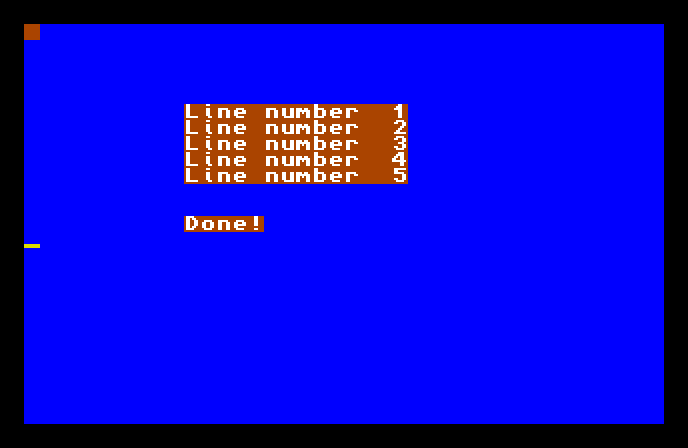
Five lines, each numbered, each on its own row — and below them, Done! You didn’t write five Print lines to get there. You wrote one, inside a loop that ran it five times, with the line number changing each time round.
The whole program
Hide
Cls 6
For N=1 To 5
   Locate 10,4+N
   Print "Line number ";N
Next N
Locate 10,12
Print "Done!"
Wait Key
The loop is these three lines:
For N=1 To 5
   Locate 10,4+N
   Print "Line number ";N
Next N
Here’s how it runs:
For N=1 To 5starts the loop. It makes a variableN, sets it to 1, and says “run the lines below, over and over, whileNgoes from 1 up to 5.”- The lines inside — the
Locateand thePrint— are the body. They run once for each value ofN. Next Nmarks the end of the body. When AMOS reaches it, it adds 1 toNand jumps back up to theFor. WhenNwould go past 5, the loop stops and the program carries on below.
So the body runs five times, with N holding 1, then 2, then 3, 4, and 5. Five trips round the loop, and out the bottom.
The counter does double duty
The clever part is that N isn’t just counting the loops — you can use its value inside the body. Look at what the two body lines do with it:
Locate 10,4+Nplaces each line one row lower than the last. WhenNis 1 the row is 5; whenNis 2 it’s 6; and so on. The counter spreads the lines down the screen.Print "Line number ";Nprints the counter’s current value, so each line announces its own number.
That’s why the five lines aren’t printed on top of each other — the loop variable changes every time round, and the body uses it to do something slightly different each pass. A counter you can read is what makes a loop more than just “do this five times.”
Counting differently
For doesn’t have to go up by one. You can tell it to Step by a different amount:
For N=10 To 2 Step -2That counts 10, 8, 6, 4, 2 — downwards, two at a time. The Step says how much to add (or, with a minus, subtract) each time round. Leave Step off and AMOS assumes Step 1, the plain count-up you used above.
Type it and run it
Type the program in and press F1. The five numbered lines appear down the screen, then Done! below them. Press a key to return to the editor.
Try this: more times round
Change For N=1 To 5 to For N=1 To 10 and run it. Ten lines now, with no extra work from you — that’s the whole point of a loop. (If they run off the bottom of the screen, you’ve just discovered how much it holds.)
Try this: count down
Change the loop to For N=5 To 1 Step -1 and run it. The lines still appear, but N now counts 5, 4, 3, 2, 1 — watch the numbers in the text, and where each line lands, follow the counter down.
If it doesn’t work
- AMOS complains about
Next. EveryForneeds a matchingNextto close the loop. The name afterNextshould match the one afterFor—For N…Next N. - Only one line appears, or they’re all on top of each other. The
Locateinside the loop is missing or doesn’t useN, so every pass prints to the same spot. The body has to use the counter to place each line differently. - It runs forever, or not at all. Check the
Tovalue makes sense for the direction. Counting up needs the end bigger than the start; counting down withStep -1needs the end smaller.
What you’ve learnt
A loop runs the same lines many times without you writing them out. For N=1 To 5 … Next N runs its body once for each value from the start to the end, and the counter N is yours to use inside — to number things, place them, or drive any change that should differ each pass. Step sets how much the counter moves each time, including counting down with a minus.
What’s next
Your programs are getting longer, and some jobs you’ll want to do in more than one place. Next — Procedures — you’ll bundle a chunk of work under a name of your own, then call it whenever you need it, instead of writing it out again.