Procedures
When you find yourself writing the same lines twice, give them a name instead. A procedure bundles a chunk of work under a label you choose, so you can run it whenever you need it by writing the name. It's how programs stay readable as they grow.
You’ve started writing longer programs, and soon you’ll spot the same few lines turning up in more than one place — drawing a border, clearing a panel, printing a score. Copying them out each time is dull and dangerous: change your mind, and you’ve got to fix every copy. A procedure solves it. You write the lines once, give them a name, and from then on you run the whole lot by just writing the name. It’s the first tool for keeping a growing program tidy enough to understand.
What you’ll see by the end
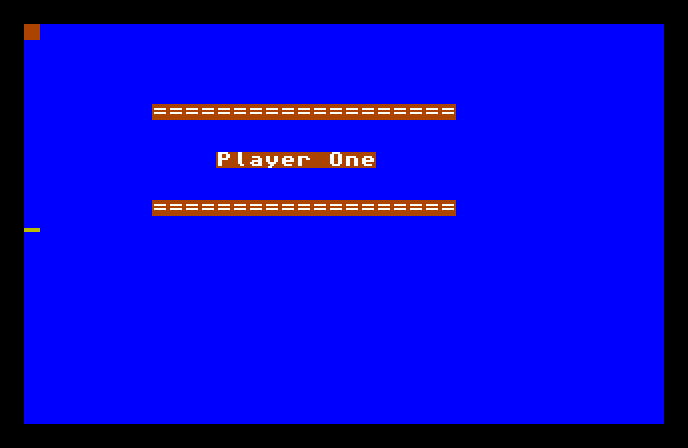
Two matching divider lines, with a label between them. The dividers are identical because they came from the same piece of code — a procedure called DIVIDER — run twice. Write it once, use it as often as you like.
The whole program
Hide
Cls 6
Locate 8,5
DIVIDER
Locate 12,8
Print "Player One"
Locate 8,11
DIVIDER
Wait Key

Procedure DIVIDER
   Print "==================="
End Proc
There are two halves to a procedure: defining it and calling it.
The definition is the block at the bottom:
Procedure DIVIDER
   Print "==================="
End Proc
Procedure DIVIDERstarts the definition and gives it a name —DIVIDERis one you chose. The lines after it are the work the procedure does.End Proccloses the definition.
Crucially, defining a procedure doesn’t run it. That block just sits there, ready. It’s a job you’ve described but not yet asked for.
To run it, you call it — by writing its name:
Locate 8,5
DIVIDER
That bare DIVIDER is the call. When AMOS reaches it, it jumps into the procedure, runs the lines inside, and comes straight back to carry on where it left off. The program calls DIVIDER twice — once at row 5, once at row 11 — and each time the same Print runs.
Why the two lines land in different places
The procedure itself has no Locate in it — it just prints at wherever the cursor happens to be. That’s deliberate. Before each call, the main program sets the position:
Locate 8,5
DIVIDER       ' draws at row 5

Locate 8,11
DIVIDER       ' draws at row 11
So one procedure does the same job — print a row of equals signs — but the caller decides where. The procedure handles the “what,” the code around it handles the “when and where.” That division is what makes a procedure worth having: the repeated part lives in one place, and the bits that vary stay outside.
Change it once, fixed everywhere
Here’s the real payoff. Want a longer divider? Change the Print line inside DIVIDER — just the once — and both lines on screen change together. With copied-out code you’d have to find and fix every copy, and miss one sooner or later. A procedure has a single home, so there’s only ever one place to change.
A note on names
Pick procedure names that say what they do — DIVIDER, DRAW_BORDER, RESET_SCORE. A good name turns a call into something you can read at a glance: you see DRAW_BORDER in the middle of your program and know exactly what happens, without reading the procedure’s insides again. Naming things well is half of keeping a big program understandable.
Type it and run it
Type the program in and press F1. Two divider lines appear with Player One between them. Press a key to return to the editor.
Try this: call it a third time
Add another pair of lines before Wait Key:
Locate 8,14
DIVIDER
Run it, and a third identical divider appears lower down — no new divider code written, just another call. That’s reuse: one definition, as many calls as you want.
Try this: change the definition
Make the divider shorter — cut some of the equals signs inside the Print in the DIVIDER procedure — and run it. Every divider on screen changes at once, because they all come from that one definition. One edit, every copy updated.
If it doesn’t work
- AMOS complains, or nothing happens at the call. Check the name in the call matches the name after
Procedureexactly —DIVIDERdefined,DIVIDERcalled. - It complains about
End Proc. EveryProcedureneeds anEnd Procto close it, the same wayIfneedsEnd IfandForneedsNext. - The dividers print on top of each other. The
Locatebefore each call is missing or the same — the caller sets the position, so each call needs its own spot.
What you’ve learnt
A procedure bundles work under a name you choose. Procedure NAME … End Proc defines it — describes the job without running it — and writing the name calls it, running those lines and returning. Keep what varies (like position) outside the procedure and the shared work inside, so a single definition serves every call and one edit fixes them all. That’s the second half of the first phase done: you can now decide, repeat, and name your own jobs.
What’s next
That completes the language groundwork — printing, variables, decisions, loops, and procedures. Next phase, the Amiga itself comes forward. Open a Screen — you’ll make a display of your own, choose its size and depth, and start treating the screen as a thing you build, not just one you print on.