
Half a spaceship should still look like half a spaceship. As it leaves the left edge, its right half stays visible. Its missing half should not reappear on the right, overwrite the next row or turn into a rather exciting crash.
Clipping selects the part that belongs inside a viewport. These implementations handle aligned software objects on three machines. They give you the reusable calculation, a masked drawing routine that uses its results, and a complete scene with objects cropped at all four corners.
| Implementation | Horizontal unit | Source and display |
|---|---|---|
| Spectrum | One bitmap byte: eight pixels | A 16×16 image into the 256×192 bitmap; attributes stay alone |
| BBC Micro | One MODE4 byte: eight pixels | A 16×16 image into the normal 320×256 MODE4 display |
| Amiga | One bitplane word: sixteen pixels | A 32×16 image into one 320×256 bitplane, using the blitter |
The horizontal alignment is a real restriction. These routines crop whole bytes or words at the sides and individual pixel rows at the top and bottom. Moving one pixel horizontally needs shifted source data or a renderer that handles shifts as well.
Clip coordinates before making an address
A position of −1 is useful: the object starts just outside the viewport. Converting it immediately into an unsigned screen offset loses that meaning. On a small machine it can become a large positive number, and a write goes somewhere entirely different.
The reusable clip_axis calculation takes a signed position, an unsigned extent and a viewport limit. It returns three quantities:
- Destination: where the visible part starts in the viewport.
- Source skip: how many original samples disappear off the near edge.
- Visible count: how much remains to draw. Zero means there is nothing to access.
Run it once for X and once for Y. If either count is zero, stop before calculating a screen address or starting a blit. The routines support signed 16-bit positions, extents from zero to 256 and viewport limits from one to 256, in the units you chose. A 320-pixel BBC viewport fits because its X limit is forty byte columns.
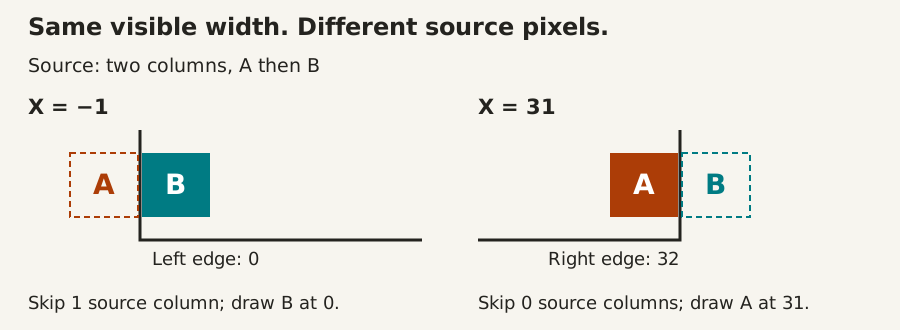
For a two-byte-wide Spectrum image at X = −1, the result is destination 0, source skip 1, visible width 1. The second byte of each image row belongs at the left edge. The first byte is outside the picture.
At X = 31, the same image has destination 31, skip 0 and width 1. Now the first byte survives. The visible width happens to match; the source does not.
A cropped row still belongs to the original image
Suppose a sixteen-pixel image uses two bytes across. With a keep-mask and image byte for each screen byte, its original source stride is four bytes per row.
Clipping its left half leaves one visible screen byte, backed by two source bytes. The next visible row still begins four bytes after the current one. Advancing only by the visible width accidentally walks through the discarded half of the previous row.
Each implementation handles that distinction explicitly. Spectrum and BBC copy only the visible mask/image pairs, then advance by the original row stride. Amiga selects the surviving source words and uses separate source and screen modulos to step between rows. Cropping a top edge also skips complete original source rows before the first draw.
The source images are deliberately patterned, rather than solid rectangles. Showing the wrong half or row changes the result and is caught by the image checks.
Combine clipping with restoration
The save/draw/restore lifecycle still applies to software objects that move over scenery. Clipping adds something worth keeping with each saved background: the old clipped rectangle.
Restore that old destination using its old width and height. Restore overlapping objects in reverse draw order. Update the scenery or camera, calculate the new clipped rectangle, save that region, then draw it. Do not recalculate the old footprint from the object’s new position.
An object can change from one visible column to two, or leave the viewport completely. Size the caller’s background buffer for its largest supported footprint. An invisible new object needs no new save, but its previous visible rectangle still needs restoring. The drawing routines here leave that bookkeeping with the caller; they do not erase old images automatically.
Choose the work you need
If an object is always fully inside the screen, the existing unclipped renderer can be a useful fast path. You pay less setup work in exchange for proving its bounds elsewhere. Clipping is particularly useful around scrolling viewports, UI windows, entrances and exits.
C64 and NES hardware sprites have different display rules. Their normal renderer does not copy these source pixels into a software background, so do not bolt this routine onto their hardware registers. Keep world and camera coordinates wide enough, decide whether an object is visible, then translate to the machine’s sprite representation. See the sprite family for those implementations; this tranche adds software clipping on the three machines above.
Beyond alignment, the next useful steps are arbitrary-X shifting, per-pixel edge masks and clipping against smaller windows. Each adds source preparation, code or runtime work. The current entries state their limits and include runnable callers so you can start with a useful piece now.
Execution record: independent interval and complete bitmap/bitplane comparisons, source preservation and deliberate clipping/source-offset failures. These are configuration-specific emulator observations, with separate fresh CPU checks in CI.
Prepared pixel phases extend this progression to positions between byte or word boundaries, with distinct runtime implementations and explicit memory costs.