
A single dot gives you a marker. A filled rectangle gives you a bar or a panel. An outline gives you a border. These routines put bounds checks around those three jobs, so a bad request returns to your game before it starts drawing.
The stock ROM gives PLOT a 256×176 pixel area, above the two bottom text lines. No scale conversion is needed. The adapter uses INVERSE to clear a pixel and restores INVERSE 0 afterwards; the caller establishes OVER 0. INK/PAPER remain character-cell attributes, not independent per-pixel colours.
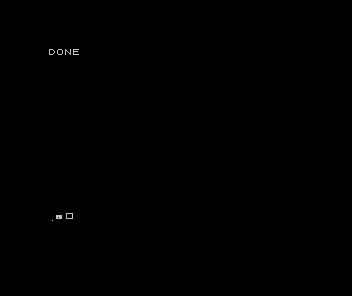
Use the routines
Copy routines.bas to free line numbers. Keep W=256 and H=176 for this display mode, and establish the caller’s normal graphics origin, full graphics window and pens before drawing. Do not change mode while these bounds are in use. Coordinates start at the bottom-left: X grows right and Y grows up.
A point, a filled box, an outline and an erased pixel
  10 BORDER 0: PAPER 0: INK 7: BRIGHT 0: FLASH 0: OVER 0: INVERSE 0: CLS
  20 LET W=256: LET H=176: LET V=1
  30 LET X=4: LET Y=3: GO SUB 2000
  40 LET Q=8: LET U=5: LET A=6: LET B=4: GO SUB 2100
  50 LET Q=18: LET U=5: LET A=7: LET B=6: GO SUB 2200
  60 LET V=0: LET X=10: LET Y=6: GO SUB 2000
  70 PRINT "DONE"
80 STOP| Call | Inputs | Effect |
|---|---|---|
| 2000 | X/Y pixel, V=0 or 1 | Clear or set one pixel |
| 2100 | Q/U bottom-left, A/B width/height, V | Fill the rectangle |
| 2200 | Same rectangle and V | Draw only its border |
Use GOSUB (GO SUB on Spectrum). Check E immediately after the call: 1 means success, 0 means rejection without drawing. Coordinates, sizes and V must be integers. Empty boxes, invalid pens and rectangles crossing an edge are rejected in full; they are not clipped.
Checked pixel, filled-box and outline-box implementations
2000 LET E=0
2005 IF V<0 THEN RETURN
2006 IF V>1 THEN RETURN
2007 IF V<>INT (V) THEN RETURN
2010 IF X<0 THEN RETURN
2020 IF Y<0 THEN RETURN
2030 IF X>=W THEN RETURN
2040 IF Y>=H THEN RETURN
2050 IF X<>INT (X) THEN RETURN
2060 IF Y<>INT (Y) THEN RETURN
2065 IF V=0 THEN INVERSE 1
2066 IF V=1 THEN INVERSE 0
2070 PLOT X,Y
2075 INVERSE 0
2080 LET E=1: RETURN
2100 LET N=0: GO SUB 2300: RETURN
2200 LET N=1: GO SUB 2300: RETURN
2300 LET E=0
2310 IF V<0 THEN RETURN
2311 IF V>1 THEN RETURN
2312 IF V<>INT (V) THEN RETURN
2320 IF Q<0 THEN RETURN
2330 IF U<0 THEN RETURN
2340 IF A<1 THEN RETURN
2350 IF B<1 THEN RETURN
2360 IF Q+A>W THEN RETURN
2370 IF U+B>H THEN RETURN
2380 IF Q<>INT (Q) THEN RETURN
2390 IF U<>INT (U) THEN RETURN
2400 IF A<>INT (A) THEN RETURN
2410 IF B<>INT (B) THEN RETURN
2420 FOR J=U TO U+B-1
2430 FOR I=Q TO Q+A-1
2440 IF N=0 THEN GO TO 2460
2450 IF I<>Q AND I<>Q+A-1 AND J<>U AND J<>U+B-1 THEN GO TO 2470
2460 LET X=I: LET Y=J: GO SUB 2000
2470 NEXT I
2480 NEXT J
2490 LET E=1: RETURN
W/H are configuration, not a way to enlarge the hardware screen. The last pixel is (255,175). A box at Q with width A ends at Q+A−1, so Q+A may equal W. This is why the check uses greater-than rather than greater-than-or-equal at that boundary.
State and cost
The caller owns the display mode, origin, window and colours. Reserve W/H/V/E/X/Y/Q/U/A/B and scratch I/J/N. Calls leave X/Y at the last plotted pixel and overwrite loop scratch; they are not re-entrant. The adapter changes the graphics pen or INVERSE state as described above. It does not save and restore a whole graphics environment.
The fill visits A×B pixels. The outline also tests A×B positions, plotting the perimeter once, including one-pixel-wide and one-pixel-high cases. That makes it easy to follow but wasteful for large outlines. Horizontal spans, ROM line drawing or native byte fills are useful next versions: they skip work or update several pixels together. They need separate contracts for alignment, corners and clipping. No unmeasured speed claim is attached to this implementation.
Customise it and recognise faults
Change Q/U/A/B in the caller to place or resize a box. Set V=0 to erase a patch. On a two-colour screen that clears a stored dot; it does not reconstruct scenery beneath a moving object. Keep the background separately if it must be restored.
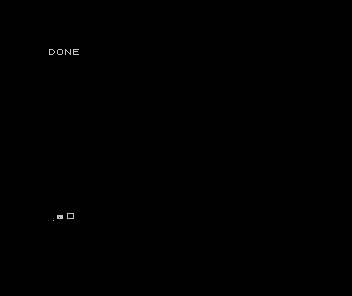
The wrong-units capture demonstrates a coordinate conversion error: the shapes shrink or move, even though the BASIC program still runs. Keep the input units in pixels and perform the machine’s conversion once in the point adapter. The omitted-draw control leaves the expected shapes absent. An off-by-one bounds test can either reject the last pixel or allow an extra one; the checks include the far corner and thin boxes.
These examples connect directly to Maths for Games: coordinate systems, rectangle extents and area all change the work a drawing routine must do. They also complement the machine’s assembly pixel/box entry; the BASIC route goes through the ROM rather than claiming the same runtime cost.
Source and evidence
Take the routines, caller and recorded checks. The tests compare complete decoded native captures with direct ROM line-drawing references, exercise rejected calls, check the far pixel and thin boxes, and require omitted drawing and wrong units to fail. That establishes the recorded emulator/firmware configuration; it does not measure a complete game or original hardware.
The graphics API and coordinate conventions are documented in Sinclair ZX Spectrum BASIC Programming, chapter 17.