The Line Number Is an Address
Edit a program by its line numbers — replace a line by reusing its number, slip a new line into a gap, delete one, and LIST them in order. The number is the line's address, and that is the whole of editing.
In Unit 1 your two lines were numbered 10 and 20, and they ran in that order. The
number isn’t only a label for where a line sits in the running order — it’s the line’s
address. Once you can write to an address, you can edit: replace what’s there, slip
something new in beside it, or take it away.
Milestone 1 — a numbered program
  10 PRINT "one"
  20 PRINT "two"
  30 PRINT "three"
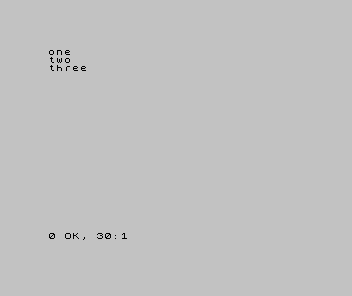
Three lines, numbered in tens. Type them in and RUN: they print one, two, three,
in number order, and the report reads 0 OK, 30:1 — it reached line 30.
Notice the numbering jumps in tens. Nothing forces that — 1, 2, 3 would run the
same. The tens leave room between the lines, and the next milestone shows why.
Milestone 2 — slip a line into the gap
You want a line between two and three, without retyping anything. Give it a number
that falls in the gap — 25, sitting between 20 and 30:
| 1 | 1 | 10 PRINT "one" | |
| 2 | 2 | 20 PRINT "two" | |
| 3 | + | 25 PRINT "...and a half" | |
| 3 | 4 | 30 PRINT "three" | |
| 4 | 5 | |
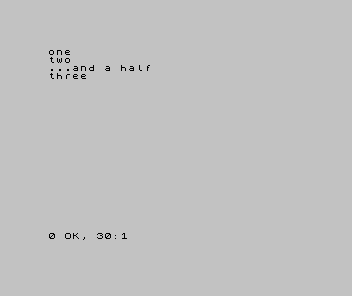
Type line 25 and press Enter — on its own, with the other lines already in place. You
don’t move anything; the Spectrum files it by number. RUN, and the new line lands
exactly where its number puts it: after 20, before 30.
Milestone 3 — write to an address that’s taken
Use the same idea to replace a line. Type line 20 again, with new text. The number
is already taken, so the new line takes the old one’s place:
| 1 | 1 | 10 PRINT "one" | |
| 2 | - | 20 PRINT "two" | |
| 2 | + | 20 PRINT "two (replaced)" | |
| 3 | 3 | 25 PRINT "...and a half" | |
| 4 | 4 | 30 PRINT "three" | |
| 5 | 5 | |
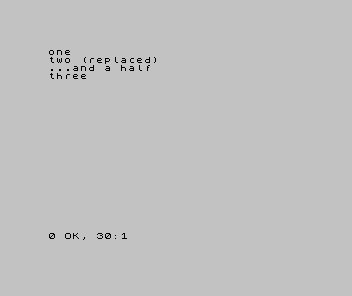
That’s the whole rule, two ways: pick a free number to add a line; reuse a number to replace one. To remove a line, type its number alone and press Enter — line gone.
To see the program in its true order at any time, type LIST. The Spectrum shows every
line from lowest number to highest — the order it will run, whatever order you typed
them in.
When it doesn’t work
- A new line overwrote one you wanted to keep. You reused a number that was already
taken.
LISTfirst, find a free number in a gap (like25), and add there instead. - The line ran in the wrong place. The number decides the order, not where you typed it. Whatever should come first needs the lowest number.
- You meant to delete a line but cleared the screen, or vice versa. Deleting a line
is its number then Enter; clearing the screen at run time is
CLS. They’re different.
Before and after
You started with three lines and ended having inserted one into a gap and replaced another — without ever retyping the whole program. The idea underneath: a line number is an address. Write to a free one to add; write to a taken one to replace. Numbering in tens keeps gaps open for the lines a later step will add — a habit every program here leans on.
Try this
- Fill another gap. Add line
15, between10and20. Predict where it prints before you run it. - Delete and confirm. Remove line
25(type25, Enter),LISTto confirm it’s gone, thenRUN. - Run out of room on purpose. Try to fit two lines between
20and25. You can —21and22— but you’ll feel why tens are roomier than ones.
What you’ve learnt
- A line number is the line’s address.
- Reuse a number to replace a line; pick a free number to add one; type a number alone to delete it.
LISTshows the program in number order — the order it runs.- Number in tens so there’s always a gap to slip a line into later.
What’s next
You can write, run, and edit a program now. Time to make it say more than a fixed
word. In Unit 3 we give PRINT its punctuation — joining text and numbers, spacing
them, and laying them out.