PRINT, Properly
Give PRINT its punctuation — join text and numbers with a semicolon, line them up in columns with a comma, break a line with an apostrophe — then clear the screen with CLS and start the title card you'll grow all primer.
You met PRINT in Unit 1. On its own it shows a word. With punctuation, it lays
text and numbers out — joined, spaced, or broken onto new lines. Three marks do most of
the work: the semicolon, the comma, and the apostrophe.
Milestone 1 — join with a semicolon
A semicolon joins two things with no gap between them:
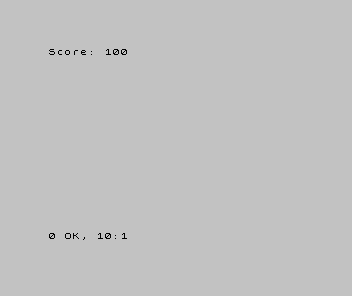
10 PRINT "Score: "; 100
RUN it: Score: 100. The text "Score: " and the number 100 print as one run,
the semicolon butting them together. The space after the colon is inside the quotes —
the semicolon adds none of its own.
Milestone 2 — columns and new lines
The comma and the apostrophe place things differently. Add two more lines:
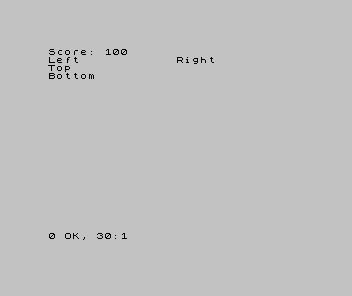
| 1 | 1 | 10 PRINT "Score: "; 100 | |
| 2 | + | 20 PRINT "Left", "Right" | |
| 3 | + | 30 PRINT "Top" ' "Bottom" | |
| 2 | 4 | |
The comma jumps to the next column zone — the screen has two, at the left edge and
halfway across — so Left and Right line up in columns. The apostrophe starts a
new line, so Top and Bottom print one above the other from a single PRINT.
Milestone 3 — clear the screen, start the title card
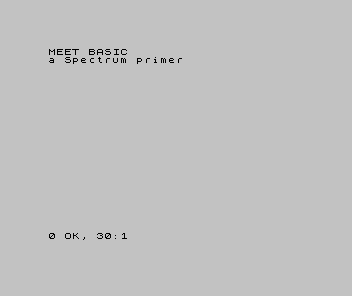
CLS clears the screen before you print, so each run starts on a clean slate. We’ll use
it to open a title card — a small splash screen we grow across the primer until it
has colour, sound, and motion. Here’s its first, plain version:
  10 CLS
  20 PRINT "MEET BASIC"
  30 PRINT "a Spectrum primer"
When it doesn’t work
- The two things printed on top of each other, or ran together oddly. Check which
separator you used —
;joins with no gap,,jumps a column,'starts a new line. - Old text is still on screen under the new. No
CLS. EachRUNprints over whatever was there;CLSwipes it first. Nonsense in BASIC. A missing quote, or a separator where a value should be. List the line the report names and read the punctuation carefully.
Before and after
You started with PRINT showing one word and finished laying text and numbers out three
ways — joined, columned, and stacked — then cleared the screen and began the title card.
The idea underneath: PRINT’s punctuation places things; CLS gives you a clean
slate. You’ll lean on both in every screen you build.
Try this
- Build a line. Print a name and a score together:
PRINT "Lives: "; 3. - Mix the marks. One
PRINTwith a comma and an apostrophe — predict the layout, then run it. - Forget the CLS. Run the title card twice without line 10. Watch it pile up, then
put
CLSback.
What you’ve learnt
;joins with no gap,,tabs to the next column zone,'starts a new line.- A
PRINTcan mix text and numbers in one statement. CLSclears the screen so each run starts clean.- The title card begins here — a splash screen we’ll grow as the primer goes on.
What’s next
So far the screen only shows what you typed into the program. In Unit 4 we give the
program a memory: LET, the named box that holds a value — and the Spectrum’s own rules
about what you may call one.