FOR / NEXT Counts For You
Repeat a block a set number of times without copying a single line. FOR ... NEXT counts from one number to another, hands you the count as a variable you can use, and counts backwards too with STEP.
When you want to do something a set number of times, you don’t copy the line out by
hand. FOR … NEXT runs a block over and over, counting as it goes — and it hands you
the count, so each pass can use the number it’s on.
Milestone 1 — count to ten
  10 FOR i = 1 TO 10
  20 PRINT i; " ";
  30 NEXT i
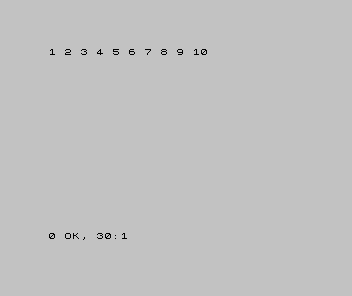
FOR i = 1 TO 10 sets a box i to 1, runs everything up to NEXT i, then bumps i to
2 and runs it again — all the way to 10. The semicolon on line 20 keeps the numbers on
one row.
Milestone 2 — use the count
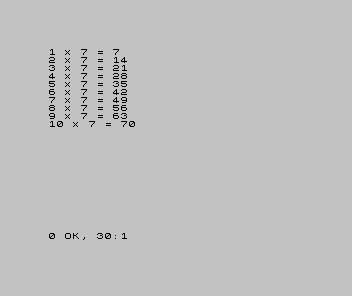
i isn’t only a counter — it’s a variable you can use. Print a times-table by
multiplying it:
| 1 | 1 | 10 FOR i = 1 TO 10 | |
| 2 | - | 20 PRINT i; " "; | |
| 2 | + | 20 PRINT i; " x 7 = "; i * 7 | |
| 3 | 3 | 30 NEXT i | |
| 4 | 4 | |
Each pass, i * 7 works out that row of the seven-times table. The loop counts; your
line does something different with the count each time round.
Milestone 3 — count the other way with STEP
STEP changes how i moves each pass. STEP -1 counts down:
  10 FOR i = 10 TO 1 STEP -1
  20 PRINT i; " ";
  30 NEXT i
  40 PRINT
  50 PRINT "Lift-off!"
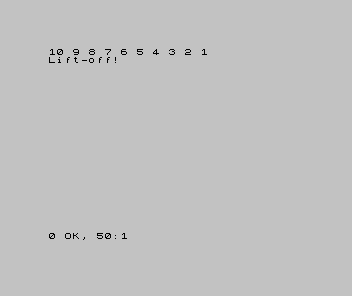
FOR i = 10 TO 1 STEP -1 starts at 10 and drops by one each pass until it reaches 1.
After the loop, line 50 prints the finish.
When it doesn’t work
NEXT without FOR. TheNEXTnames a variable that has no matchingFORabove — often a typo, likeNEXT jfor aFOR i. Match the letters.- The loop ran once, or not at all. Check the range.
FOR i = 5 TO 1with noSTEP -1won’t count down — it has nowhere to go. - Everything printed on top of itself. A semicolon keeps a row going; without one,
each
PRINTstarts a new line. Choose the layout you want.
Before and after
You started repeating work by hand and finished letting FOR … NEXT do it — counting
up, using the count in a sum, and counting back down with STEP. The idea underneath: a
counted loop runs a block a set number of times and hands you the count as a variable.
Try this
- A different table. Change
7to your own number and run the table again. - Skip-counting. Use
STEP 2to print 2, 4, 6, 8, 10. - A square of stars. Loop ten times, printing a row of stars each pass.
What you’ve learnt
FOR i = a TO b…NEXT irepeats a block, countingifromatob.- The loop variable
iis a real variable — use it inside the loop. STEPchanges the stride:STEP -1counts down,STEP 2skips; the default is 1.NEXTmust name the same variable as itsFOR.
What’s next
A counted loop runs a known number of times. But a game runs until something
happens — until you win, lose, or quit. In Unit 8 we build that loop with GO TO
and GO SUB, and let the computer pick a secret number with RND.