GO TO, GO SUB, and the Game Loop
Build the loop every game runs on — keep asking until the player wins — with GO TO. Package a job and call it from anywhere with GO SUB and RETURN. And let the computer pick a secret number with RND.
A counted loop runs a known number of times. A game runs until something happens —
until you win, lose, or quit. That loop is built from GO TO: a jump back to an earlier
line, guarded by an IF. Both GO TO and GO SUB are two words on the Spectrum,
not one.
Milestone 1 — the game loop
Here’s a number-guessing game. We fix the secret to 7 for now, so you can follow the
play; in a moment RND will choose it.
  10 LET secret = 7
  20 LET tries = 0
  30 INPUT "Guess (1-10)? "; g
  40 LET tries = tries + 1
  50 IF g < secret THEN PRINT g; " is too low"
  60 IF g > secret THEN PRINT g; " is too high"
  70 IF g <> secret THEN GO TO 30
  80 PRINT "Correct in "; tries; " guesses!"
Line 70 is the loop: IF g <> secret THEN GO TO 30 jumps back to the INPUT whenever
the guess is wrong, so the program keeps asking. When the guess is right, line 70 is
false, the jump is skipped, and line 80 runs. Played with 4, then 9, then 7:
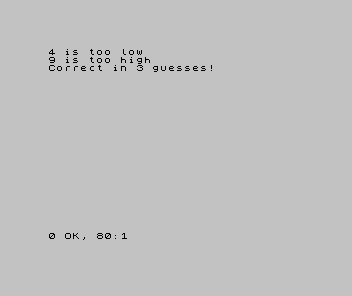
This is the game loop. You’ll meet it in every game — the program keeps running, taking input and responding, until a condition ends it.
Milestone 2 — GO SUB: a job you can call
When you need the same job in several places, give it its own lines and GO SUB to it.
RETURN comes back to where you called from:
  10 GO SUB 100
  20 PRINT "Hello"
  30 GO SUB 100
  40 PRINT "Goodbye"
  50 GO SUB 100
  60 STOP
 100 PRINT "============"
 110 RETURN
GO SUB 100 jumps to line 100, runs until RETURN, then comes back to the line after
the call. The divider at line 100 is written once and called three times.
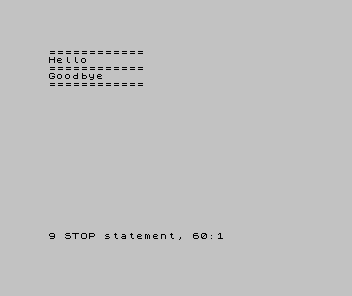
Notice you jump to a line number — GO SUB 100, not a name. Sinclair BASIC has no
named subroutines; the number is the name. That’s why we leave numbering gaps, and why
subroutines usually live at high line numbers, out of the main program’s way. The STOP
at line 60 matters: without it, the program would run past line 50 straight into the
subroutine, hit RETURN with nowhere to return to, and fail.
Milestone 3 — RND picks a number
To make the secret a real surprise, the computer needs an unpredictable number. RND
gives a fresh fraction between 0 and 1 each time; INT (RND * 10) + 1 turns it into a
whole number from 1 to 10:
  10 FOR i = 1 TO 6
  20 PRINT INT (RND * 10) + 1; " ";
  30 NEXT i
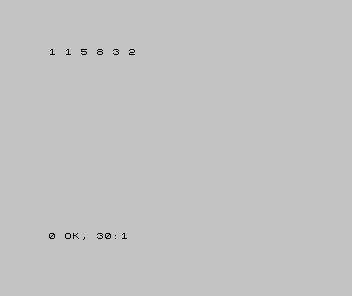
Now you can drop it into the game. Replace line 10’s LET secret = 7 with
LET secret = INT (RND * 10) + 1, and the computer chooses a different secret every
time — a real game. (Each run starts the sequence fresh; making it repeat a chosen
sequence is a job for later.)
When it doesn’t work
RETURN without GO SUB. The program reached aRETURNwithout a matchingGO SUB— usually it ran into the subroutine from above. Add aSTOPbefore it.- The loop never ends. The
IFguarding theGO TOis always true, so it always jumps back. Check the condition that’s meant to let it through. GOTOgaveNonsense in BASIC. It’s two words —GO TO,GO SUB.
Before and after
You started able to make single decisions and finished building the game loop — the
input-check-repeat shape every game runs on — packaging a job with GO SUB and RETURN,
and giving the computer a RND secret. The idea underneath: GO TO jumps to a line to
loop; GO SUB calls a numbered subroutine and RETURN comes back; RND makes a value
unpredictable.
Try this
- Make it random. Swap line 10 for
LET secret = INT (RND * 10) + 1and play. You won’t know the answer in advance. - A wider range. Change
10to100in both the secret and the prompt. How many guesses does it take? - Reuse the divider. Add a
GO SUBto the divider before and after the game’s result.
What you’ve learnt
- A
GO TOback to an earlier line, guarded by anIF, is the game loop. GO SUB ncalls the subroutine at linen;RETURNcomes back. Both are two words.- You call a subroutine by line number — Sinclair BASIC has no named ones.
RNDgives a random fraction;INT (RND * n) + 1is a whole number from 1 ton.
What’s next
You now have the whole language: output, variables, input, decisions, loops, and
subroutines. Time to make the Spectrum show off. In Unit 9 we leave plain text
behind and place it anywhere on screen with PRINT AT — and the title card finds its
spot.