When It's Wrong
The skill that separates getting it done from getting stuck. The Spectrum tells you how every program stopped — a code, a message, and the line. Read the report, read the state, and find out why; don't guess. The debugging mindset, as the primer's last lesson.
Every program you’ve written ends with a report line. You’ve seen 0 OK after each one.
This last unit is about the times it says something else — and about the bugs that don’t
report at all. Reading what the machine did, instead of guessing, is the one
skill that carries through every game you’ll build.
Reading the report
The Spectrum names every stop three ways: a code, a message, and the line and
statement where it stopped. Here’s a program with a small mistake — score is set, but
line 20 prints scor:
  10 LET score = 100
  20 PRINT scor

2 Variable not found, 20:1 — read it backwards from the comma: it stopped at line 20,
because of a variable it couldn’t find. LIST the program, look at line 20, and the
typo is right there: scor should be score. The report didn’t fix it for you, but it
pointed at the exact line — that’s most of the work done.
The bug that doesn’t report
Worse than an error is a program that runs cleanly and gives the wrong answer. This one means to double a number:
  10 LET n = 5
  20 PRINT "double: "; n + 2
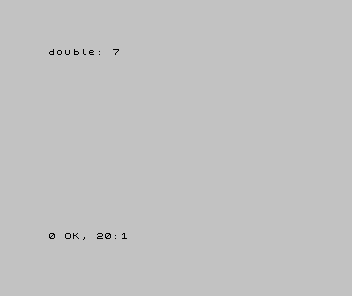
The report reads 0 OK. No error — and yet double: 7 is wrong, because double 5 is 10.
The machine did exactly what you wrote — n + 2 — which isn’t what you meant. That
gap, between what you meant and what you wrote, is what a bug is. You find it not from
a report but by reading the output and asking “is that the number I expected?”
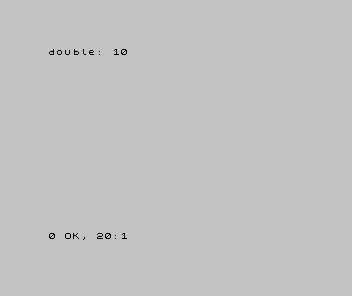
| 1 | 1 | 10 LET n = 5 | |
| 2 | - | 20 PRINT "double: "; n + 2 | |
| 2 | + | 20 PRINT "double: "; n * 2 | |
| 3 | 3 | |
Suspect yourself first
When a program misbehaves, the answer is almost always in your own code — a typo, a +
where you meant a *, a line in the wrong order. Read the report, LIST the line it
names, and check what the program actually does against what you wanted. Don’t guess
and re-run hoping it changes; look at the state and reason from it.
That said — computers were built by people, and people make mistakes. A few famous bugs are baked into real silicon and ROMs. They’re rare and documented, and in your first months a misbehaving program is almost never one of them — it’s the line you wrote. So suspect your own code first. The discipline holds because genuine machine bugs are rare and known: if you ever truly suspect one, you prove it — isolate the smallest case, reproduce it, and check it against a known-good reference — not blame the machine to dodge your own bug.
A few reports you’ll meet, and what they usually mean:
Variable not found— a name you read was never set, often a typo.Nonsense in BASIC— the line doesn’t parse: a missing quote, or a text name that’s too long (name$instead ofn$).Subscript wrong— an index outside what you set up.Number too big— a value past what the Spectrum can hold.
(And CONTINUE resumes a stopped program from where it halted — handy once you’ve fixed
what stopped it.)
Before and after
You started this unit reading 0 OK and finished able to read the other reports — and,
harder, to find the bug that reports nothing by reading the state. The idea underneath:
the machine does exactly what you wrote; a bug is the gap to what you meant; find it by
reading the report and the output, not by guessing.
Try this
- Predict three reports. Write a missing quote, a
name$, and ascortypo, and guess each report before you run it. - Plant a logic bug. Change a
*to a+somewhere in your title-card maths and find it by the wrong result, not an error. - Read before you fix. Next time something’s wrong, say out loud what the program does, line by line, before changing anything.
What you’ve learnt
- The report line is a code, a message, and a line — read it to find where and why.
- A program can run
0 OKand still be wrong; find that by reading the output. - A bug is the gap between what you meant and what you wrote — suspect your own code first.
- Genuine machine bugs are rare and known; if you suspect one, prove it, don’t assume it.
Where you go from here
That’s the primer. You can write, run, edit, and save Sinclair BASIC; put text, colour, sound, and motion on screen; build a game loop; and — most useful of all — find out why a program is wrong. You’ve met every feature the games will use.
Next, you put it to work. The Spectrum BASIC games start here — each one a complete game built from the pieces you now know, opening not on “what PRINT does” but on the game itself. And when you want motion that doesn’t flicker, the assembly track is waiting. The same ideas, said a different way — which is what every language is.