
You can build one tower at one column. To build a row of them, you need a loop around the loop you already have: an outer one that chooses where each tower stands, and the inner one that draws what stands there.
10 PRINT CHR$(147)
20 POKE 53281,0
30 H=8
40 FOR C=2 TO 38 STEP 4
50 FOR R=24 TO 24-H+1 STEP -1
60 POKE 1024+R*40+C,160
70 POKE 55296+R*40+C,12
80 NEXT R
90 NEXT C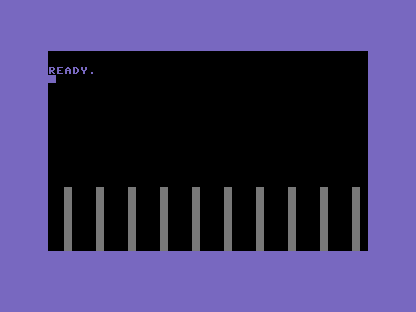
This is a nested loop — a loop inside a loop. The outer FOR C=2 TO 38 STEP 4 steps
the column across the screen in fours; for every one of those columns, the inner
FOR R=24 TO 24-H+1 runs in full, raising a complete tower before the outer loop moves on.
Ten outer steps, eight inner blocks each — eighty blocks, drawn by four lines.
The STEP 4 is doing quiet work: it leaves three empty columns between towers, so the city
has streets, not one solid wall. Spacing is composition — change the step to 2 and the
towers crowd together; change it to 6 and they stand far apart.
Try this
- Crowd the city. Change
STEP 4toSTEP 2and watch the streets close up. - Taller skyline. Raise
Hto 12. Every tower grows together, because they all read the same height — which is exactly the thing Unit 5 will set loose.
What’s next
The city stands, but the windows are dark. In Unit 4 the colour cell earns its keep — some cells light up against the tower’s body, and the skyline comes alive.
Run it here
This unit's program, built for you.
- Program
- towers.prg
- Machine
- Commodore 64 (PAL Breadbin)