
A loop repeats a block of work. Here, one Print statement produces five numbered lines because the program runs it five times, with a different number each time.
What you’ll see by the end
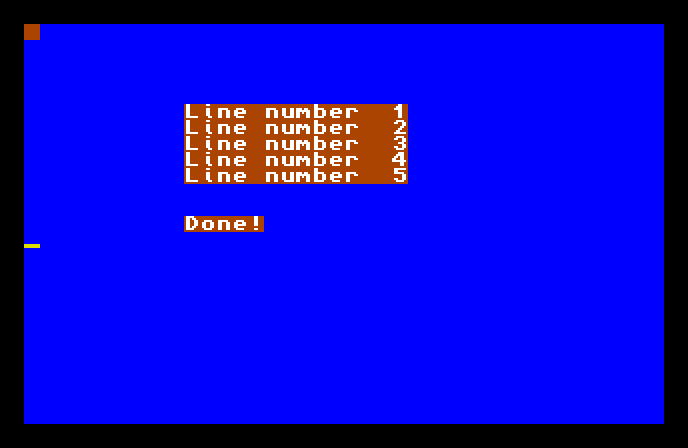
First make this picture. Then you’ll change the number of passes, find an overlapping message, and make the numbers count down the screen.
The whole program
Hide
Cls 6
For N=1 To 5
   Locate 10,4+N
   Print "Line number ";N
Next N
Locate 10,12
Print "Done!"
Wait Key
Type it and run it
Type the listing into the AMOS editor and press F1. Check that it shows Line number 1 through Line number 5, in that order from top to bottom, with Done! below. Press a key to finish Wait Key, then Return to dismiss AMOS’s end-of-program message.
Four lines make the loop
For N=1 To 5
   Locate 10,4+N
   Print "Line number ";N
Next N
For N=1 To 5 sets the counter N to 1. The two indented lines form the body: they position the text and print the current number. Next N advances the counter by 1 and repeats the body until it has used 1, 2, 3, 4 and 5. Then execution continues at Locate 10,12, after the loop.
The body contains two statements; the whole loop, including For and Next, occupies four lines. Done! prints once because it is outside that block.
The counter chooses the row too
Locate takes a column and a row. The column stays at 10; the expression 4+N changes the row.
| Pass | N |
Row: 4+N |
Text |
|---|---|---|---|
| First | 1 | 5 | Line number 1 |
| Second | 2 | 6 | Line number 2 |
| Last | 5 | 9 | Line number 5 |
The counter has two jobs: it supplies the printed number and places each line. The final Locate 10,12 places Done! on a separate row.
If the loop reaches N=3, which row does it use? Does it print Done! on that pass?
Show the explanation
It uses row 7, because 4+3 is 7. It prints Line number 3. The program reaches Done! only after the whole loop finishes.
Try this: ten lines and an overlap
Change only For N=1 To 5 to For N=1 To 10. Before running, work out which value of N puts text on row 12. Leave the final Locate 10,12 unchanged for this first run.
Why does row 12 read Done!number 8 instead of Line number 8?
Show the explanation
When N=8, 4+N is 12. The loop prints its eighth line there. After all ten passes, the final Print writes Done! at the same column and row, replacing the beginning of that line. Printing shorter text does not clear the rest of the row.
Repair the overlap: change the final Locate 10,12 to Locate 10,16. Keep the loop’s Locate 10,4+N. Run again and check that all ten numbered lines remain intact, with Done! below them. The last numbered line uses row 14.
Try this: count backwards
Restore the original five-line program, including the final Locate 10,12. Now replace its For line with:
For N=5 To 1 Step -1Step -1 subtracts 1 on each pass. The body uses 5, 4, 3, 2 and 1. Leave Locate 10,4+N unchanged and predict the final picture before running.
Why does the finished screen still read 1, 2, 3, 4, 5 from top to bottom?
Show the explanation
The first pass prints 5 on row 9. The next prints 4 on row 8, and the last prints 1 on row 5. The program visits the rows in reverse order, but each number lands in its original place. A finished picture does not reveal the order in which it was drawn.
To make a countdown that reads 5, 4, 3, 2, 1 from top to bottom, keep that descending For line and change the line inside the loop to:
Locate 10,10-NNow N=5 uses row 5; N=4 uses row 6; and N=1 uses row 9. Run and check the countdown. Leave the final Locate 10,12 alone so Done! stays below it.
Leaving out Step means Step 1. The AMOS Professional manual, “Control Structures”, describes For, Next and Step.
If it doesn’t work
- AMOS complains about
Next. Check thatFor Nhas a matchingNext Nand that neither was deleted while editing. - Lines cover one another. Check the
Locateinside the loop. It must useN; a fixed row sends every pass to the same place. - Done! covers part of line 8. In the ten-line version, move the final message to row 16. Do not change the row formula inside the loop to fix this.
- The countdown still reads upwards. Check both edits:
Step -1changes the visiting order;10-Nchanges where each value lands.
What you’ve learnt
For and Next repeat a body with a changing counter. You can use that counter in text and in coordinates. Step changes the counting direction, but the final arrangement also depends on the position formula. Trace both before predicting the screen.
What’s next
Next — Procedures — give a block of work a name, then call it from more than one place.