
Crates
Spectrum · BASIC
Make space, plan a push and deliver every crate
11 units
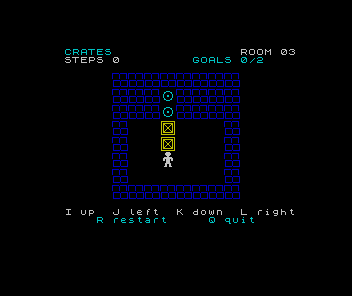
Three warehouses. A few wooden crates. Plenty of opportunities to stand on the wrong side of one.
Push each crate onto a target. You can push one crate at a time, but you cannot pull. A square can be open and still be a terrible place to leave a box. R restores the room when you want another attempt.
Use I up, J left, K down and L right. Press one direction at a time, letting each move finish. S starts from the instructions, Q leaves, and N advances after delivery. After the third room, N begins a new game. There is no timer; the step count records successful moves without setting a score you must beat.
Build the warehouse
We begin with a wooden crate drawn from four custom characters. A numeric array then stores the room independently of its picture. Before moving, the program checks the proposed destination; before pushing, it checks the square beyond the crate too. Rejected moves change nothing.
A complete one-room game is ready in lesson six. Later lessons describe rooms with readable strings, catch map mistakes and introduce the other two puzzles. Their difficulty comes from the arrangement of walls and crates, using the same movement rules.
The program runs in Sinclair BASIC on a stock 48K ZX Spectrum. A compatible emulator is suitable. It uses original pixel artwork and is deliberately silent. The GOALS readout accompanies the change of colour when a crate is delivered.
Touchdown introduced custom characters and keyboard polling; Sonar used a two-dimensional array to remember clues. Here the array describes the world itself. We recall those techniques where they are used, and explain string arrays and slices locally. Start a new program: there is no previous game’s listing to convert.