
Sonar
Spectrum · BASIC
Choose probes, combine clues and discover a hidden object
10 units
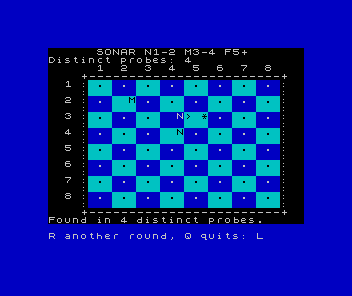
One object is hidden in an 8×8 sea. Choose a row and a column, send a probe, and use its reading to decide where to search next. Earlier clues stay on the board. You can take as long as you need.
The distance rule counts rows plus columns. N means near, one or two steps away; M means medium, three or four; F means far, at least five. An asterisk marks a discovery. A reading tells you a distance band, not a direction.
Press a row number, then a column number: each is a single key, with no Enter. The > marker shows your latest probe. Repeated probes do not increase the count. After finding the object, R begins another round and Q leaves; Q also works at the coordinate prompts.
Build the search
We start with a visible target, so we can check the coordinates before hiding anything. Exact distances explain the calculation; then we group them into bands. A two-dimensional array remembers what the player has discovered, while two separate variables keep the hidden target.
The game runs in Sinclair BASIC on a stock 48K ZX Spectrum. It uses coloured character cells, keyboard input and tape saving, and is deliberately silent. A compatible emulator is suitable for following the lessons.
Touchdown used one array position per terrain column. Here we use both a row and a column. If you are joining at Sonar, the lessons explain the loops, routines, coordinate calculations and input checks where they are used; you do not need to reconstruct a previous game’s program.
The lessons
- A sea to search: build the labelled board.
- Send a probe: validate coordinates and test a cell.
- Measure the distance: calculate a useful clue.
- Read the sonar: reveal near, medium or far.
- Remember the clues: record the search in an array.
- One probe, one count: recognise repeats and rebuild the display.
- A complete round: add instructions, discovery and retry.
- Search somewhere new: choose random targets.
- Keep your game: save, reload and check the whole game.
- One key, one choice: read each coordinate as a single key press.
A quick discovery can still be a satisfying one. The interesting question is what each clue lets you rule out, and what you choose to ask next.