
A Commodore 64 has two numbers for every character on its screen. Type PRINT ASC("A") and it answers 65. Look at the top-left corner of the screen with PEEK(1024) after printing an A there, and it answers 1. The first number is the character’s code in Commodore’s own version of ASCII, the one PRINT, CHR$, ASC and GET use. The second is its screen code, the number the video chip reads from screen memory. Commodore’s Programmer’s Reference Guide warns its readers that “the character codes for POKEing are different from CBM ASCII character values”, and keeps the two in separate appendices.
Commodore’s manuals call the first code “CBM ASCII” or “PET ASCII”. It came from the PET and carried on through the VIC-20 and the 64. The name programmers use now was already in print in 1982, when Jim Butterfield wrote in the Toronto PET Users Group’s newsletter that Commodore stores text “in a code sometimes called ASCII but which I’ll call PET-ASCII or PETSCII. It’s not standard ASCII code.” Standard ASCII has 128 characters; PETSCII, he explained, “has up to 256”, including the cursor movements and screen clear that ASCII lacks.
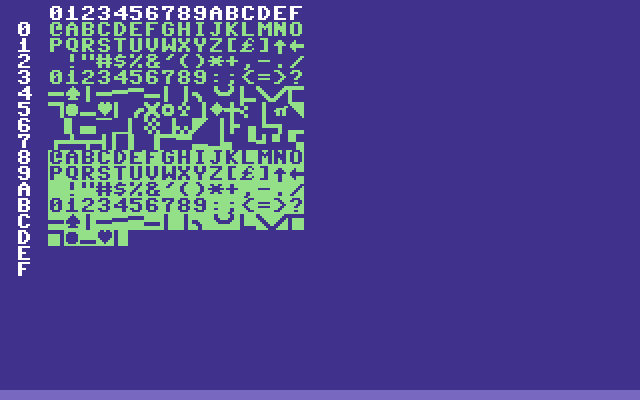
The chart above is the screen-code set: the numbers you POKE. Row 0 begins @ABCDEFG…, so the letter A is screen code 1. In PETSCII, the letter A is 65, and screen code 65 is a spade.
Which number goes where
PETSCII codes are what the operating system speaks:
PRINT "HELLO"andPRINT CHR$(147)ASC("A"), which returns 65GET A$andINPUT, for keyboard input- the KERNAL’s character output routine at
$FFD2, which takes “the CBM ASCII code of the character” in the accumulator
Screen codes are what the hardware reads:
POKE 1024,1andPEEK(1024), for direct access to screen memory- in machine code,
LDA #1/STA $0400
10 PRINT "A": REM PETSCII 65
20 POKE 1024,1: REM SCREEN CODE 1
Both lines put an A on the screen.
Screen and colour memory
| Memory | Address | Decimal | What it does |
|---|---|---|---|
| Screen memory | $0400-$07E7 | 1024-2023 | One screen code for each of the 40×25 positions |
| Colour memory | $D800-$DBE7 | 55296-56295 | One colour for each position |
P = 1024 + ROW*40 + COLUMN
C = 55296 + ROW*40 + COLUMN
Row 0 is the top and column 0 the left, so position (0,0) is address 1024. A character poked into screen memory takes its colour from the matching colour memory location; the Programmer’s Reference Guide turns a circle yellow with POKE 55776,7.
How the KERNAL converts PETSCII to screen codes
When PRINT puts a character on the screen, the KERNAL’s screen output routine at $E716 converts it from PETSCII to a screen code with a few bit operations. Reading the ROM gives the complete rule:
| PETSCII | Screen code | What happens |
|---|---|---|
| 0-31, 128-159 | none | Control codes: they act rather than print |
| 32-63 | 32-63 | Unchanged: space, digits and punctuation |
| 64-95 | 0-31 | Subtract 64: @, the letters, [ £ ] ↑ ← |
| 96-127 | 64-95 | Subtract 32: the shifted-key graphics |
| 160-191 | 96-127 | Subtract 64: the Commodore-key graphics |
| 192-223 | 64-95 | The same characters as 96-127 |
| 224-254 | 96-126 | The same characters as 160-190 |
| 255 | 94 | The same character as 126 (π) |
Commodore’s CHR$ table says the same in its footnote: “CODES 192-223 SAME AS 96-127, CODES 224-254 SAME AS 160-190, CODE 255 SAME AS 126”. So CHR$(97) and CHR$(193) print the same spade, and you will see both in listings.
Screen codes 128-255 are reversed versions of 0-127: the Programmer’s Reference Guide says “the reverse character code may be obtained by adding 128”. PRINT reaches them through reverse mode. After CHR$(18) (RVS ON), the KERNAL sets bit 7 of each screen code it writes, until CHR$(146) (RVS OFF) or a RETURN.
To go the other way, from a screen code S below 128 back to a PETSCII code that prints it:
10 IF S<32 THEN P=S+64
20 IF S>=32 AND S<64 THEN P=S
30 IF S>=64 AND S<96 THEN P=S+32
40 IF S>=96 THEN P=S+64
Common characters
| Character | PETSCII | Screen code |
|---|---|---|
| Space | 32 | 32 |
| 0-9 | 48-57 | 48-57 |
| @ | 64 | 0 |
| A-Z | 65-90 | 1-26 |
| [ | 91 | 27 |
| £ | 92 | 28 |
| ] | 93 | 29 |
| ↑ | 94 | 30 |
| ← | 95 | 31 |
The pound sign sits where ASCII has a backslash, and the arrows where ASCII has ^ and _.
These are the upper case and graphics character set, the one the machine starts in. In the lower case set the same codes show different shapes: screen codes 1-26 become lower case letters and 65-90 upper case, so PETSCII 65-90 print as lower case and 97-122 (or 193-218) as capitals. The codes do not change, only the pictures.
Control codes
These codes do not print a character. They act on the screen or the cursor.
| Code | Key | What it does |
|---|---|---|
| 5 | WHT | White text |
| 8 | Disable the SHIFT and Commodore-key case switch | |
| 9 | Enable it again | |
| 13 | RETURN | Carriage return |
| 14 | Switch to lower case (upper/lower case set) | |
| 17 | CRSR ↓ | Cursor down |
| 18 | RVS ON | Reverse on |
| 19 | HOME | Cursor to top left |
| 20 | DEL | Delete |
| 29 | CRSR → | Cursor right |
| 141 | SHIFT RETURN | Shifted RETURN |
| 142 | Switch to upper case (upper case/graphics set) | |
| 145 | CRSR ↑ | Cursor up |
| 146 | RVS OFF | Reverse off |
| 147 | CLR | Clear the screen and home the cursor |
| 148 | INST | Insert |
| 157 | CRSR ← | Cursor left |
Codes 133-140 are the function keys f1-f8, which GET returns when they are pressed.
Codes 14 and 142 switch the whole screen at once, because the VIC-II can only show one character set at a time. They change where the video chip fetches its character shapes, bits 1-3 of register 53272 ($D018). The two sets sit next to each other in the character ROM, which the video chip sees at $1000 and $1800; the Programmer’s Reference Guide gives POKE 53272,21 for upper case and POKE 53272,23 for lower case.
Quote mode
Type a quotation mark and the screen editor goes into quote mode: cursor and colour keys stop acting and are stored in the line instead, shown as reversed symbols. The Programmer’s Reference Guide explains that this “allows you to program these cursor controls, because once the text inside the quotes is PRINTed they perform their functions”. That is why old listings are full of reversed characters inside PRINT statements. The User’s Guide tells beginners that SHIFT and CLR/HOME “shows as a reversed heart”.
Colour codes
Print one of these and the following text comes out in that colour. To colour a character you have poked, write the colour number from the second table into colour memory instead.
| Colour | PETSCII | Colour memory value |
|---|---|---|
| Black | 144 | 0 |
| White | 5 | 1 |
| Red | 28 | 2 |
| Cyan | 159 | 3 |
| Purple | 156 | 4 |
| Green | 30 | 5 |
| Blue | 31 | 6 |
| Yellow | 158 | 7 |
| Orange | 129 | 8 |
| Brown | 149 | 9 |
| Light red | 150 | 10 |
| Grey 1 (dark grey) | 151 | 11 |
| Grey 2 (medium grey) | 152 | 12 |
| Light green | 153 | 13 |
| Light blue | 154 | 14 |
| Grey 3 (light grey) | 155 | 15 |
The first eight colours are on the number keys with CTRL, and the second eight with the Commodore key. Colour memory is four bits wide (the Programmer’s Reference Guide’s memory map lists it as “1K Nybbles”), so only the low four bits of a value count: POKE 55296,18 gives red, because 18 AND 15 is 2.
10 PRINT CHR$(147);CHR$(31);"SCORE: ";CHR$(158);"9999"That clears the screen and prints “SCORE:” in blue and the number in yellow.
Graphics characters
The shifted letter keys give a set of line-drawing and card-suit characters, which is how many BASIC games drew their borders. The shapes are those in the 64’s character ROM:
| Character | PETSCII | Screen code |
|---|---|---|
| Horizontal line ─ | 99 | 67 |
| Vertical line │ | 98 | 66 |
| Rounded corner, top left ╭ | 117 | 85 |
| Rounded corner, top right ╮ | 105 | 73 |
| Rounded corner, bottom left ╰ | 106 | 74 |
| Rounded corner, bottom right ╯ | 107 | 75 |
| Cross ┼ | 123 | 91 |
| Heart ♥ | 115 | 83 |
| Diamond ♦ | 122 | 90 |
| Club ♣ | 120 | 88 |
| Spade ♠ | 97 | 65 |
| Filled circle ● | 113 | 81 |
Square corners come from the Commodore-key graphics: screen codes 112 (top left), 110 (top right), 109 (bottom left) and 125 (bottom right), printed with PETSCII 176, 174, 173 and 189.
There is no solid block among the PETSCII codes. PETSCII 160 is a shifted space, screen code 96, which is blank. The solid block is screen code 160, a reversed space: POKE 160 into screen memory, or print a space in reverse mode with CHR$(18);" ".
Examples
Clear the screen and print in reverse
10 PRINT CHR$(147);
20 PRINT CHR$(31);
30 PRINT CHR$(18);"  GAME OVER  ";
40 PRINT CHR$(146)
Draw a box top
10 PRINT CHR$(147);CHR$(5);
20 PRINT CHR$(117);
30 FOR I=1 TO 18
40 PRINT CHR$(99);
50 NEXT I
60 PRINT CHR$(105)
Write text directly to the screen
10 REM DISPLAY "HI" AT ROW 5, COLUMN 10
20 P=1024+(5*40)+10
30 POKE P,8
40 POKE P+1,9
50 C=55296+(5*40)+10
60 POKE C,7
70 POKE C+1,7
H and I are screen codes 8 and 9; colour 7 is yellow.
Sources
- Commodore Business Machines, Commodore 64 Programmer’s Reference Guide (1982): Appendix B, “Screen Display Codes”, pp. 376-378 (screen memory 1024-2023, the two character sets and
POKE 53272,21/23, adding 128 for reverse, the circle at code 81 and the yellowPOKE 55776,7); Appendix C, “ASCII and CHR$ Codes”, pp. 379-381 (the CHR$ table and its “same as” footnote); Appendix D, pp. 382-383 (colour codes and the screen and colour memory maps); pp. 103-104 (character memory set by bits 3, 2 and 1 of 53272, the ROM image at$1000and$1800); pp. 71-72 (quote mode); p. 220 (“the character codes for POKEing are different from CBM ASCII character values”); p. 228 ($FFD2and “CBM ASCII”); p. 263 (“PET ASCII”); the memory map’s “Color RAM … 1K Nybbles”. - Commodore Business Machines, Commodore 64 User’s Guide (1982): Appendix F, “ASCII and CHR$ Codes”, pp. 138-139 (the names of the control and colour codes); p. 41 (SHIFT and CLR/HOME “shows as a reversed heart”); p. 54 (the sixteen text colours on CTRL and the Commodore key with 1-8).
- Commodore 64 KERNAL ROM 901227-03: the screen output routine at
$E716, whose bit operations give the conversion table above, its reverse-modeORA #$80, and RETURN clearing the reverse flag. - Commodore 64 character generator ROM 901225-01: the shapes of the graphics characters listed above.
- Jim Butterfield, “Butterfield Box”, The TORPET (Toronto PET Users Group) no. 11, June 1982: “which I’ll call PET-ASCII or PETSCII”, and PETSCII’s 256 codes against ASCII’s 128.
- The Transactor vol. 4 no. 1, October 1982: Commodore’s code “sometimes called ‘PETSCII’”.
See also
- Screen memory — layout and addressing
- PRINT vs POKE — performance comparison
- VIC-II — the hardware behind the display
- Commodore 64 — the complete system
- KERNAL I/O — the ROM routines behind
$FFD2 - Jim Butterfield