PRINT vs POKE
Why games don't use PRINT statements
Performance comparison of PRINT and POKE for screen output—and why understanding the difference makes you a better C64 programmer.
Every C64 programmer learns PRINT first—it’s simple, friendly, and handles all the details for you. But games don’t use it, and the usual explanation is that they POKE to screen memory instead because POKE is faster.
Measured, that is not where the difference lives. Filling the screen from BASIC takes seconds whichever statement you use; POKE in a FOR loop is not quicker than PRINT, and can be slower. The gap that actually separates a slideshow from a game is not PRINT against POKE. It is BASIC against machine code, and it is three orders of magnitude wide.
The Simple Version
PRINT:
- Easy to use
- Handles scrolling, cursor, colours
- Converts characters automatically
- Slow (dozens of operations per character)
POKE:
- Direct memory write
- No automatic features
- You handle everything
- Fast (one operation per character)
When to use PRINT: User input, text adventures, file listings, debugging.
When to use POKE: Games, graphics, fast updates, static screens.
What PRINT Actually Does
When you type PRINT "A", BASIC:
- Parses the string
- Converts PETSCII ‘A’ (65) to screen code 1
- Checks cursor position
- Checks if screen will scroll
- Calls KERNAL routine CHROUT ($FFD2)
- CHROUT checks for control characters
- CHROUT checks for quote mode
- CHROUT updates cursor position
- CHROUT writes to screen memory
- CHROUT updates colour memory
- CHROUT updates cursor RAM location
All of that for one character.
What POKE Actually Does
When you type POKE 1024,1:
- Writes value 1 to address 1024
Done.
Performance Benchmark
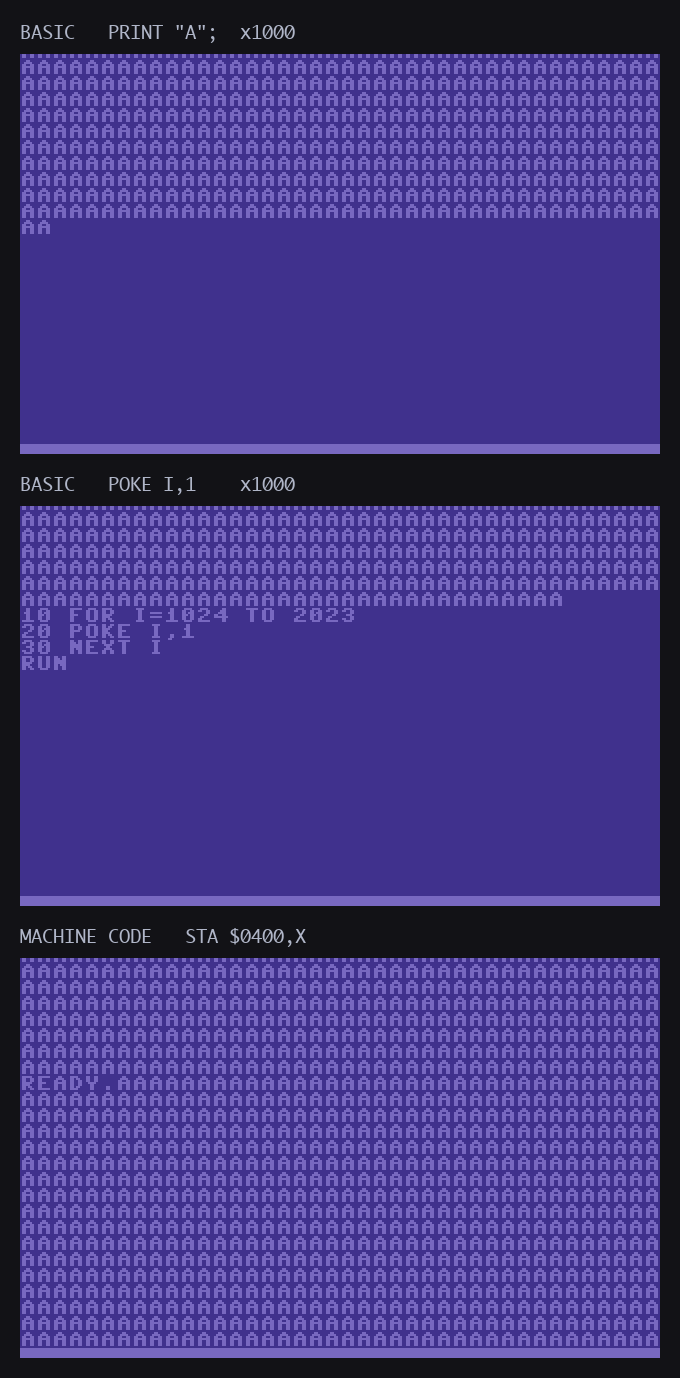
Let’s fill the screen with the letter ‘A’ using both methods:
Using PRINT
10 PRINT CHR$(147);
20 FOR I=1 TO 1000
30 PRINT "A";
40 NEXT I
Measured: 125 frames — 2.5 seconds (PAL C64)
Using POKE
10 FOR I=1024 TO 2023
20 POKE I,1
30 NEXT I
Measured: 215 frames — 4.3 seconds (PAL C64)
Using machine code
        lda #$01
        ldx #$00
loop:   sta $0400,x     ; four stores cover 1024 cells
        sta $0500,x
        sta $0600,x
        sta $0700,x
        inx
        bne loop
        rts
Measured: about 6,400 cycles — 6.5 milliseconds, a third of one frame.
The result
| Method | Time to fill the screen |
|---|---|
BASIC, PRINT "A"; |
2.5 s |
BASIC, POKE I,1 |
4.3 s |
| Machine code | 0.0065 s |
POKE from BASIC is not faster than PRINT here — it is slower, because every iteration converts the floating-point loop variable I into an address, work that PRINT never does. Both are dominated by the BASIC interpreter rather than by the screen write.
Machine code is roughly 660 times faster than the BASIC POKE loop. That is the number worth remembering, and it is the reason games were not written in BASIC.
Real-World Example: Score Display
Method 1: Using PRINT
10 SCORE=9999
20 PRINT CHR$(19);
30 PRINT "SCORE:";SCORE
Clears screen, homes cursor, prints text. Takes ~50 milliseconds (nearly one frame at 50Hz).
Method 2: Using POKE
10 SCORE=9999
20 S$=STR$(SCORE)
30 FOR I=1 TO LEN(S$)
40 C=ASC(MID$(S$,I,1))
50 POKE 1024+I-1,C
60 NEXT I
Writes directly to screen RAM. Takes ~10 milliseconds (much less than one frame).
Method 3: Using POKE (Optimised)
Important: extracting decimal digits requires repeated division by 10, not bitwise AND with 15 (AND 15 extracts the low 4 binary bits, not a decimal digit — for 99 AND 15 = 3, not 9).
10 SCORE=9999
20 D1=INT(SCORE/1000)
30 D2=INT(SCORE/100)-D1*10
40 D3=INT(SCORE/10)-INT(SCORE/100)*10
50 D4=SCORE-INT(SCORE/10)*10
60 POKE 1024,48+D1
70 POKE 1025,48+D2
80 POKE 1026,48+D3
90 POKE 1027,48+D4
No string conversion, direct digit extraction. Takes ~3 milliseconds (still much faster than PRINT). For real games, push this into machine code or precompute a digit-table.
Frame Time Budget
The C64 updates the screen 50 times per second (PAL). That gives you 20 milliseconds per frame to:
- Read joystick input
- Update player position
- Check collisions
- Move enemies
- Update score
- Redraw sprites
- Play sound effects
If updating your score takes 50ms with PRINT, you’ve blown 2.5 frames just displaying a number. The game slows down, sprites judder, controls feel sluggish. Use POKE and it’s instant.
When PRINT Is Actually Better
Text adventures and interactive fiction:
PRINT "YOU ARE IN A DARK ROOM."
PRINT "EXITS: NORTH, SOUTH, EAST"
INPUT "WHAT NOW";A$
PRINT handles word wrap, scrolling, and cursor positioning. You focus on the story, not screen coordinates.
Debugging:
PRINT "X=";X;" Y=";Y;" SCORE=";SFast to write, easy to read. Perfect for development.
File listings and utilities:
PRINT "LOADING...PLEASE WAIT"User doesn’t care about speed. They’re waiting anyway.
Hybrid Approach
Many programs use both:
10 REM Setup screen with POKE (once)
20 FOR I=1024 TO 2023:POKE I,32:NEXT
30 REM Draw UI borders with POKE
40 POKE 1024,85:POKE 1063,73
50 REM Use PRINT for user messages (occasionally)
60 PRINT CHR$(19);"READY"
70 REM Update game state with POKE (constantly)
80 FOR I=1 TO 100
90 POKE ENEMYX+I,160
100 NEXT I
POKE for frequent updates, PRINT for convenience.
Technical details
Why PRINT Is Slow
PRINT goes through the BASIC interpreter, then the KERNAL. Each layer adds overhead:
BASIC layer:
- String evaluation
- Expression parsing
- Type checking
- PETSCII handling
KERNAL layer:
- CHROUT routine ($FFD2)
- Control character checking
- Scroll handling
- Cursor management
- IRQ synchronisation
What POKE Actually Costs
It is tempting to say POKE compiles to two instructions:
LDA #value      ; Load value
STA address     ; Store to address
It does not. BASIC is interpreted, so nothing is compiled at all. Every POKE is re-read as text, its two arguments evaluated as floating-point expressions, each converted to an integer, and the address range-checked — and only then does the store happen. In a FOR loop the address expression is re-evaluated on every pass.
That is why the benchmark above comes out the way it does. Those two instructions are what the machine code version does, once per cell, with nothing in between. The difference between the two is the interpreter, and the interpreter is most of the cost.
Advanced: Inline Assembly
For ultimate speed, embed machine code. To fill the whole screen (1000 bytes) you need to chain stores across pages — one STA $0400,X covers only 256 bytes:
10 FOR I=0 TO 19
20 READ B:POKE 49152+I,B
30 NEXT I
40 SYS 49152
50 REM LDA #$01 / LDX #$00 / loop: STA $0400,X / STA $0500,X / STA $0600,X
60 REM    / STA $0700,X / DEX / BNE loop / RTS  (X starts at 0, wraps to FF, ...0)
70 DATA 169,1,162,0,157,0,4,157,0,5,157,0,6,157,0,7,202,208,243,96
Disassembled:
        LDA #$01            ; A9 01
        LDX #$00            ; A2 00
loop:   STA $0400,X         ; 9D 00 04
        STA $0500,X         ; 9D 00 05
        STA $0600,X         ; 9D 00 06
        STA $0700,X         ; 9D 00 07
        DEX                 ; CA
        BNE loop            ; D0 F3 (-13 from after BNE)
        RTS                 ; 60
This fills all 1024 bytes (the screen plus a small overshoot — the actual screen is 1000 bytes at $0400-$07E7, so the last 24 STA writes go beyond into unused area, harmless). Runs in under 0.1 seconds — far faster than PRINT.
The earlier example in some references that uses only one STA $0400,X / CPX #232 fills only 232 bytes (about 6 rows), not the whole screen.
Memory considerations
PRINT:
- Uses BASIC string buffers
- Uses KERNAL workspace
- Affects zero page temporaries
- Can trigger garbage collection
POKE:
- Direct memory write
- No intermediate storage
- No side effects
- Predictable behaviour
For tight game loops, predictability matters. POKE never surprises you.
The learning curve
PRINT: Instant gratification. Works immediately.
POKE: Requires understanding:
- Screen memory layout (1024-2023)
- Colour memory layout (55296-56295)
- Screen codes vs PETSCII
- Position calculation formulas
Worth learning? Absolutely. It’s the difference between “I made a program” and “I made a game.”
What the manuals said at the time
Commodore’s own reference guide draws the line where the benchmark does. “Machine language is the ONLY programming language that your Commodore 64 understands”, it says; BASIC’s commands “are simply recognized by another huge machine language program built into your Commodore 64… This program is called the BASIC INTERPRETER, because it interprets each command, one by one.” Jim Butterfield, opening his 1984 machine-language book, gave speed as the first of three reasons to learn it — “machine language programs are fast” — and the rule that makes the 660× figure unsurprising: “count the memory cycles, and that’s how fast the instruction will execute”, at “roughly 1 microsecond” each. A STA to the screen costs four of them. A POKE costs the interpreter.
The manual also names the middle road this page uses for its machine-code PRINT: “a machine language subroutine that will PRINT a character to the screen”, called at $FFD2 with “the CBM ASCII code of the character” in the accumulator. That is PRINT without the interpreter around it.
Practical Rules
- Starting out: Use PRINT. Learn BASIC first.
- Building a game: Switch to POKE for anything that moves or updates frequently.
- Text-heavy program: PRINT is fine.
- Real-time display: Always POKE.
- Not sure: Time it. If it’s slow, switch to POKE.
Code Comparison: Status Bar
PRINT Version (Slow)
10 PRINT CHR$(19);
20 PRINT "LIVES: ";L;" SCORE: ";S;" TIME: ";T
Executes in ~30 milliseconds. Causes visible flicker if updated every frame.
POKE Version (Fast)
Same digit-extraction caveat — use INT(... / 10) * 10 rather than AND 15:
10 REM Lives (single digit at position 7)
20 POKE 1031,48+L
30 REM Score (5 digits at positions 20-24)
40 FOR I=0 TO 4
50 D=INT(S/10^(4-I))-INT(S/10^(5-I))*10
60 POKE 1044+I,48+D
70 NEXT
80 REM Time (3 digits at positions 36-38)
90 FOR I=0 TO 2
100 D=INT(T/10^(2-I))-INT(T/10^(3-I))*10
110 POKE 1060+I,48+D
120 NEXT
Executes in ~5 milliseconds. No visible delay.
The Bottom Line
PRINT taught millions to program. It’s friendly, forgiving, and perfect for learning.
POKE is the right tool once you need a specific cell rather than the next one — arbitrary addressing, no cursor, no scrolling, colour under your control. What it is not, from BASIC, is meaningfully faster.
Machine code made the games you loved. Not because it uses a different screen, but because it removes the interpreter between your loop and the write. That is the whole of the 660× difference, and it is why the games on your shelf are not BASIC listings.
Learn PRINT first. Learn POKE for the control it gives you. Reach for machine code when the clock is the constraint.
See also
- Screen Memory — understanding the layout
- PETSCII Chart — character code reference
- VIC-II — the hardware behind the display
- Commodore 64 — system overview