PETSCII Character Chart
Every character code the C64 knows about
PETSCII codes, screen codes, and control characters—the complete reference for displaying text and graphics on the Commodore 64.
PETSCII (PET Standard Code of Information Interchange) is the Commodore 64’s character encoding system — Commodore’s own manuals call it “CBM ASCII” or “PET ASCII”. Unlike ASCII, PETSCII includes built-in graphics characters, colour control codes, and cursor movement—everything needed for games and demos. But here’s the catch: PETSCII codes and screen codes are different numbers for the same character.
When you PRINT "A" or use CHR$(65), you’re using PETSCII. When you POKE 1024,1, you’re using screen codes. Same letter ‘A’, different numbers (65 vs 1). Master this distinction and you’ve unlocked direct hardware control.
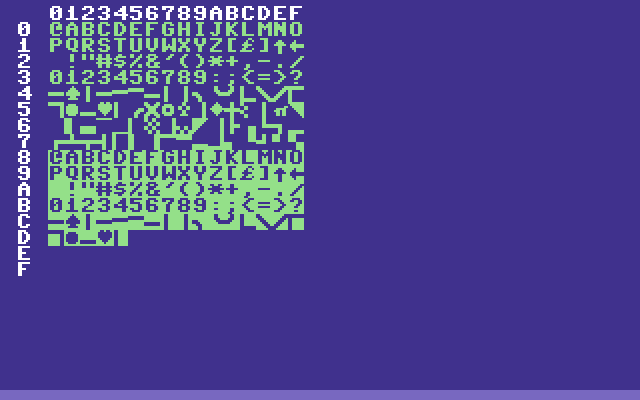
The chart above is the screen-code set — the numbers you POKE. Row 0 begins @ABCDEFG…, so the letter A is screen code 1. In PETSCII, which is what PRINT and CHR$ use, the letter A is 65 — and screen code 65 is something else entirely.
The Critical Difference
PETSCII Codes
Used with:
PRINT "HELLO"CHR$(147)— clear screenASC("A")— returns 65GET A$— keyboard inputINPUTstatements
Screen Codes
Used with:
POKE 1024,1— write directly to screen memoryPEEK(1024)— read screen memory- Assembly:
STA $0400(direct screen writes)
Quick example:
PRINT "A"       : REM Uses PETSCII 65
POKE 1024,1     : REM Uses screen code 1
REM Both display the letter A!
Memory Locations
| Memory | Address | Decimal | What It Does |
|---|---|---|---|
| Screen RAM | $0400-$07E7 | 1024-2023 | Character positions (40×25) |
| Colour RAM | $D800-$DBE7 | 55296-56295 | Colour for each character |
Formula for any position:
Position = 1024 + (row * 40) + column
Colour = 55296 + (row * 40) + column
Row 0 is the top, column 0 is the left. Position (0,0) is address 1024.
Common Characters (Uppercase Mode)
| Character | PETSCII | Screen Code | Notes |
|---|---|---|---|
| Space | 32 | 32 | Same in both |
| 0-9 | 48-57 | 48-57 | Same in both |
| @ | 64 | 0 | Different! |
| A | 65 | 1 | Different! |
| B | 66 | 2 | Different! |
| C | 67 | 3 | Different! |
| … | … | … | … |
| Z | 90 | 26 | Different! |
| [ | 91 | 27 | Different |
| £ | 92 | 28 | Pound sterling |
| ] | 93 | 29 | Different |
| ↑ | 94 | 30 | Up arrow |
| ← | 95 | 31 | Left arrow |
Pattern: For letters A-Z, subtract 64 from PETSCII to get screen code.
Control Characters
These codes don’t display—they do things. Essential for clearing screens, moving cursors, and changing colours.
| Code | CHR$() | What It Does |
|---|---|---|
| 13 | CHR$(13) | Carriage return (ENTER key) |
| 19 | CHR$(19) | Home cursor (top-left) |
| 147 | CHR$(147) | Clear screen (most used!) |
| 17 | CHR$(17) | Cursor down one line |
| 145 | CHR$(145) | Cursor up one line |
| 29 | CHR$(29) | Cursor right one space |
| 157 | CHR$(157) | Cursor left one space |
| 18 | CHR$(18) | Reverse video on |
| 146 | CHR$(146) | Reverse video off |
| 14 | CHR$(14) | Switch to lowercase/mixed-case charset |
| 142 | CHR$(142) | Switch to uppercase/graphics charset |
Switching charsets is implemented by changing the VIC-II’s character base pointer ($D018 bits 1-3) — CHR$(14) points at the lowercase character ROM region, CHR$(142) at the uppercase/graphics region. Both ROM regions live inside the C64’s character ROM at $D000-$DFFF; the switch is just a register write, instantaneous.
Game use: CHR$(147) clears the screen instantly. CHR$(19) resets cursor to home. Both faster than scrolling or manually clearing.
Colour Control Codes
Change text colour mid-PRINT with these PETSCII codes:
| Colour | PETSCII | Example |
|---|---|---|
| Black | 144 | PRINT CHR$(144); |
| White | 5 | PRINT CHR$(5); |
| Red | 28 | PRINT CHR$(28); |
| Cyan | 159 | PRINT CHR$(159); |
| Purple | 156 | PRINT CHR$(156); |
| Green | 30 | PRINT CHR$(30); |
| Blue | 31 | PRINT CHR$(31); |
| Yellow | 158 | PRINT CHR$(158); |
| Orange | 129 | PRINT CHR$(129); |
| Brown | 149 | PRINT CHR$(149); |
| Light Red | 150 | PRINT CHR$(150); |
| Dark Grey | 151 | PRINT CHR$(151); |
| Grey | 152 | PRINT CHR$(152); |
| Light Green | 153 | PRINT CHR$(153); |
| Light Blue | 154 | PRINT CHR$(154); |
| Light Grey | 155 | PRINT CHR$(155); |
Example:
PRINT CHR$(147);CHR$(31);"SCORE: ";CHR$(158);"9999"Clear screen, blue “SCORE:”, yellow number—all in one line.
Colour RAM Values (For POKEing)
When writing directly to colour RAM (55296+), use these values:
| Colour | Value | Hex |
|---|---|---|
| Black | 0 | $00 |
| White | 1 | $01 |
| Red | 2 | $02 |
| Cyan | 3 | $03 |
| Purple | 4 | $04 |
| Green | 5 | $05 |
| Blue | 6 | $06 |
| Yellow | 7 | $07 |
| Orange | 8 | $08 |
| Brown | 9 | $09 |
| Light Red | 10 | $0A |
| Dark Grey | 11 | $0B |
| Grey | 12 | $0C |
| Light Green | 13 | $0D |
| Light Blue | 14 | $0E |
| Light Grey | 15 | $0F |
Note: Only the low 4 bits matter—POKE 55296,18 gives you red (18 AND 15 = 2).
Graphics Characters
PETSCII includes built-in line-drawing and symbol characters, perfect for game borders and UI:
| Description | PETSCII | Screen Code |
|---|---|---|
| Horizontal line ─ | 99 | 67 |
| Vertical line │ | 98 | 66 |
| Upper-left corner ╭ | 117 | 85 |
| Upper-right corner ╮ | 105 | 73 |
| Lower-left corner ╰ | 106 | 74 |
| Lower-right corner ╯ | 107 | 75 |
| Cross ┼ | 110 | 78 |
| Heart ♥ | 115 | 83 |
| Diamond ♦ | 122 | 90 |
| Club ♣ | 120 | 88 |
| Spade ♠ | 97 | 65 |
| Circle ● | 113 | 81 |
| Solid block █ | 160 | 96 |
Every one of these sits on a shifted letter key, and each row was read back from screen RAM after printing the code rather than derived — PRINT CHR$(97) then PEEK(1024) returns 65.
The 193–218 range prints the same characters. CHR$(193) and CHR$(97) both put screen code 65 on the screen, so either works and you will see both in listings.
Game use: Draw UI borders with line characters. Hearts for lives. Solid blocks for platforms or walls.
Conversion Rules
PETSCII → Screen Code
Letters A-Z (uppercase):
Screen = PETSCII - 64
Example: 'A' = 65 - 64 = 1
Numbers and symbols (32-63):
Screen = PETSCII (same)
Example: '0' = 48 (both)
Graphics/shifted (97-122):
Screen = PETSCII - 32
Example: spade = 97 - 32 = 65
Measured across every graphics character in the table above, and it holds for all of them. The equivalent codes in the 193-218 range print the same characters.
Screen Code → PETSCII
Quick approximation:
IF S<32 THEN P=S+64
IF S>=32 AND S<64 THEN P=S
IF S>=64 THEN P=S+64
Better: Use lookup tables for accuracy.
Practical Examples
Example 1: Clear Screen and Set Colours
10 PRINT CHR$(147);
20 PRINT CHR$(31);
30 PRINT CHR$(18);
40 PRINT "  GAME OVER  ";
50 PRINT CHR$(146)
Example 2: Draw a Simple Box
10 PRINT CHR$(147);CHR$(5)
20 PRINT CHR$(85);
30 FOR I=1 TO 18
40 PRINT CHR$(67);
50 NEXT I
60 PRINT CHR$(73)
Example 3: Write Text Directly to Screen
10 REM Display "HI" at position (5,10)
20 P=1024+(5*40)+10
30 POKE P,8
40 POKE P+1,9
50 C=55296+(5*40)+10
60 POKE C,7
70 POKE C+1,7
Example 4: Scroll Text Effect
10 T$="*** WELCOME TO THE GAME ***"
20 FOR I=1 TO LEN(T$)
30 PRINT CHR$(19);
40 PRINT MID$(T$,I,40)
50 FOR D=1 TO 50:NEXT D
60 NEXT I
70 GOTO 20
Two appendices, two tables
The Programmer’s Reference Guide keeps the two numberings in separate appendices and never blurs them. Appendix B, “Screen Display Codes”, “shows which numbers should be POKEd into screen memory (locations 1024 – 2023) to get a desired character”, adds that “the reverse character code may be obtained by adding 128”, and gives the two case-switching POKEs — POKE 53272,21 for upper case and graphics, POKE 53272,23 for lower case. Appendix C, “ASCII and CHR$ Codes”, covers the other table: “what characters will appear if you PRINT CHR$(X), for all possible values of X”, and what ASC returns — which the manual recommends “in evaluating the character received in a GET statement, converting upper/lower case, and printing character based commands (like switch to upper/lower case) that could not be enclosed in quotes”.
See also
- Screen Memory — layout and addressing
- PRINT vs POKE — performance comparison
- VIC-II — the hardware behind the display
- Commodore 64 — the complete system