A Live Dashboard
PRINT AT writes to a fixed spot, so the same six lines can be rewritten over and over — the totals climb in place while five hundred dice land.
The tally works, but you see nothing until the run ends — six numbers appear all at once.
A dashboard shows them climbing. The trick is PRINT AT, which you met in Meet BASIC: it
writes to a fixed row and column, so the same spot can be overwritten again and again.
  10 BORDER 0: PAPER 0: INK 7: CLS
  20 RANDOMIZE
  60 CLS
  70 LET t1 = 0: LET t2 = 0: LET t3 = 0
  80 LET t4 = 0: LET t5 = 0: LET t6 = 0
  90 PRINT "Rolling 500 dice..."
 100 PRINT
 110 FOR i = 1 TO 500
 120 LET d = INT (RND * 6) + 1
 130 IF d = 1 THEN LET t1 = t1 + 1
 140 IF d = 2 THEN LET t2 = t2 + 1
 150 IF d = 3 THEN LET t3 = t3 + 1
 160 IF d = 4 THEN LET t4 = t4 + 1
 170 IF d = 5 THEN LET t5 = t5 + 1
 180 IF d = 6 THEN LET t6 = t6 + 1
 190 PRINT AT 2, 3; t1; "  "
 200 PRINT AT 3, 3; t2; "  "
 210 PRINT AT 4, 3; t3; "  "
 220 PRINT AT 5, 3; t4; "  "
 230 PRINT AT 6, 3; t5; "  "
 240 PRINT AT 7, 3; t6; "  "
 250 NEXT i
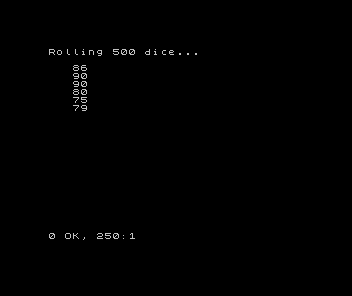
Updating in place
The end-of-run summary is gone. In its place, lines 190–240 sit inside the loop and rewrite
all six totals every single roll: PRINT AT 2, 3; t1; " " puts t1 at row 2, column 3 —
the exact same spot each time, so the new value lands on top of the old one. The two trailing
spaces matter: when a count climbs from 9 to 10 it gains a digit, and from 100 it would
gain another; the spaces wipe any leftover digit so 9 never reads as 90.
Line 110 now rolls 500 times. Run it and watch: the six numbers flicker upward together, and you can see one face pull ahead, then the others catch up. That live movement is the whole difference between a report (here are the final numbers) and a dashboard (watch the numbers happen).
It also makes the convergence visible. Over 500 rolls the six totals cluster much closer to even — around 83 each — than they did over 100. The more you roll, the flatter it gets.
Next: hand the controls to the player.