
A variable gives a stored value a name. Blitz lets you choose the type of that value: how it is represented, how much storage it uses and which numbers it can hold. Here you’ll compare two integer types, then see what happens when a result does not fit.
What you’ll see by the end
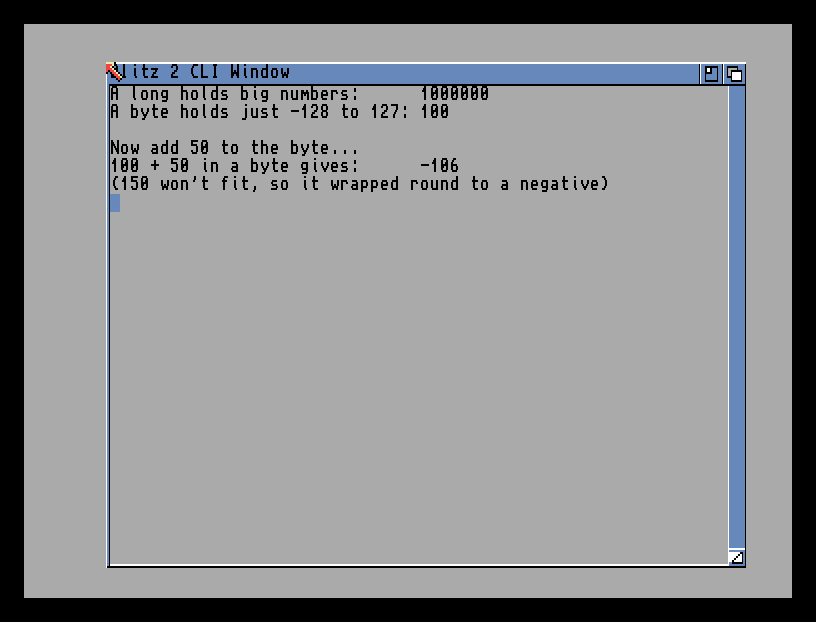
The long holds a million without blinking. The byte holds 100. But add 50 to the byte and the answer comes back −106, not 150 — because a byte is a small box, and 150 doesn’t fit. That wrap-around is the lesson made visible.
The whole program
; Blitz lets you choose how big each number is.
big.l = 1000000
small.b = 100

NPrint "A long holds big numbers:      ", big
NPrint "A byte holds just -128 to 127: ", small
NPrint ""
NPrint "Now add 50 to the byte..."
small = small + 50
NPrint "100 + 50 in a byte gives:      ", small
NPrint "(150 won't fit, so it wrapped round to a negative)"
MouseWait
End
The new idea is the little suffix after each variable’s name:
big.l— the.lmakesbiga long: a 32-bit box that holds huge numbers (into the billions). Its value occupies four bytes; a word uses two and a byte uses one.small.b— the.bmakessmalla byte: an 8-bit box that holds only −128 to 127. It uses one byte of storage. The result of an addition can exceed that range.
You write the suffix once, when you first use the variable. After that, just the name — big, small — and Blitz remembers the size. The suffix is you telling the compiler “make this box exactly this big.”
The sizes you’ll use
The AmiBlitz guide, §2.5, “Primitive Types”, gives these three signed integer types:
| Suffix | Name | Holds | Use it for |
|---|---|---|---|
.b |
byte | −128 to 127 | tiny counts — lives, a small index |
.w |
word | −32,768 to 32,767 | positions or scores within this range |
.l |
long | −2,147,483,648 to 2,147,483,647 | larger totals |
For fractions, you’ll also meet .q (a fixed-point number) and .f (a floating-point number) — for when you need values between the whole numbers, like smooth sub-pixel movement. You’ll reach for those later; for now, the three integer sizes are the toolkit.
Storage is a choice
Choosing .b rather than .l saves three bytes of value storage, but also reduces the range. It does not guarantee a faster calculation. AMOS also distinguishes whole numbers, real numbers and text; being interpreted does not make its numbers unlimited.
The Blitz BASIC 2.1 manual, chapter 3, pp. 21–23, describes these types and optional overflow checking. With checking off, storing 150 in a signed byte leaves the bit pattern read as −106. With checking enabled, exceeding the range can instead report an overflow error. Compiler settings matter: the screenshot shows a wrap, not a promise that every configuration silently wraps.
For a score that must remain positive, that wrapped result is a bug. Choose a type whose range covers the values the program needs.
Type it and compile it
Use the first lesson’s plain-text import procedure with a new file called types.ab3. Keep its RuntimeDebug = 0 header and add ; OverflowCheck = 0 immediately before ; /XTRA for this wrap experiment. These per-source settings are described in the guide’s file-format section. Put the maintained listing below the header. Load it into PED, then choose Compiler → Compile & Run or press right-Amiga+#.
Check the long’s value, the byte’s initial 100 and its final −106 separately. Left-click to finish MouseWait, then press Return at the termination prompt.
Try this: give it a bigger box
Change small.b to small.w — make it a word instead of a byte. Run it again. Now 100 + 50 gives 150, the right answer, because a word has room to spare. The program’s printed labels are fixed text: update the byte-range label and replace the final wrap message so they describe your word experiment. The value should now fit. That’s the whole skill: match the box to the numbers it has to hold.
Try this: a string box
Numbers aren’t the only kind. Add these lines before MouseWait:
name$ = "Blitz"
NPrint "A string holds text: ", name$
The $ marks a string variable — a box for text, the same as in other BASICs. So Blitz has the familiar string box and a choice of number boxes. Text in quotes goes in a $; numbers go in a .b, .w or .l.
If it doesn’t work
- Blitz complains about the
.bor.l. The type suffix goes on the variable name with no space —small.b, notsmall .b— and only the first time you use the variable. - Your number is wrong, with no warning. It may have overflowed quietly. Check the arithmetic and the type’s range. A wider
.wor.lhelps only if the result fits its range. - A string assignment is rejected. Text needs both the
$on the name and quotes round the value:name$ = "Blitz".
What you’ve learnt
Blitz lets you choose how a number is stored. A suffix on the variable’s name — set once — picks the box: .b byte (−128 to 127), .w word, .l long, with .q and .f for fractions, and $ for text. A value outside its type’s range can wrap when overflow checking is off, as in this experiment. Choose for the required range; fewer bytes alone do not establish faster execution.
What’s next
That’s the groundwork done — you can compile, you know the two modes, and you can store values the Blitz way. Next phase, the payoff begins: Decisions, Loops, and the Frame — the control flow every game runs on, and the VWait that paces it to the screen.