
What you’ll see by the end
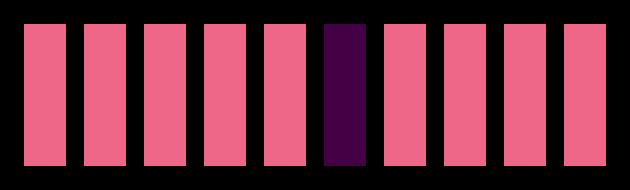
One loop draws ten bars. A decision inside it chooses the colour of each bar. You’ll change that decision to make an alternating pattern, then investigate why the colour must be reset on every pass.
Start with the AmiBlitz setup and first compile if PED is not ready. This lesson uses the same PAL A1200 configuration.
The whole program
; A loop draws ten bars; a decision picks out the middle one.
VWait 100
BLITZ
  BitMap 0,320,256,3
  Cls 0
  For x = 0 To 9
    c = 2
    If x = 5 Then c = 5
    Boxf x*30+10, 90, x*30+30, 160, c
  Next
  Slice 0,44,3
  Show 0
  MouseWait
The opening VWait 100 lets time pass before entering Blitz mode; wait for disk activity to finish too. The bitmap and slice follow the previous graphics example. Inside that setup, the drawing loop is:
For x = 0 To 9
  c = 2
  If x = 5 Then c = 5
  Boxf x*30+10, 90, x*30+30, 160, c
Next
For x = 0 To 9…Nextrepeats the enclosed instructions withxequal to 0, 1, 2 … 9: ten passes, including both ends.c = 2chooses colour index 2 at the start of each pass.If x = 5 Then c = 5changes that choice on the pass wherexequals 5.Boxf …, cuses the chosen colour. Its horizontal coordinates depend onx, placing each bar 30 pixels further right than the previous one.
The first bar uses x=0. The sixth uses x=5. After drawing all ten into bitmap memory, the program shows the bitmap and waits for a left mouse click. This is a static picture, not yet an animation.
Load and compile it
Use the first lesson’s plain-text import procedure with a new file called loop.ab3. Keep its three-line RuntimeDebug = 0 settings header and put this lesson’s listing below it. Load the file into PED, then choose Compiler → Compile & Run, or press right-Amiga+#. Right-Amiga+X cuts text in PED.
Check that there are ten bars and only the sixth has a different colour. Left-click to finish MouseWait, then press Return if AmiBlitz shows its termination prompt.
Try this: change which bar is selected
Change only If x = 5 Then c = 5 to If x = 0 Then c = 5. Predict the result before compiling.
Which bar changes colour, and does the program still draw ten bars?
Show the explanation
The first bar is selected, because the first pass has x=0. The loop bounds are unchanged, so it still draws ten bars. The sixth returns to colour 2 because each pass starts with c=2.
Try this: every other bar
Replace the decision line with:
If (x MOD 2) = 0 Then c = 5MOD gives the remainder after division. For the whole-number counts in this loop, dividing an even value by 2 leaves remainder 0; dividing an odd value leaves remainder 1. Work out the remainders for x=0, 1, 2 and 3, then compile.
Does the first bar get colour 5 or colour 2? Which five bars should get colour 5?
Show the explanation
The first gets colour 5: zero has remainder 0 when divided by 2. Values 0, 2, 4, 6 and 8 select the first, third, fifth, seventh and ninth bars. Values 1, 3, 5, 7 and 9 leave the other bars at colour 2.
Use a remainder test for this question. An expression such as x/2*2 does not explicitly ask for a remainder. In the default syntax mode, unsuffixed Blitz variables use the fractional Quick type, so division must not be assumed to discard fractions. The AmiBlitz guide, §2.2.1 describes the default, and §3.1.5 lists MOD.
Try this: find the colour bug
Restore the original If x = 5 Then c = 5 decision. Now move c = 2 out of the loop: delete it from between For and If, and insert it immediately before For x = 0 To 9. Predict the colours, then compile.
Why do the sixth bar and all the bars after it now share colour 5?
Show the explanation
c starts at 2 once. At x=5, the decision changes it to 5. Later passes do not change it back, so they draw with 5 too. Repair this by moving c=2 back inside the loop, before If, then compile and check that only the sixth bar is selected again.
From counted loops to frames
This For loop finishes after ten passes. Other shapes suit other jobs: While … Wend repeats while a condition remains true; Repeat … Until repeats until its condition becomes true. A longer decision can use If, Else and EndIf on separate lines.
Animation repeats an update as well as drawing. VWait waits for the next vertical blank, a point between display refreshes; an optional count waits for several. On this lesson’s PAL setup, the display refreshes about 50 times a second, roughly 20 milliseconds apart. Other display modes can have different rates.
A wait can synchronise updates to the display. It cannot make slow work finish sooner: if one update takes longer than the interval between refreshes, the program cannot complete an update on every refresh. Adding VWait alone also does not make these static bars move; an animation needs changing positions and repeated updates.
The Blitz BASIC 2.1 manual, “VWait”, printed p. 98, documents the vertical-blank wait. No AMOS-versus-Blitz speed comparison follows from this picture.
If it doesn’t work
- Every bar changes in the alternating exercise. Check that you used
(x MOD 2) = 0, and keptc=2inside the loop before the decision. - The first bar is selected when you expected the second. The counter starts at zero. Count bar positions separately from
xvalues. - All the bars overlap. Compare both horizontal coordinate expressions with the listing; each must use
x. - A compile error names
Next. Check that theForline is still present and the loop has one matchingNext. Use the compiler message and affected line rather than changing several lines at once.
What you’ve learnt
A loop counter can place repeated shapes. A decision chooses what happens on each pass, and the location of an assignment determines whether it resets once or repeatedly. MOD tests remainders; VWait synchronises with display refresh, subject to the time the program’s work takes.
What’s next
Next — Many Things at Once — keep track of several moving objects and update them repeatedly.