
Under the character grid is a finer one: pixels, 256 across and 176 tall. Three
keywords draw on it — PLOT a point, DRAW a line, CIRCLE a circle. There’s one catch
to learn first, and it’s about which way is up.
Milestone 1 — a point and a line
  10 BORDER 0
  20 PAPER 0
  30 INK 7
  40 CLS
  50 PLOT 20,20
  60 DRAW 200,140
PLOT 20, 20 lights a pixel near the bottom-left — because the pixel grid counts from
the bottom-left, with y going up. DRAW 200, 140 then draws a line relative to that
point: 200 pixels right and 140 up. So the line climbs as it goes right.
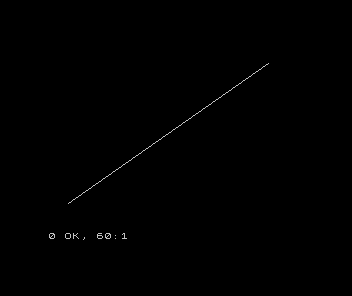
That’s the catch: PLOT and DRAW measure from the bottom-left, y upward, while
PRINT AT measures rows from the top. Two grids, two origins — mixing them up is the most
common drawing mistake.
Milestone 2 — a box and a circle
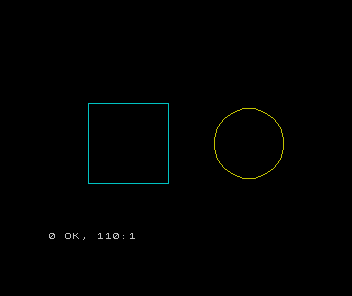
DRAW runs from wherever the last point was, so four DRAWs make a closed box. CIRCLE
takes a centre and a radius:
  10 BORDER 0
  20 PAPER 0
  30 CLS
  40 INK 5
  50 PLOT 40,40
  60 DRAW 80,0
  70 DRAW 0,80
  80 DRAW -80,0
  90 DRAW 0,-80
 100 INK 6
 110 CIRCLE 200,80,35
The four DRAWs trace a square — right, up, left, down, back to the start. CIRCLE 200, 80, 35 draws a circle centred at (200, 80) with a radius of 35.
Milestone 3 — frame the title card
Now both grids at once. The title card’s text is placed with PRINT AT (rows from the
top); the frame around it is drawn with PLOT and DRAW (pixels from the bottom). Line
them up and the title card gets its border:
  10 BORDER 1
  20 PAPER 1
  30 INK 6
  40 CLS
  50 PRINT AT 8,11;"MEET BASIC"
  60 PRINT AT 10,7;"a Spectrum primer"
  70 PLOT 48,70
  80 DRAW 160,0
  90 DRAW 0,50
 100 DRAW -160,0
 110 DRAW 0,-50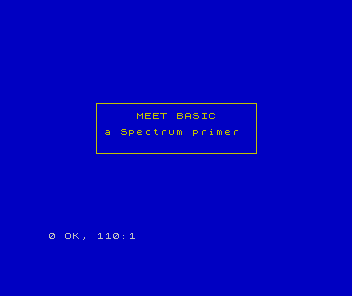
When it doesn’t work
- The drawing came out upside down. You used
PRINT ATthinking, top-down.PLOT/DRAWcount up from the bottom — a bigger y is higher on screen. Integer out of range. A point off the grid. Pixels run 0–255 across and 0–175 up.- The box didn’t close.
DRAWis relative — each one starts where the last ended. To close a box, the four moves must sum back to the start.
Before and after
You started able to place text and finished drawing shapes — a line, a box, a circle, and
a frame around the title card. The idea underneath: PLOT lights a pixel, DRAW runs a
line from it, CIRCLE draws a circle — on a 256-by-176 grid measured from the
bottom-left, y upward.
Try this
- A triangle. Three
DRAWs from aPLOT, back to the start. - A target. Stack three
CIRCLEs at the same centre with growing radii. - Resize the frame. Widen the title-card box by changing the
DRAWlengths — and watch which way “up” moves the top edge.
What you’ve learnt
- The pixel grid is 256 across, 176 up, measured from the bottom-left.
PLOT x, ylights a pixel;DRAW dx, dyruns a line relative to the last point;CIRCLE x, y, rdraws a circle.PLOT/DRAWcount y upward — the opposite ofPRINT AT’s rows-from-the-top.- Text and graphics share the screen: place with
PRINT AT, draw withPLOT/DRAW.
What’s next
The title card has everything but life. In Unit 13 we make it move — and discover, in the flicker, exactly why the Spectrum’s legends reached for assembly.
Run it here
This unit's program, built for you.
- Program
- step-03.tap
- Machine
- ZX Spectrum 48K (PAL)