
A small face makes the moving head easy to find. We will draw it first, then give it a 24×16 arena.
Use a 48K ZX Spectrum with Sinclair BASIC. Save any program you want to keep, then enter NEW. In the original keyword editor, R enters RUN at the start of a command. Keywords are tokens; the spaces the ROM displays after them are not extra spaces you must type. The Meet BASIC entry and saving guide is available if you need a reminder.
Start a new program. Custom characters and arrays have appeared earlier in this course, but we will explain the parts needed here. There is no previous game’s source to convert.
Draw eight rows
Our right-facing head uses these pixels. # is ink and . is paper.
..####..
.######.
######..
##..##..
##..##..
######..
.######.
..####..
Across a row the bit values are 128, 64, 32, 16, 8, 4, 2, 1. The first row is 32+16+8+4 = 60. The fourth is 128+64+8+4 = 204. Each of the eight rows becomes one byte.
USR "c" gives the address of custom character c, character code 146. Here USR has a string argument and locates graphic storage; it does not call machine code. READ v takes the next row number from DATA, and POKE stores that byte. CHR$ 146 makes the one-character string that PRINT displays.
Enter this short program and RUN it. STOP prevents execution from falling into the DATA; its 9 STOP statement report is expected.
  10 BORDER 0: PAPER 0: INK 7: CLS
  20 RESTORE 7220: FOR j=0 TO 7: READ v: POKE USR "c"+j,v: NEXT j
  30 PRINT AT 11,12;CHR$ 146
  40 STOP
7220 DATA 60,126,252,204,204,252,126,60
Give it room
The wall is another eight-row drawing, stored in custom character a, code 144. Its row bytes are 255,129,129,129,255,129,129,255: full horizontal rows with two outside pixels between them. The second checkpoint adds the arena and a drawing routine.
Replace lines 10, 20, 30.
Add lines 1000, 1010, 1020, 1030, 1040, 1060, 1070, 1080, 3000, 3040, 3050, 7000, 7010, 7200, 9000.
  10 GO SUB 7000
  20 LET r=8: LET c=9
  30 GO SUB 1000
1000 BORDER 0: PAPER 0: INK 7: CLS
1010 PRINT AT 0,11; INK 5;"TAIL CHASE"
1020 PRINT AT 2,5; INK 7;"Keep some room to turn."
1030 FOR x=3 TO 28: PRINT AT 3,x; INK 1;CHR$ 144;AT 20,x;CHR$ 144: NEXT x
1040 FOR y=4 TO 19: PRINT AT y,3; INK 1;CHR$ 144;AT y,28;CHR$ 144: NEXT y
1060 GO SUB 3000
1070 PRINT AT 21,5; INK 5;"An arena with room to turn.";
1080 RETURN
3000 LET z=146
3040 PRINT AT r+3,c+3; INK 7;CHR$ z
3050 RETURN
7000 RESTORE 7200: FOR j=0 TO 7: READ v: POKE USR "a"+j,v: NEXT j
7010 RESTORE 7220: FOR j=0 TO 7: READ v: POKE USR "c"+j,v: NEXT j: RETURN
7200 DATA 255,129,129,129,255,129,129,255
9000 PAPER 0: INK 7: PRINT AT 21,0;"Finished. RUN to try again.     ";: STOP
RUN the changed program.
Complete source at this checkpoint
  10 GO SUB 7000
  20 LET r=8: LET c=9
  30 GO SUB 1000
  40 STOP
1000 BORDER 0: PAPER 0: INK 7: CLS
1010 PRINT AT 0,11; INK 5;"TAIL CHASE"
1020 PRINT AT 2,5; INK 7;"Keep some room to turn."
1030 FOR x=3 TO 28: PRINT AT 3,x; INK 1;CHR$ 144;AT 20,x;CHR$ 144: NEXT x
1040 FOR y=4 TO 19: PRINT AT y,3; INK 1;CHR$ 144;AT y,28;CHR$ 144: NEXT y
1060 GO SUB 3000
1070 PRINT AT 21,5; INK 5;"An arena with room to turn.";
1080 RETURN
3000 LET z=146
3040 PRINT AT r+3,c+3; INK 7;CHR$ z
3050 RETURN
7000 RESTORE 7200: FOR j=0 TO 7: READ v: POKE USR "a"+j,v: NEXT j
7010 RESTORE 7220: FOR j=0 TO 7: READ v: POKE USR "c"+j,v: NEXT j: RETURN
7200 DATA 255,129,129,129,255,129,129,255
7220 DATA 60,126,252,204,204,252,126,60
9000 PAPER 0: INK 7: PRINT AT 21,0;"Finished. RUN to try again.     ";: STOP
The world uses rows 1–16 and columns 1–24. PRINT AT uses screen coordinates starting at zero, so the drawing adds three to each world coordinate. World (8,9) appears at screen (11,12). Border columns 3 and 28 and rows 3 and 20 sit immediately outside the world. The title and bottom message use separate rows.
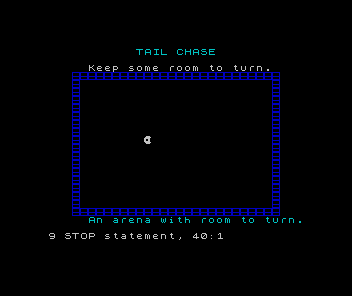
GO SUB 7000 installs graphics and returns. GO SUB 1000 draws the arena, calls the head routine at 3000, and returns. Separate RESTORE positions let us load wall a and head c without filling the unused character b.
Where would world row 16, column 24 appear?
Show the explanation
At screen row 19, column 27: add three to each coordinate. It remains just inside the bottom and right walls.
Try that corner by changing line 20, then restore row 8, column 9. If the head is scrambled, check eight numbers at line 7220 and the address USR "c". If the border is wrong, check the two loop limits before changing the drawing offset.
Sources
Steven Vickers, edited by Robin Bradbeer, ZX Spectrum BASIC Programming, second edition (Sinclair Research, 1983), 6, 14–16 (DATA, custom characters and printing).
Run it here
This unit's program, built for you.
- Program
- step-02.tap
- Machine
- ZX Spectrum 48K (PAL)