
The expedition works, but watch the screen as you play. Every move blanks it and builds it again, line by line: the title, the rule and the controls vanish and come back, although none of them has changed. This lesson keeps the screen steady. The game itself stays exactly the same.
Find the flash
Line 490 ends every turn with GO TO 270, and 270 calls the drawing routine at 1000. Its first statement is CLS, which clears the whole screen. Everything after it is printed again from the top.
Before reading on: which parts of the screen can one move change?
Show the explanation
The treasure and turn counts, the room name and description, the four tunnel rows and their signs, the creature line and the message. The title, the rule under it, the TUNNELS heading and the two lines of controls never change during an expedition.
CLS is quick, but the BASIC that follows is not. We stepped the emulator one frame at a time (a fiftieth of a second) through each move of the worked routes. A move took about 45 frames, and for about 30 of them at least one line that was there before the move, and is there after it, was blank. That is more than half a second of an emptied screen on every turn.
Draw the frame once
Split the drawing into two parts. The frame holds everything that stays: CLS, the title, the rule, the heading and the controls. The update holds everything a turn can change. Put the frame first, so the routine at 1000 draws the frame and then runs straight on into the update at 1020.
GO SUB 1000 therefore still draws everything. Line 270 uses it when an expedition starts, and again after R, because a new expedition needs a clean screen. GO SUB 1020 enters the same routine part-way through and draws only the update. It reaches the same RETURN at 1220. A turn uses it at 490, and the result routine uses it at 5030.
Overprinting leaves old text behind
Without CLS, each turn prints on top of the last one. PRINT AT replaces only the characters it prints. The rest of the line keeps whatever was there.
The creature line says No creature in this room. The creature arrives, and line 1170 prints IT IS HERE. MOVE NOW. at the same place. What does the line show?
Show the explanation
IT IS HERE. MOVE NOW.oom. The new text is four characters shorter, so the last four characters of the old text stay on screen.
The cure is padding: make each piece of text as long as the longest text that place ever shows, adding spaces after the shorter ones. The spaces print over whatever was left behind. Go through the changing places one at a time:
- Room name and description. These are already safe.
DIM a$(12,24)gave every name exactly 24 characters, padded with spaces when you entered them in Connect the rooms. Each description is 28. - Message. h$ holds anything from 25 to 29 characters.
DIM h$(29)with one number makes h$ a single string that is always 29 characters long.LET h$="Your footsteps fade away."then stores that text followed by four spaces. This is the same padding the room arrays use. The wall message at 390 was already typed with a space at its end to make 29 characters. - Signs.
DIM s$(13)does the same for the sign beside each tunnel. The longest sign, Steps + glint, has 13 characters. - Creature line. “IT IS HERE. MOVE NOW.” gains four spaces at 1170, to match “No creature in this room.”
- Tunnel state.
" -- "gains two spaces so that it covers" Open". - Results. Line 5040 used to blank the creature line before 5050 or 5060 printed the result. The two results are now padded to the same 28 characters, so 5040 is no longer needed.
The status line, TREASURE 0/3 TURNS 0, is printed at 1020 without any padding. Why can it never leave a stale digit?
Show the explanation
During one expedition both numbers only grow, so each new status line is at least as long as the last. R starts a new expedition through GO SUB 1000, whose CLS clears the old line first.
Print each place once
The old tunnel rows printed --, then printed Open over it, then printed a sign, and sometimes a second and third sign over that. CLS hid those steps, because the whole screen was being rebuilt anyway. Without CLS, a sign that stays the same from one turn to the next would blink off and on.
Instead, decide what each row should say, then print it once. Line 1090 starts each tunnel with no sign: s$ becomes 13 spaces. Lines 1120 to 1150 no longer print anything. They choose the sign text and its colour, in hue. Line 1155 prints the chosen sign, padded to 13 characters, in the chosen colour. INK inside PRINT accepts a variable as well as a number. A closed tunnel jumps from 1100 straight to 1155, so its 13 spaces clear any sign that the previous room showed in that row. The jump also skips t(v), which has no element 0.
Make the changes
Replace lines 200, 490, 1090, 1100, 1120, 1130, 1140, 1150, 1170, 5030, 5050, 5060.
Add lines 1012, 1014, 1016, 1018, 1155.
Delete lines 1030, 1060, 1200, 1210, 5040. To delete a BASIC line, enter its number on its own.
 200 DIM m(12,4): DIM a$(12,24): DIM b$(12,28): DIM t(12): DIM c(8): DIM h$(29): DIM s$(13)
 490 GO SUB 1020: GO TO 300
1012 INK 1: PLOT 16,148: DRAW 223,0
1014 PRINT AT 9,2; INK 6;"TUNNELS       NEARBY SIGNS"
1016 PRINT AT 20,2; INK 7;"N S E W / SPACE waits"
1018 PRINT AT 21,2; INK 7;"R: restart   Q: quit"
1090 LET s$="": LET hue=7
1100 IF v=0 THEN PRINT AT y,2; INK 7;d$(j);"  --  ": GO TO 1155
1120 IF v=pit THEN LET s$="Cold draught": LET hue=6
1130 IF v=cr THEN LET s$="Footsteps": LET hue=6
1140 IF t(v)=1 THEN LET s$="Glint": LET hue=4
1150 IF v=cr AND t(v)=1 THEN LET s$="Steps + glint": LET hue=6
1155 PRINT AT y,15; INK hue;s$
1170 IF cr=rm THEN PRINT AT 16,2; INK 6;"IT IS HERE. MOVE NOW.    "
5030 GO SUB 1020
5050 IF ending=3 THEN PRINT AT 16,2; INK 6;"YOU ESCAPED THE CAVERNS.    "
5060 IF ending<>3 THEN PRINT AT 16,2; INK 6;"YOUR EXPEDITION ENDS.       "
The new 1012 to 1018 are the old 1030, 1060, 1200 and 1210, moved up into the frame. RUN the changed program.
Complete source at this checkpoint
  10 BORDER 0: PAPER 0: INK 7: BRIGHT 1: CLS
  20 PRINT AT 3,8; INK 5;"THE CAVERNS"
  30 PRINT AT 6,2;"Find three lost treasures."
  40 PRINT AT 8,2;"Bring them to the entrance."
  50 PRINT AT 10,2;"N S E W: move. SPACE: wait."
  60 PRINT AT 12,2;"Read the signs by each exit."
  70 PRINT AT 14,2;"If it arrives, leave at once!"
  80 PRINT AT 17,2;"R restarts. Q quits."
  90 PRINT AT 20,2; INK 6;"S enters the cave."
 100 GO SUB 9000
 110 LET k$=INKEY$: IF k$="" THEN GO TO 110
 120 IF k$="q" OR k$="Q" THEN GO TO 8000
 130 IF k$<>"s" AND k$<>"S" THEN GO TO 110
 200 DIM m(12,4): DIM a$(12,24): DIM b$(12,28): DIM t(12): DIM c(8): DIM h$(29): DIM s$(13)
 210 RESTORE 9500
 220 FOR i=1 TO 12: READ a$(i),b$(i): FOR j=1 TO 4: READ m(i,j): NEXT j: NEXT i
 230 RESTORE 9800: FOR i=1 TO 8: READ c(i): NEXT i
 240 LET t(6)=1: LET t(10)=1: LET t(12)=1
 250 LET rm=1: LET pit=7: LET ci=3: LET cr=c(ci): LET found=0: LET turns=0
 260 LET d$="NSEW": LET e$="nsew": LET h$="Find treasure. Return here."
 270 GO SUB 1000
 300 GO SUB 9000
 310 LET k$=INKEY$: IF k$="" THEN GO TO 310
 320 IF k$="q" OR k$="Q" THEN GO TO 8000
 330 IF k$="r" OR k$="R" THEN GO TO 200
 340 LET dir=0: FOR j=1 TO 4: IF k$=d$(j) OR k$=e$(j) THEN LET dir=j
 350 NEXT j
 360 IF dir=0 AND k$<>" " THEN GO TO 300
 370 LET dest=rm
 380 IF dir>0 THEN LET dest=m(rm,dir)
 390 IF dest=0 THEN PRINT AT 18,2; INK 6;"No tunnel in that direction. ": GO TO 300
 400 LET turns=turns+1: LET h$="Your footsteps fade away."
 410 IF dest=pit THEN LET rm=dest: LET ending=1: GO TO 5000
 420 IF dest=cr THEN LET rm=dest: LET ending=2: GO TO 5000
 430 LET rm=dest
 440 IF t(rm)=1 THEN LET t(rm)=0: LET found=found+1: LET h$="You recover a lost treasure."
 450 IF rm=1 AND found=3 THEN LET ending=3: GO TO 5000
 460 LET ci=ci+1: IF ci=9 THEN LET ci=1
 470 LET cr=c(ci)
 480 IF cr=rm THEN LET h$="It arrives! Leave next turn!"
 490 GO SUB 1020: GO TO 300
1000 CLS
1010 PRINT AT 0,8; INK 5;"THE CAVERNS"
1012 INK 1: PLOT 16,148: DRAW 223,0
1014 PRINT AT 9,2; INK 6;"TUNNELS       NEARBY SIGNS"
1016 PRINT AT 20,2; INK 7;"N S E W / SPACE waits"
1018 PRINT AT 21,2; INK 7;"R: restart   Q: quit"
1020 PRINT AT 2,2; INK 6;"TREASURE ";found;"/3    TURNS ";turns
1040 PRINT AT 5,2; INK 5;a$(rm)
1050 PRINT AT 7,2; INK 7;b$(rm)
1070 FOR j=1 TO 4
1080 LET v=m(rm,j): LET y=10 +j
1090 LET s$="": LET hue=7
1100 IF v=0 THEN PRINT AT y,2; INK 7;d$(j);"  --  ": GO TO 1155
1110 PRINT AT y,2; INK 7;d$(j);"  Open"
1120 IF v=pit THEN LET s$="Cold draught": LET hue=6
1130 IF v=cr THEN LET s$="Footsteps": LET hue=6
1140 IF t(v)=1 THEN LET s$="Glint": LET hue=4
1150 IF v=cr AND t(v)=1 THEN LET s$="Steps + glint": LET hue=6
1155 PRINT AT y,15; INK hue;s$
1160 NEXT j
1170 IF cr=rm THEN PRINT AT 16,2; INK 6;"IT IS HERE. MOVE NOW.    "
1180 IF cr<>rm THEN PRINT AT 16,2; INK 7;"No creature in this room."
1190 PRINT AT 18,2; INK 5;h$
1220 RETURN
5000 IF ending=1 THEN LET h$="The cold tunnel hid a pit."
5010 IF ending=2 THEN LET h$="The creature catches you."
5020 IF ending=3 THEN LET h$="All three treasures are safe."
5030 GO SUB 1020
5050 IF ending=3 THEN PRINT AT 16,2; INK 6;"YOU ESCAPED THE CAVERNS.    "
5060 IF ending<>3 THEN PRINT AT 16,2; INK 6;"YOUR EXPEDITION ENDS.       "
5070 PRINT AT 20,2; INK 7;"R: try again   Q: quit       ": PRINT AT 21,2;"                            "
5080 GO SUB 9000
5090 LET k$=INKEY$: IF k$="" THEN GO TO 5090
5100 IF k$="q" OR k$="Q" THEN GO TO 8000
5110 IF k$="r" OR k$="R" THEN GO TO 200
5120 GO TO 5090
8000 PRINT AT 21,2; INK 7;"The Caverns finished.       ": STOP
9000 IF INKEY$<>"" THEN GO TO 9000
9010 RETURN
9500 DATA "The entrance","Daylight rims the stone.",0,5,2,0
9510 DATA "Split passage","Two worn paths meet here.",0,6,3,1
9520 DATA "Echo gallery","Every step returns twice.",0,7,4,2
9530 DATA "High ledge","A narrow shelf bends south.",0,8,0,3
9540 DATA "Root chamber","Roots grip the damp ceiling.",1,9,6,0
9550 DATA "Old camp","A torn pack lies in dust.",2,10,7,5
9560 DATA "The black shaft","The floor vanishes below.",3,11,8,6
9570 DATA "Dripping stair","Water counts the seconds.",4,12,0,7
9580 DATA "Still pool","Your lamp trembles in water.",5,0,10,0
9590 DATA "Buried shrine","Carved faces watch the path.",6,0,11,9
9600 DATA "Low arch","You stoop beneath the rock.",7,0,12,10
9610 DATA "Crystal hollow","Crystals catch the lamplight.",8,0,0,11
9800 DATA 2,3,4,8,12,11,10,6
Play the same moves as before. The title, rule and controls now stay put, and each turn rewrites only its own lines. Walk into a room whose tunnels show signs and then into one without them, so you can see the padding clear the old text. Then reach an ending: it should read exactly as it did before.
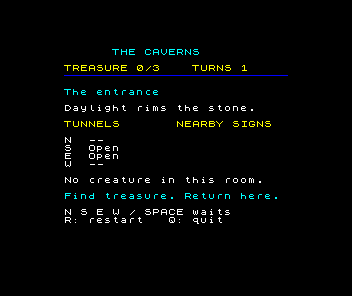
We checked the new program the same way, frame by frame through every move of the worked routes, including all three endings. No line that stays was ever blank. After every action, both programs showed the same colour at every pixel, so the padding leaves nothing behind. The changed program is a little quicker too, at about 40 frames a move, because it no longer redraws the lines that never change.
You are standing next to the creature's room, so one tunnel reads Footsteps. You move to a room where that same direction has no sign. Which line clears the word, and with what?
Show the explanation
- Line 1090 set s$ to 13 spaces, and none of 1120 to 1150 chose a sign, so 1155 prints 13 spaces over Footsteps.
If letters are left at the end of a message, check DIM h$(29) in line 200. If a sign stays beside a tunnel that no longer has one, check DIM s$(13) and that 1100 jumps to 1155, not 1160. If the title still blanks on every move, check that 490 calls 1020 rather than 270. If R leaves the result on screen, check that 270 still calls 1000.
Keep the steadier expedition
Save this version as you did in Keep the expedition: quit with Q, enter SAVE "caverns" LINE 10 and record the tape, then load it in a fresh session and play a few turns.
The idea outlasts BASIC. Web browsers and desktop window systems also keep track of which parts of a window have changed, and repaint only those.
Sources
Steven Vickers, edited by Robin Bradbeer, ZX Spectrum BASIC Programming, second edition (Sinclair Research, 1983), chapter 12 (string arrays have a fixed length and assignment to them is padded or cut), chapter 15, chapter 16.
Run it here
This unit's program, built for you.
- Program
- caverns.tap
- Machine
- ZX Spectrum 48K (PAL)