
A ball can move between character columns. We will give ours a four-pixel shape, then draw the court around it.
Use a 48K ZX Spectrum with Sinclair BASIC. Save anything you want to keep, then enter NEW. Start this as a new program; there is no previous game’s listing to convert. The entry and saving guide can help with the original keyword editor. R enters RUN at the start of a command. The spaces the ROM displays after keywords are not additional spaces you must type.
Two ways to name a position
PRINT AT uses a character row, column, counting from the top left. PLOT uses pixel x,y, counting across from the left and up from the bottom of BASIC’s drawing area. Each character occupies eight pixels in each direction. The drawing area spans x=0–255 and y=0–175.
| Instruction | First number | Second number |
|---|---|---|
| PRINT AT | Row: increases downwards | Column: increases rightwards |
| PLOT | x: increases rightwards | y: increases upwards |
PLOT 127,40 sets a pixel at a position. DRAW 1,0 goes one pixel right from the current drawing position; its numbers are offsets, not a new absolute position. Negative offsets go left or down.
Enter and RUN this program.
  10 BORDER 0: PAPER 0: INK 7: CLS
  20 LET x=127: LET y=40
  30 GO SUB 1000: GO SUB 3000: STOP
1000 PRINT AT 0,2; INK 5;"BRICK BASH"
1030 PLOT INK 1;15,16: DRAW INK 1;0,136: DRAW INK 1;225,0: DRAW INK 1;0,-136
1040 RETURN
3000 PLOT INK 7; OVER 1;x,y: DRAW INK 7; OVER 1;1,0: DRAW INK 7; OVER 1;0,1: DRAW INK 7; OVER 1;-1,0: RETURN
LET gives a variable its value. GO SUB visits a numbered routine, and RETURN comes back to the statement after that call. Line 30 draws the court and ball, then STOP prevents execution from falling into the routines. The ROM’s 9 STOP statement report is expected.
Four pixels, drawn once each
The ball’s x,y is its lower-left pixel. Routine 3000 visits these four positions in order:
       4 — 3       y+1
       1 — 2       y
       x  x+1
PLOT supplies pixel 1. The three short DRAW instructions add the right, upper-right and upper-left pixels. There is no fourth DRAW back to the start: we have already drawn that pixel.
OVER 1 toggles each visited pixel between ink and paper. At the BASIC prompt, enter the unnumbered command GO SUB 3000. The ball disappears. Enter that command again and it returns. This gives us the same routine for drawing and erasing, provided we call it at exactly the same position.
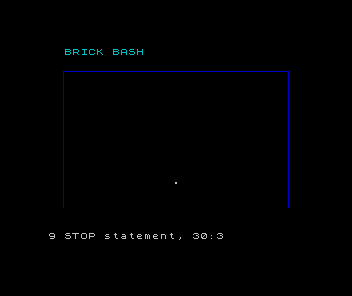
The court starts at (15,16), rises 136 pixels, crosses 225 and drops 136. Its sides are x=15 and x=240, and its top is y=152. We leave the bottom open for the paddle and a missed ball.
Colour is separate
INK 7 makes the ball white; INK 1 makes the court blue. Ink and paper colours belong to whole character cells. A pixel’s stored on/off value and the colour used to display it are different things. Changing ink to black can hide a set pixel without clearing it; toggling the same four pixels removes their stored shape.
Why would an extra DRAW back to pixel 1 make a corner disappear?
Show the explanation
OVER 1 would visit that pixel twice. The second visit would undo the first, leaving only three ball pixels.
If the ball does not disappear cleanly, check all three DRAW offsets and every OVER 1. Keep x and y unchanged between the two calls. This experiment restores pixel bits; it does not promise to restore a character cell’s previous colour attributes.
New keyword keys
In keyword mode, Q enters PLOT and W enters DRAW. For OVER, enter extended mode with Caps Shift and Symbol Shift together, then use Symbol Shift with N. The supplied listings show readable Sinclair BASIC; the ROM supplies keyword spacing.
Sources
Steven Vickers, edited by Robin Bradbeer, ZX Spectrum BASIC Programming, second edition (Sinclair Research, 1983), chapters 17. Chapter 17: Graphics describes pixel coordinates, DRAW offsets and OVER. The court dimensions, collision rules and artwork are choices made for this game.
Run it here
This unit's program, built for you.
- Program
- brick-bash.tap
- Machine
- ZX Spectrum 48K (PAL)