
A whole wall needs more than one alive flag. Before returning to fast-moving play, we will ask the new wall questions directly: if the ball were here, which brick would it touch?
Keep a saved copy of the one-brick game. This checkpoint is an inspector, not a round to win. We temporarily remove its moving loop, paddle drawing and result routines, retain the graphics and wall routines, and enter candidate positions through INPUT. The next lesson restores play around the new lookup.
Delete lines 270, 280, 290, 300, 310, 320, 350, 360, 370, 380, 390, 400, 410, 440, 450, 460, 470, 480, 490, 500, 510, 1080, 3000, 4000, 4010, 4020, 4030, 4040, 4050, 4060.
Replace lines 100, 130, 200, 210, 220, 230, 240, 250, 260, 1010, 1020, 1040, 1090, 2000, 2010, 2020, 2030, 2500, 2510.
Add lines 120, 1050, 1060, 1070, 2040.
Delete a BASIC line by entering its number on its own. The listing below contains only the lines to enter or replace.
 100 DIM g(3,6): LET left=18: LET p=14: LET x=127: LET y=40
 120 FOR r=1 TO 3: FOR c=1 TO 6: LET g(r,c)=1: NEXT c: NEXT r
 130 GO SUB 1000
 200 INPUT "Ball X (-1 quits)? ";tx
 210 IF tx=-1 THEN GO TO 9000
 220 INPUT "Ball Y? ";ty
 230 GO SUB 2000
 240 PRINT AT 20,0;"                                ";AT 20,0;"ROW ";br;" COL ";bc;" HIT ";hit
 250 IF hit=1 THEN GO SUB 2500
 260 GO TO 200
1010 PRINT AT 0,2; INK 5;"BRICK BASH";AT 0,21; INK 7;"BRICKS 18"
1020 PRINT AT 1,2;"Probe a ball position."
1040 FOR r=1 TO 3: LET inkcol=6
1050 IF r=2 THEN LET inkcol=3
1060 IF r=3 THEN LET inkcol=5
1070 FOR c=1 TO 6: PRINT AT 2+2*r,4*c; INK inkcol;b$: NEXT c: NEXT r
1090 PRINT AT 21,2; INK 5;"X = -1 quits the inspector";
2000 LET hit=0: LET br=1 +INT ((143 -ty)/16): LET bc=1 +INT ((tx+1 -32)/32)
2010 IF br<1 OR br>3 OR bc<1 OR bc>6 THEN RETURN
2020 IF ty+1 <152 -16 *br OR tx>32 *bc+23 THEN RETURN
2030 IF g(br,bc)=0 THEN RETURN
2040 LET hit=1: RETURN
2500 LET g(br,bc)=0: LET left=left-1
2510 PRINT AT 2+2*br,4*bc;"   ";AT 0,28; INK 7;left;" "
RUN the changed program.
Complete source at this checkpoint
  10 GO SUB 7000
 100 DIM g(3,6): LET left=18: LET p=14: LET x=127: LET y=40
 110 LET dx=4: LET dy=4: LET served=0: LET steps=0
 120 FOR r=1 TO 3: FOR c=1 TO 6: LET g(r,c)=1: NEXT c: NEXT r
 130 GO SUB 1000
 200 INPUT "Ball X (-1 quits)? ";tx
 210 IF tx=-1 THEN GO TO 9000
 220 INPUT "Ball Y? ";ty
 230 GO SUB 2000
 240 PRINT AT 20,0;"                                ";AT 20,0;"ROW ";br;" COL ";bc;" HIT ";hit
 250 IF hit=1 THEN GO SUB 2500
 260 GO TO 200
1000 BORDER 0: PAPER 0: INK 7: CLS
1010 PRINT AT 0,2; INK 5;"BRICK BASH";AT 0,21; INK 7;"BRICKS 18"
1020 PRINT AT 1,2;"Probe a ball position."
1030 PLOT INK 1;15,16: DRAW INK 1;0,136: DRAW INK 1;225,0: DRAW INK 1;0,-136
1040 FOR r=1 TO 3: LET inkcol=6
1050 IF r=2 THEN LET inkcol=3
1060 IF r=3 THEN LET inkcol=5
1070 FOR c=1 TO 6: PRINT AT 2+2*r,4*c; INK inkcol;b$: NEXT c: NEXT r
1090 PRINT AT 21,2; INK 5;"X = -1 quits the inspector";
1100 RETURN
2000 LET hit=0: LET br=1 +INT ((143 -ty)/16): LET bc=1 +INT ((tx+1 -32)/32)
2010 IF br<1 OR br>3 OR bc<1 OR bc>6 THEN RETURN
2020 IF ty+1 <152 -16 *br OR tx>32 *bc+23 THEN RETURN
2030 IF g(br,bc)=0 THEN RETURN
2040 LET hit=1: RETURN
2500 LET g(br,bc)=0: LET left=left-1
2510 PRINT AT 2+2*br,4*bc;"   ";AT 0,28; INK 7;left;" "
2520 RETURN
7000 RESTORE 7200: FOR j=0 TO 47: READ v: POKE USR "a"+j,v: NEXT j
7010 LET b$=CHR$ 144 +CHR$ 145 +CHR$ 146
7020 LET p$=CHR$ 147 +CHR$ 148 +CHR$ 148 +CHR$ 149: RETURN
7200 DATA 127,255,255,255,255,255,255,127
7210 DATA 255,255,255,255,255,255,255,255
7220 DATA 254,255,255,255,255,255,255,254
7230 DATA 63,127,127,63,0,0,0,0
7240 DATA 255,255,255,255,0,0,0,0
7250 DATA 252,254,254,252,0,0,0,0
9000 PAPER 0: INK 7: PRINT AT 21,0;"Finished. RUN to try again.     ";: STOP
Eighteen remembered states
DIM g(3,6) creates three rows of six numeric entries. The nested loops put 1 in every entry: each brick starts live. left begins at 18. When a hit removes a brick, its entry becomes 0 and left decreases by one.
The drawing loops use the same row r and column c. PRINT AT 2+2*r,4*c spaces each three-character brick within a four-character pitch. A blank character column separates neighbours, and a blank character row separates brick rows. inkcol chooses yellow, magenta or cyan for the row; it never decides contact.
| Brick row r | PRINT row | Pixel bottom | Pixel top |
|---|---|---|---|
| 1 | 4 | 136 | 143 |
| 2 | 6 | 120 | 127 |
| 3 | 8 | 104 | 111 |
A brick’s pixel left is 32c and its right is 32c+23. The 32 comes from four character columns of eight pixels. Its bottom is 152−16*r: each brick row moves sixteen pixels down. Its top is seven pixels above that bottom.
Find a possible address
Routine 2000 converts tx/ty into a candidate row br and column bc. INT rounds down to an integer. In the column calculation, subtracting 32 measures from the first brick’s left edge and dividing by 32 counts horizontal pitches. Adding one changes a zero-based count into array columns 1–6.
The calculation uses tx+1, the ball’s rightmost pixel. A ball beginning at x=31 can touch the first brick at x=32. Using only tx would wrongly put that contact before column 1.
For rows, 143-ty measures downwards from the first brick’s top. Divide by the sixteen-pixel row pitch, take INT and add one. Remember that pixel y grows upwards while brick row numbers grow downwards.
An address is only a possibility. It may describe a gap or lie outside the wall.
Bounds, gaps, then state
Line 2010 rejects br outside 1–3 and bc outside 1–6 before reading g. An invalid subscript must not reach the array.
Line 2020 rejects the spaces between bricks. If the ball’s upper pixel ty+1 is below that row’s bottom, it is in a vertical gap. If its left pixel tx is beyond that column’s right edge, it is in a horizontal gap. The address calculation has already selected the other two edges of the possible rectangle.
Line 2030 rejects an entry that is already zero. Only after all three kinds of rejection does line 2040 return hit=1.
Probe the edges
Try these pairs in order, confirming each number with Enter:
| Ball X | Ball Y | Expected result |
|---|---|---|
| 30 | 136 | No hit; ball ends at 31 |
| 31 | 136 | Row 1, column 1 hit and removed |
| 31 | 136 | No hit; that brick is now absent |
| 56 | 136 | No hit; horizontal gap |
| 64 | 134 | No hit; below row 1 |
| 64 | 135 | Row 1, column 2 hit by the upper pixel |
| 255 | 175 | No hit; outside the wall |
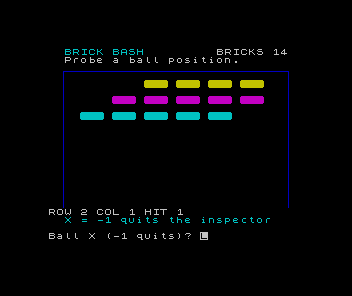
The report shows the candidate address even when it is outside the array. HIT distinguishes an actual live brick from that preliminary calculation. A hit also removes the brick, so the order of probes matters. Enter -1 at the X prompt to leave; RUN restores all eighteen bricks.
Why does a sensible row and column not prove that a brick was hit?
Show the explanation
The ball may be in the blank space within that row or column pitch. Even after the gap checks pass, the brick may already have been removed. Address, overlap and stored state are separate questions.
If you get a subscript error, check that the bounds RETURN comes before g(br,bc). If a gap removes a brick, check the two comparisons at 2020 rather than adjusting the artwork. This lookup relies on our regular spacing and small ball; it is not a general search for arbitrary rectangles.
Sources
Steven Vickers, edited by Robin Bradbeer, ZX Spectrum BASIC Programming, second edition (Sinclair Research, 1983), chapters 12, 15 and 17–18. The court dimensions, collision rules and artwork are choices made for this game.
Run it here
This unit's program, built for you.
- Program
- brick-bash.tap
- Machine
- ZX Spectrum 48K (PAL)