
Our ship needs a nose before it needs an engine. Draw a small triangle inside a blue arena, then use the same drawing routine to make it disappear and return.
Use a 48K ZX Spectrum or a Spectrum emulator in 48K mode. Start a new program with NEW, after saving anything you want to keep. Sinclair BASIC uses keyword entry: a command such as PRINT is entered as a token, rather than typed letter by letter. The Meet BASIC opening lesson has the entry and setup introduction if you need it.
  10 BORDER 0: PAPER 0: INK 7: CLS
  20 LET x=48: LET y=56
  30 GO SUB 1000: GO SUB 3000: STOP
1000 PRINT AT 0,2; INK 5;"DRIFT"
1030 PLOT INK 1;15,24: DRAW INK 1;0,128: DRAW INK 1;225,0: DRAW INK 1;0,-128: DRAW INK 1;-225,0
1090 RETURN
3000 LET px=INT (x+.5): LET py=INT (y+.5)
3010 PLOT INK 7; OVER 1;px+5,py
3020 DRAW INK 7; OVER 1;-8,3
3030 DRAW INK 7; OVER 1;0,-6
3040 DRAW INK 7; OVER 1;8,3: RETURN
RUN it. A white triangle appears near the lower left of the arena. The STOP report is expected: this first program draws once and finishes.
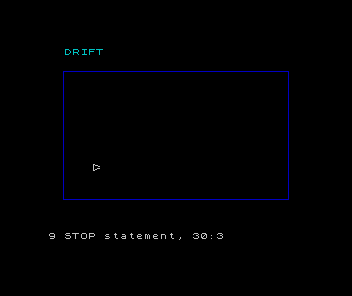
LET assigns a value to a variable. Colons separate statements on the same numbered line. BORDER and PAPER choose the surrounding and background colours; INK chooses the drawing colour. CLS clears the display. The local INK values on the drawing commands make the arena blue and the ship white.
Three points around a centre
x and y store the ship’s centre. Spectrum graphics coordinates increase to the right and upwards. PRINT AT uses character rows and columns instead; its rows count down from the top. We use PRINT for the title and PLOT/DRAW for the arena and ship.
The triangle’s corners are offsets from its centre:
| Point | Horizontal offset | Vertical offset | Position when x=48, y=56 |
|---|---|---|---|
| Nose | 5 | 0 | 53,56 |
| Upper rear | −3 | 3 | 45,59 |
| Lower rear | −3 | −3 | 45,53 |
PLOT starts at the nose. DRAW takes a movement from the current drawing point, so the first side uses −8,3: eight pixels left and three up. The next side uses 0,−6. The final side uses 8,3 to return towards the nose.
The computer turns these lines into individual pixels. This is an outline, with the small irregularities of drawing on a grid. It is not a filled triangle.
Line 3000 makes integer drawing coordinates px and py. INT takes the integer at or below a number; adding .5 first rounds to the nearest integer, with exact halves going upwards. Our centre is already whole, but later it will move by fractions of a pixel. Keeping x/y separate lets motion retain those fractions while the picture uses whole pixels.
Draw twice to restore
OVER 1 toggles the pixels along each line: an unlit pixel becomes lit, and a lit pixel becomes unlit. Repeating the same drawing reverses those changes. The closed outline visits its starting point again, so that first plotted pixel is toggled off on the return. You may see a tiny gap at the nose.
GO SUB 3000 runs the ship routine, and RETURN goes back to the statement after the call. The routine neither moves the centre nor clears the screen. The arena has its own routine at 1000.
At the BASIC prompt, enter this unnumbered command:
GO SUB 3000The ship disappears. Enter it again and the ship returns; the walls stay put. If the walls vanish too, check that you called 3000 rather than 1000. If the ship fails to erase, check OVER 1 on all four drawing statements.
Why do we keep x=48 when the nose is drawn at x=53?
Show the explanation
x describes the centre. The extra five pixels describe one point of the shape. Moving the nose into x would shift the reference point and make the other corners harder to place.
Sources
Steven Vickers, edited by Robin Bradbeer, ZX Spectrum BASIC Programming, second edition (Sinclair Research, 1983), chapter 9, chapter 17. Chapter 9 describes INT; chapter 17 describes graphics coordinates, relative DRAW movements and OVER. The triangle and arena dimensions are choices for this game.
Run it here
This unit's program, built for you.
- Program
- drift.tap
- Machine
- ZX Spectrum 48K (PAL)