
Load the game you saved, press S and touch nothing. The ship is not moving, yet it shimmers and breaks up. In this lesson we find out why, then change the main loop so it leaves the ship alone until its picture really changes.
Watch a still ship
Before changing anything, read the main loop from line 200 to line 370. With no key pressed, x, y and h keep the same values on every pass. Two lines still touch the ship: line 230 calls the ship routine at 3000, and line 350 calls it again.
With the ship sitting still, what is on the screen between line 230 and line 350, and why could that look like flicker?
Show the explanation
The routine draws with OVER 1, so line 230 toggles the ship off. Lines 240 to 340 then run with no ship on the screen at all, and line 350 toggles it back on. The Spectrum shows its screen memory as a new television picture 50 times a second. Every picture made while the loop is between those two lines shows the ship missing or half-drawn.
We measured it. With the ship still, one pass of the loop takes about 20 television frames, and drawing a triangle in BASIC takes several of those frames on its own. We sampled the screen memory at 300 frame boundaries: the whole ship was there in only 81. In 100 it was missing completely, and in the other 119 it was partly drawn or partly erased.
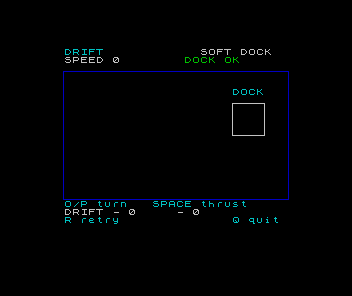
The Spectrum has no hardware that moves a shape for us. The picture is whatever is in screen memory, so a program that moves something must erase and redraw it itself. The trick is to do that only when the picture would come out different.
Remember what is on the screen
A still ship needs no drawing, but the loop cannot tell whether it is still unless it remembers what it drew last time. Three new variables do that job: px and py hold the whole-pixel centre that was drawn, and ph holds the heading that was drawn.
Delete line 230. To delete a BASIC line, enter its number on its own.
Replace lines 330, 350, 3000, 3010, 3020, 3030, 3040.
Add lines 3100, 3110.
 330 IF nx<22 OR nx>233 OR ny<30 OR ny>145 THEN GO SUB 3100: LET e$="Hull lost. Try a gentler burn.": GO TO 4000
 350 GO SUB 3100
3000 LET px=INT (x+.5): LET py=INT (y+.5): LET ph=h
3010 PLOT INK 7; OVER 1;px+c(ph),py+d(ph)
3020 DRAW INK 7; OVER 1;e(ph)-c(ph),f(ph)-d(ph)
3030 DRAW INK 7; OVER 1;g(ph)-e(ph),j(ph)-f(ph)
3040 DRAW INK 7; OVER 1;c(ph)-g(ph),d(ph)-j(ph): RETURN
3100 IF INT (x+.5)<>px OR INT (y+.5)<>py OR h<>ph THEN GO SUB 3010: GO SUB 3000
3110 RETURN
RUN the changed program.
Complete source at this checkpoint
  10 GO SUB 7000: GO SUB 5000
 100 LET x=48: LET y=56: LET vx=0: LET vy=0: LET h=2: LET steps=0
 110 GO SUB 1000: GO SUB 3000: GO SUB 6000
 200 LET k$=INKEY$
 210 IF k$="q" OR k$="Q" THEN GO TO 9000
 220 IF k$="r" OR k$="R" THEN GO TO 100
 240 IF k$="o" OR k$="O" THEN LET h=h+1
 250 IF k$="p" OR k$="P" THEN LET h=h-1
 260 IF h=9 THEN LET h=1
 270 IF h=0 THEN LET h=8
 280 IF k$<>" " THEN GO TO 320
 290 LET vx=vx+.2 *a(h): LET vy=vy+.2 *b(h)
 300 LET speed=SQR (vx*vx+vy*vy)
 310 IF speed>3 THEN LET vx=3 *vx/speed: LET vy=3 *vy/speed
 320 LET nx=x+vx: LET ny=y+vy
 330 IF nx<22 OR nx>233 OR ny<30 OR ny>145 THEN GO SUB 3100: LET e$="Hull lost. Try a gentler burn.": GO TO 4000
 340 LET x=nx: LET y=ny: LET steps=steps+1
 350 GO SUB 3100
 355 IF k$=" " THEN GO SUB 6000
 360 IF x>=190 AND x<=210 AND y>=94 AND y<=114 AND vx*vx+vy*vy<=.16 THEN LET e$="Docked. A soft arrival!": GO TO 4000
 370 GO TO 200
1000 BORDER 0: PAPER 0: INK 7: CLS
1010 PRINT AT 0,2; INK 5;"DRIFT";AT 0,19; INK 7;"SOFT DOCK"
1020 PRINT AT 1,2;"SPEED"
1030 PLOT INK 1;15,24: DRAW INK 1;0,128: DRAW INK 1;225,0: DRAW INK 1;0,-128: DRAW INK 1;-225,0
1040 PLOT INK 7;184,88: DRAW INK 7;32,0: DRAW INK 7;0,32: DRAW INK 7;-32,0: DRAW INK 7;0,-32
1050 PRINT AT 5,23; INK 5;"DOCK"
1060 PRINT AT 19,2; INK 5;"O/P turn   SPACE thrust"
1070 PRINT AT 20,2; INK 7;"DRIFT"
1080 PRINT AT 21,2; INK 5;"R retry              Q quit";
1090 RETURN
3000 LET px=INT (x+.5): LET py=INT (y+.5): LET ph=h
3010 PLOT INK 7; OVER 1;px+c(ph),py+d(ph)
3020 DRAW INK 7; OVER 1;e(ph)-c(ph),f(ph)-d(ph)
3030 DRAW INK 7; OVER 1;g(ph)-e(ph),j(ph)-f(ph)
3040 DRAW INK 7; OVER 1;c(ph)-g(ph),d(ph)-j(ph): RETURN
3100 IF INT (x+.5)<>px OR INT (y+.5)<>py OR h<>ph THEN GO SUB 3010: GO SUB 3000
3110 RETURN
4000 PRINT AT 1,0;"                                ";AT 1,2; INK 6;e$
4010 PRINT AT 20,2;"R plays again. Q quits.      "
4020 IF INKEY$<>"" THEN GO TO 4020
4030 LET k$=INKEY$
4040 IF k$="q" OR k$="Q" THEN GO TO 9000
4050 IF k$="r" OR k$="R" THEN GO TO 100
4060 GO TO 4030
5000 BORDER 0: PAPER 0: INK 7: CLS
5010 PRINT AT 3,13; INK 5;"DRIFT"
5020 PRINT AT 6,3;"Space has no brakes."
5030 PRINT AT 8,3;"O/P turn. SPACE fires thrust."
5040 PRINT AT 10,3;"Release thrust: keep drifting."
5050 PRINT AT 12,3;"Turn back and burn to brake."
5060 PRINT AT 14,3;"DOCK OK means slow enough."
5070 PRINT AT 16,3;"DRIFT: E/W and N/S motion."
5080 PRINT AT 18,3;"R retries. Q quits."
5090 PRINT AT 20,11; INK 6;"S starts."
5100 LET k$=INKEY$
5110 IF k$="q" OR k$="Q" THEN GO TO 9000
5120 IF k$<>"s" AND k$<>"S" THEN GO TO 5100
5130 RETURN
6000 LET speed=SQR (vx*vx+vy*vy)
6010 PRINT AT 1,8; INK 7;INT (10 *speed+.5)/10;"  "
6020 IF vx*vx+vy*vy<=.16 THEN PRINT AT 1,17; INK 4;"DOCK OK "
6030 IF vx*vx+vy*vy>.16 THEN PRINT AT 1,17; INK 6;"TOO FAST"
6040 LET u$="E": LET w$="N"
6050 IF vx<-.001 THEN LET u$="W"
6060 IF vy<-.001 THEN LET w$="S"
6070 IF ABS vx<.001 THEN LET u$="-"
6080 IF ABS vy<.001 THEN LET w$="-"
6090 PRINT AT 20,8; INK 7;u$;" ";INT (10 *ABS vx+.5)/10;"  ";AT 20,16;w$;" ";INT (10 *ABS vy+.5)/10;"  ": RETURN
7000 DIM a(8): DIM b(8): DIM c(8): DIM d(8): DIM e(8): DIM f(8): DIM g(8): DIM j(8)
7010 FOR i=1 TO 8: LET angle=(i-1)*PI/4
7020 LET a(i)=COS angle: LET b(i)=SIN angle
7030 LET c(i)=INT (5 *a(i)+.5): LET d(i)=INT (5 *b(i)+.5)
7040 LET e(i)=INT (-3 *a(i)-3 *b(i)+.5): LET f(i)=INT (-3 *b(i)+3 *a(i)+.5)
7050 LET g(i)=INT (-3 *a(i)+3 *b(i)+.5): LET j(i)=INT (-3 *b(i)-3 *a(i)+.5)
7060 NEXT i: RETURN
9000 PAPER 0: INK 7: PRINT AT 21,0;"Finished. RUN to try again.     ";: STOP
Press S and leave the keys alone. The ship now stays solid. Turn with O or P and it redraws once for each new heading. Burn gently and watch it step from pixel to pixel as it drifts.
One routine, two entrances
Line 3000 already worked out px and py from x and y. Now it also copies h into ph. Lines 3010 to 3040 draw using ph, so they always draw the picture that px, py and ph describe.
That gives the routine two ways in:
- GO SUB 3000 remembers the ship’s current position and heading, then draws them.
- GO SUB 3010 skips the remembering and toggles the picture already stored in px, py and ph.
Because of OVER 1, toggling the stored picture erases it exactly, even after x, y or h have changed. The erase uses the same numbers the earlier draw used, so the two always match.
Line 3100 makes the decision. If the rounded centre or the heading differs from the stored picture, it erases the old picture with GO SUB 3010, then remembers and draws the new one with GO SUB 3000. If nothing differs, the IF is false, the rest of the line is skipped, and line 3110 returns without touching the screen.
Compare whole pixels
The ship’s x and y keep fractions, so a slow drift changes them on every pass. The picture changes only when a rounded coordinate changes. That is why line 3100 compares INT (x+.5) with px, rather than x with a stored copy of x: we compare the numbers that decide which pixels light up. The heading is already a whole number from 1 to 8, so h can be compared directly.
The ship is coasting east from x=48 with vx=.2 and vy=0. No keys are pressed. In how many of the next five passes does line 3100 redraw the ship?
Show the explanation
One. Over the five passes x becomes 48.2, 48.4, 48.6, 48.8 and 49. Adding .5 and taking INT gives 48, 48, 49, 49 and 49. Only the third pass changes the rounded centre, so only that pass erases and draws. Comparing the raw x would have redrawn on all five passes.
Keep every path paired
Each place that used to draw the ship now has to leave exactly one ship on the screen.
- Every pass: line 350 calls 3100, so the ship is redrawn only when its picture changed.
- Hitting a wall: line 330 leaves x and y at their last safe values, but the heading may have changed on the same pass if you turned while coasting into the wall. Calling 3100 there shows the latest heading before the result appears.
- Docking: line 350 runs before the docking test at 360, so the ship is up to date when the game freezes.
- Starting and retrying: line 110 clears the screen and calls 3000, which records the new flight’s ship and draws it.
Why does line 110 call 3000 instead of 3100?
Show the explanation
CLS has already removed the old ship, so there is nothing to erase. On the first flight px, py and ph do not exist yet, so 3100 would stop with a Variable not found report. After R, the ship restarts at 48, 56 facing heading 2. If the last flight ended in that same state, 3100 would see no difference and draw nothing, leaving the new flight with no ship. If it ended anywhere else, the erase at 3010 would draw an extra triangle on the clean screen instead of removing one.
A quicker loop at rest
Skipping the drawing also makes a still pass much shorter. In our measurements a pass with the ship at rest took 9 frames instead of 19. The loop now checks the keyboard about twice as often while the ship is at rest or creeping slowly, so turns and burns start sooner.
A pass that does redraw costs as much as before, plus the comparison: a pass while thrusting took about 45 frames instead of 44. The loop’s pace now depends on whether the picture changed. A very slow drift skips most redraws, so it crosses the arena a little sooner than it did before. The rules for speed and docking are unchanged.
Try it and keep it
Sit still, then turn through all eight headings. Drift slowly in each direction and check that no stray pixels are left behind. Crash into a wall while turning, press R, then fly a full docking.
If turning leaves the old triangle behind, or the ship seems not to turn, check that lines 3010 to 3040 use ph and not h. If the ship is missing after R, check that line 110 still calls 3000. If the program stops with Variable not found at line 3100, line 3100 has run before 3000 ever did.
This is the game to keep. Save it again with SAVE "drift" LINE 10, as in Keep the game, and load it into a fresh machine to check.
Sources
Steven Vickers, edited by Robin Bradbeer, ZX Spectrum BASIC Programming, second edition (Sinclair Research, 1983), chapter 17, chapter 18. Chapter 17 describes OVER; chapter 18 gives the television picture rate of 50 frames per second in Europe, in its description of PAUSE. The frame counts and pass rates come from our own runs of both programs on an emulated stock 48K PAL Spectrum.
Run it here
This unit's program, built for you.
- Program
- drift.tap
- Machine
- ZX Spectrum 48K (PAL)