
A strip of traffic separates you from the exit. Before anything moves, give the player somewhere to stand and a shape we can recognise.
Use a 48K ZX Spectrum, or an emulator in 48K mode. Save anything you want to keep, then enter NEW to begin a new program. The Meet BASIC opening explains the setup and keyword entry if you need it. Commands are entered as Spectrum keyword tokens, rather than typed letter by letter.
  10 GO SUB 7000
 110 LET x=7: LET y=2
 180 GO SUB 1000: GO SUB 3000
 190 STOP
1000 BORDER 0: PAPER 0: INK 7: CLS
1010 PRINT AT 0,1; INK 5;"QUICKSTEP";AT 0,21; INK 4;"EXIT ABOVE"
1030 FOR j=0 TO 2 STEP 2
1040 PRINT AT 2+2*j,1; PAPER 1; INK 5;s$;AT 3+2*j,1;s$
1060 NEXT j
1070 PRINT AT 2,15; PAPER 4; INK 7;"  ";AT 3,15;"  "
1090 RETURN
3000 LET shade=0: IF y<>1 THEN LET shade=1
3010 IF y=0 AND x=7 THEN LET shade=4
3020 PRINT AT 2+2*y,1+2*x; PAPER shade; INK 7;h$;AT 3+2*y,1+2*x;f$
3030 RETURN
7000 RESTORE 7280: FOR j=64 TO 103: READ n: POKE USR "a"+j,n: NEXT j
7010 LET h$=CHR$ 152 +CHR$ 153: LET f$=CHR$ 154 +CHR$ 155
7020 LET g$=CHR$ 156 +CHR$ 156: LET s$="": FOR j=1 TO 15: LET s$=s$+g$: NEXT j: RETURN
7280 DATA 0,7,15,13,15,7,3,31
7290 DATA 0,224,240,176,240,224,192,248
7300 DATA 63,55,7,7,6,6,14,0
7310 DATA 252,236,224,224,96,96,112,0
7320 DATA 0,0,0,0,0,16,0,0
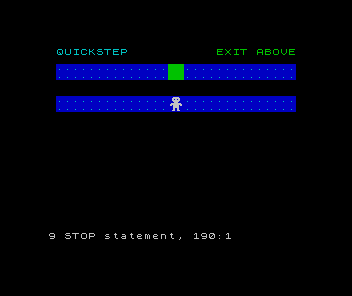
RUN it. A white person stands on the lower dotted strip, with an empty black lane above and a marked exit on the upper strip. The STOP report is expected: this program draws once and finishes.
A cell made from four characters
The game stores x=7 and y=2. These are logical cells, not pixels or character positions. x counts across from 0 to 14; y counts down from 0 to 2. Each cell occupies two character columns and two character rows.
Line 3020 converts the position before printing. The upper row is 2+2*y, the left column is 1+2*x, and the lower row is 3+2*y. PRINT AT takes the row first. At (7,2), our player occupies character rows 6–7 and columns 15–16. Cell (0,0) begins at row 2, column 1; cell (14,2) begins at row 6, column 29.
GO SUB calls a routine, then RETURN resumes after that call. Line 10 creates the artwork; line 180 draws the board and player. STOP prevents execution from falling through into the drawing routines again. LET assigns a value, and colons separate statements on one numbered line.
Draw your own characters
A user-defined graphic, or UDG, is an 8×8 pattern stored as eight row bytes. USR with a letter gives its pattern address; POKE stores a byte there. Our player uses four UDGs, while the dots use one. The DATA lines contain original artwork for this game.
For a row byte, the left-to-right bit weights are 128, 64, 32, 16, 8, 4, 2 and 1. The value 31 is 16+8+4+2+1: five lit pixels at the right. The value 224 is 128+64+32: three at the left. Follow those rows in the upper halves of the person.
RESTORE 7280 positions the DATA reader. The FOR loop reads forty values, placing them at offsets 64–103 from USR "a". Those offsets reserve the first eight UDG slots for the vehicles we will add later. READ takes the next DATA value; NEXT advances the loop. CHR$ converts a character code to a one-character string. Codes 152–155 select the four player characters; 156 selects the dots. h$ joins the player’s upper pair, and f$ joins the lower pair.
Give the ground a texture
g$ holds two copies of the dotted character. Line 7020 joins fifteen copies of g$ into the thirty-character strip s$. In the board routine, STEP 2 makes j visit rows 0 and 2. Each visit prints two rows of texture.
PAPER sets the background and INK the foreground. Values 0, 1, 4, 5 and 7 give us black, blue, green, cyan and white. The player routine chooses the background for its cell; the exit uses green. Dots distinguish the safe strips, while the gap between them will carry traffic.
If x changes from 7 to 8, does the player move one character column or two?
Show the explanation
Two. Its left column changes from 1+27=15 to 1+28=17. One logical step must move the entire two-character-wide figure to the next cell.
If the person appears as letters, check the DATA and the loop at 7000. If the strip is too short, check that line 7020 joins fifteen pairs. RUN restarts the complete drawing after a correction.
Sources
Steven Vickers, edited by Robin Bradbeer, ZX Spectrum BASIC Programming, second edition (Sinclair Research, 1983), chapter 5, chapter 6, chapter 14, chapter 15, chapter 16. These chapters cover DATA and READ, subroutines, custom characters, PRINT placement and colour. The cell sizes, offsets and artwork are choices in this program.
Run it here
This unit's program, built for you.
- Program
- quickstep.tap
- Machine
- ZX Spectrum 48K (PAL)