
Each probe costs four presses: a digit, Enter, another digit, Enter. Every answer the game accepts is a single key, so Enter only adds a step. We will read each coordinate from one key press, show the choice beside its prompt, and let the player keep their eyes on the board.
Load the sonar tape you saved in Keep your game, then make these edits.
Delete lines 10, 3015, 3030. Enter each line number on its own, then press Enter.
Replace lines 100, 110, 3010, 5030, 5090, 5100, 5110, 6000, 6010, 6040.
Add lines 3005, 3012, 3045, 3200, 3210, 3220, 5085.
 100 LET p$="Row": LET pl=0: GO SUB 3000: LET pr=v
 110 LET p$="Column": LET pl=1: GO SUB 3000: LET pc=v
3005 IF pl=0 THEN PRINT #1;AT 1,0;"                    ";
3010 PRINT #1;AT pl,0;p$;" (1-8, Q):   ";
3012 GO SUB 3200
3045 PRINT #1;AT pl,LEN p$+11;a$;
3200 LET a$=INKEY$: IF a$="" THEN GO TO 3200
3210 IF INKEY$<>"" THEN GO TO 3210
3220 RETURN
5030 PRINT AT 7,1;"Press a row key, then a column."
5085 IF INKEY$<>"" THEN GO TO 5085
5090 PRINT #1;AT 0,0;"Any key to search, Q quits.";
5100 GO SUB 3200
5110 IF a$="q" OR a$="Q" THEN GO TO 9000
6000 PRINT #1;AT 0,0;"R another round, Q quits:   ";AT 1,0;"                    ";
6010 GO SUB 3200
6040 LET s$="Press R for another round or Q.": GO SUB 2600
Complete program for this step
  15 GO SUB 5000
  16 RANDOMIZE
  20 LET tr=INT (RND*8)+1: LET tc=INT (RND*8)+1
  25 DIM g(8,8)
  26 FOR r=1 TO 8: FOR c=1 TO 8: LET g(r,c)=-1: NEXT c: NEXT r
  27 LET n=0: LET lr=0: LET lc=0: LET pr=0: LET pc=0
  28 LET d=0: LET v=0: LET a$="": LET b$="": LET p$=""
  30 GO SUB 1000
  80 LET s$="N=1-2, M=3-4, F=5+ steps.": GO SUB 2600
 100 LET p$="Row": LET pl=0: GO SUB 3000: LET pr=v
 110 LET p$="Column": LET pl=1: GO SUB 3000: LET pc=v
 120 LET seen=g(pr,pc)
 130 LET d=seen
 140 IF seen<>-1 THEN GO TO 200
 150 LET d=ABS (pr-tr)+ABS (pc-tc)
 151 IF d>4 THEN LET d=3: GO TO 160
 152 IF d>2 THEN LET d=2: GO TO 160
 153 IF d>0 THEN LET d=1
 160 LET g(pr,pc)=d: LET n=n+1
 200 LET oldr=lr: LET oldc=lc: LET lr=pr: LET lc=pc
 210 IF oldr=0 THEN GO TO 240
 220 LET r=oldr: LET c=oldc: GO SUB 2100
 240 LET r=pr: LET c=pc: GO SUB 2100
 250 GO SUB 2500
 260 LET s$="Far: at least 5 steps away."
 261 IF d=2 THEN LET s$="Medium: 3 or 4 steps away."
 262 IF d=1 THEN LET s$="Near: 1 or 2 steps away."
 270 IF seen<>-1 THEN LET s$="Already probed. No extra count."
 280 IF d=0 THEN LET s$="Found in "+STR$ n+" distinct probes."
 290 GO SUB 2600
 300 IF d=0 THEN GO TO 6000
 310 GO TO 100
1000 BORDER 1: PAPER 0: INK 7: CLS
1010 PRINT AT 0,6;"SONAR N1-2 M3-4 F5+"
1020 FOR c=1 TO 8
1030 PRINT AT 2,6 +3 *(c-1);c
1040 NEXT c
1050 PRINT AT 3,4;"+------------------------+"
1060 PRINT AT 20,4;"+------------------------+"
1070 FOR r=1 TO 8
1080 PRINT AT 4 +2 *(r-1),2;r
1090 FOR k=0 TO 1
1100 PRINT AT 4 +2 *(r-1)+k,4;":";AT 4 +2 *(r-1)+k,29;":"
1110 NEXT k
1120 FOR c=1 TO 8
1130 GO SUB 2100
1150 NEXT c
1160 PAPER 0: INK 7
1170 NEXT r
1180 GO SUB 2500
1190 RETURN
2000 LET y=4 +2 *(r-1): LET x=5 +3 *(c-1)
2010 PAPER 1: INK 7
2020 IF r+c=2 *INT ((r+c)/2) THEN PAPER 5: INK 0
2030 RETURN
2100 GO SUB 2000
2110 LET z=g(r,c): LET b$=". "
2120 IF z=-1 THEN GO TO 2160
2130 LET b$=" F"
2140 IF z=2 THEN LET b$=" M"
2145 IF z=1 THEN LET b$=" N"
2150 IF z=0 THEN LET b$=" *"
2160 LET m$=" "
2170 IF r=lr AND c=lc THEN LET m$=">"
2180 PRINT AT y,x;m$;b$;AT y+1,x;"   "
2190 RETURN
2500 PAPER 0: INK 7
2510 PRINT AT 1,0;"Distinct probes: ";n;"   "
2520 RETURN
2600 PAPER 0: INK 7
2610 PRINT AT 21,0;"                               ";
2620 PRINT AT 21,0;s$;
2630 RETURN
3000 PAPER 0: INK 7
3005 IF pl=0 THEN PRINT #1;AT 1,0;"                    ";
3010 PRINT #1;AT pl,0;p$;" (1-8, Q):   ";
3012 GO SUB 3200
3020 IF a$="q" OR a$="Q" THEN GO TO 9000
3040 IF a$<"1" OR a$>"8" THEN GO TO 3100
3045 PRINT #1;AT pl,LEN p$+11;a$;
3050 LET v=VAL a$
3060 RETURN
3100 LET s$="Use one digit from 1 to 8.": GO SUB 2600
3110 GO TO 3010
3200 LET a$=INKEY$: IF a$="" THEN GO TO 3200
3210 IF INKEY$<>"" THEN GO TO 3210
3220 RETURN
5000 BORDER 1: PAPER 0: INK 7: CLS
5010 PRINT AT 2,9;"SONAR - BANDS"
5020 PRINT AT 5,1;"Find one object on an 8x8 grid."
5030 PRINT AT 7,1;"Press a row key, then a column."
5040 PRINT AT 9,1;"N = near 1-2. M = medium 3-4."
5050 PRINT AT 11,1;"F = far 5+. Rows plus columns."
5060 PRINT AT 13,1;"Old clues stay. > marks latest."
5070 PRINT AT 15,1;"* means found. No probe limit."
5080 PRINT AT 18,1;"Q leaves from any prompt."
5085 IF INKEY$<>"" THEN GO TO 5085
5090 PRINT #1;AT 0,0;"Any key to search, Q quits.";
5100 GO SUB 3200
5110 IF a$="q" OR a$="Q" THEN GO TO 9000
5120 RETURN
6000 PRINT #1;AT 0,0;"R another round, Q quits:   ";AT 1,0;"                    ";
6010 GO SUB 3200
6020 IF a$="q" OR a$="Q" THEN GO TO 9000
6030 IF a$="r" OR a$="R" THEN GO TO 20
6040 LET s$="Press R for another round or Q.": GO SUB 2600
6050 GO TO 6000
9000 LET s$="Finished. RUN to try again.": GO SUB 2600
9010 STOP
INKEY$ is on the N key in extended mode: press CAPS SHIFT and SYMBOL SHIFT together, release them, then press N. # is SYMBOL SHIFT and 3.
What INPUT was doing
INPUT hands the bottom of the screen to the ROM. It prints the prompt there and shows a cursor. Then it runs a small line editor: the player can type, delete and change their mind, and nothing reaches the program until Enter. That suits a name or a number with several digits.
The editor also owns the space it uses. A long answer makes the lower part of the screen grow upwards, and the board above it scrolls away. Lines 3015 and 6010 redrew the whole board after any answer longer than sixteen characters, to put back what the scroll had moved. Those lines fixed the symptom. Reading single keys removes the cause: nothing is typed, so the lower screen never grows.
Read the keyboard with INKEY$
INKEY$ reads the keyboard at the instant the program asks. If one key is down, the result is that key’s character. If nothing is pressed, the result is the empty string "". It never waits. If the player presses a key while the program is busy elsewhere and lets go before the next reading, that press is missed.
The routine at 3200 wraps that up as “wait for one press”. Line 3200 keeps reading until it gets a character and stores it in a$. Line 3210 then keeps reading until the keyboard is empty again. Only then does line 3220 return.
That second loop matters because a finger is slow compared with the program. After accepting the row, the program checks it, echoes it, returns and reaches the column prompt in a little over a tenth of a second. An ordinary press lasts longer than that. Without line 3210, the column’s INKEY$ would find the row key still down and take it as the column as well. With it, one press makes one choice, however long the key stays down.
Delete line 3210, run the game and press 3 once at the row prompt. What do you predict the board shows?
Show the explanation
The row prompt accepts 3, and the column prompt reads the same key before you let go, so the probe is row 3, column 3. Hold the key longer and the next row and column prompts take 3 again: the board reports a repeated probe.
We timed it in an emulator. Without line 3210, a press held for a sixth of a second became row 3, column 3, and one held for most of a second went on to repeat the probe. Only very short taps, under a tenth of a second, chose the row alone. With line 3210 in place, a key held for three seconds still made one choice. Put line 3210 back afterwards.
Line 5085 waits for an empty keyboard before the instructions accept a key. When you type RUN, the Enter key that starts the program may still be down when the instructions finish printing. Without this line it could skip them.
Prompts in the lower screen
PRINT #1; sends what follows to the bottom two lines, the area that INPUT used. #1 names stream 1, which the ROM connects to the keyboard and that lower area. AT inside it counts from the top of the lower area, so AT 0,0 is its first line and AT 1,0 its second. The ordinary PRINT still draws the board above.
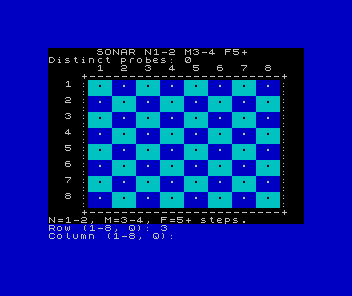
Lines 100 and 110 now set pl, the prompt line, as well as the label: 0 for the row and 1 for the column. Line 3005 clears the old column line before a new row prompt. Line 3010 prints the prompt with three trailing spaces, which rub out the previous answer. After a key passes the checks, line 3045 echoes it straight after the prompt. The prompt text " (1-8, Q): " is eleven characters long, so LEN p$+11 is the column just after it, whatever the label. Every PRINT #1 ends with a semicolon, so the print position stays on its line instead of moving down.
After a row, the player sees Row (1-8, Q): 3 above Column (1-8, Q):. The chosen row stays visible while they pick the column.
The checks get shorter
INKEY$ gives at most one character, so the length check at line 3030 had nothing left to catch, and it is gone. Line 3020 still accepts q or Q from either prompt. Line 3040 still refuses anything outside "1" to "8": 0, 9, letters, Space and Enter all show the same message at 3100 and wait for another key. VAL only ever sees a single digit.
The instructions and the replay prompt use the same routine. Line 5090 prints the start prompt in the lower screen, line 5100 waits for a key, and line 5110 leaves on Q; any other key starts the round. At the end of a round, line 6000 prints the replay prompt and clears the old column line, and line 6010 waits for a key. R plays again, Q leaves, and anything else shows the reminder at line 6040.
A line nobody read
Line 10, LET stage=6, sets a variable that no other line reads. Until Read the sonar, line 1010 printed it in the title as SONAR - STAGE. When that line began printing the band legend instead, stage lost its only reader, and line 10 stayed behind. Deleting it changes nothing a player can see.
SAVE "sonar" LINE 10 still works. With line 10 gone, the Spectrum starts from the first line after it, line 15, which shows the instructions. Save over your old copy that way, start a fresh 48K session and load it to check.
Opens in your Spectrum.
Edit this listing, then run it. Changes are marked against the original code.
Check it
From the instructions, press any key. At the row prompt, press 0, 9, a letter and Space: each shows the reminder, and the board stays still. Press a row and watch it appear beside the prompt. Press a column and hold it for a few seconds: one probe, and the next row prompt waits for a fresh press. Probe a cell twice and check that the count does not rise. Find the target, press a key other than R or Q, then R. Check the empty board and zero count, and press Q.
If a choice sometimes registers twice, look at the release loop at 3210 before anything else.
Sources
Steven Vickers, edited by Robin Bradbeer, ZX Spectrum BASIC Programming, second edition (Sinclair Research, 1983), chapter 15 (INPUT and the lower part of the screen) and chapter 18, pp. 131–132 (INKEY$, waiting for a key to be released).
Amstrad, ZX Spectrum +3 Manual (1987), chapter 8, part 22 (streams), p. 177: PRINT #1 prints on the lower screen. We checked the same behaviour on the 48K ROM this course uses.
Run it here
This unit's program, built for you.
- Program
- step-01.tap
- Machine
- ZX Spectrum 48K (PAL)