
The game plays well, but its board is hard to read: a blue grid on black paper is dim even with BRIGHT on. A second problem is easier to miss. One drawing routine changes a colour that the rest of the program depends on, and that colour turns up somewhere it was never chosen. We will find it, then make every colour change belong only to the shape that asked for it.
Load the program you saved in the previous lesson, or enter it from here.
Complete source to use
  10 BORDER 0: PAPER 0: INK 7: BRIGHT 1: CLS
  20 LET wins=0: LET losses=0: LET draws=0: LET first=1
  30 PRINT AT 3,6; INK 5;"T H R E E  I N  A  R O W"
  40 PRINT AT 7,2;"You are X. The computer is O."
  50 PRINT AT 9,4;"Three in a line wins."
  60 PRINT AT 11,4;"Choose a square with 1-9."
  70 PRINT AT 13,2;"Watch why O chooses its move."
  80 PRINT AT 16,4;"R restarts. Q quits."
  90 PRINT AT 19,6; INK 5;"S starts. Q quits."
 100 GO SUB 9000
 110 LET k$=INKEY$: IF k$="" THEN GO TO 110
 120 IF k$="q" OR k$="Q" THEN GO TO 8000
 130 IF k$<>"s" AND k$<>"S" THEN GO TO 110
 200 DIM b(9): LET moves=0: LET winner=0: LET wl=0: LET a$=""
 210 GO SUB 1000
 220 IF first=2 THEN GO TO 600
 250 GO SUB 9000
 260 LET k$=INKEY$: IF k$="" THEN GO TO 260
 270 IF k$="q" OR k$="Q" THEN GO TO 8000
 280 IF k$="r" OR k$="R" THEN GO TO 200
 290 IF k$<"1" OR k$>"9" THEN GO TO 250
 300 LET n=VAL k$
 310 IF b(n)<>0 THEN PRINT AT 18,2; INK 6;"Taken. Choose an empty square.": GO TO 250
 320 LET b(n)=1: LET moves=moves+1: GO SUB 2000
 330 GO SUB 3000
 340 IF winner>0 OR moves=9 THEN GO TO 5000
 600 PRINT AT 18,2; INK 6;"O is choosing...             "
 610 GO SUB 4000
 620 LET n=mv: LET b(n)=2: LET moves=moves+1: GO SUB 2000
 630 PRINT AT 19,2; INK 5;"O chose ";mv;": ";a$;"        "
 640 GO SUB 3000
 650 IF winner>0 OR moves=9 THEN GO TO 5000
 660 PRINT AT 18,2; INK 7;"Your move: choose 1-9.        "
 670 GO TO 250
1000 CLS
1010 PRINT AT 0,8; INK 5;"THREE IN A ROW"
1020 PRINT AT 1,2; INK 7;"W ";wins;"   L ";losses;"   D ";draws
1030 INK 1: FOR i=0 TO 3: PLOT 56 +i*48,32: DRAW 0,120: NEXT i
1040 FOR i=0 TO 3: PLOT 56,32 +i*40: DRAW 144,0: NEXT i
1050 FOR n=1 TO 9: GO SUB 2000: NEXT n
1060 PRINT AT 18,2; INK 7;"Your move: choose 1-9."
1070 IF first=1 THEN PRINT AT 19,2; INK 5;"You start this round."
1080 IF first=2 THEN PRINT AT 19,2; INK 5;"O starts this round."
1090 PRINT AT 21,2; INK 7;"1-9: place  R: reset  Q: quit"
1100 RETURN
2000 LET row=INT ((n-1)/3): LET col=n-1 -row*3
2010 LET x=80 +col*48: LET y=132 -row*40
2020 PRINT AT 5 +row*5,10 +col*6; INK 7;" "
2030 IF b(n)=0 THEN PRINT AT 5 +row*5,10 +col*6; INK 7;n: RETURN
2040 IF b(n)=2 THEN GO TO 2100
2050 INK 5: FOR z=0 TO 1: PLOT x-10 +z,y-10: DRAW 20,20: PLOT x-10 +z,y+10: DRAW 20,-20: NEXT z
2060 RETURN
2100 INK 7: FOR z=0 TO 1: PLOT x-6,y+10 -z: DRAW 12,0: DRAW 4,-4: DRAW 0,-12: DRAW -4,-4: DRAW -12,0: DRAW -4,4: DRAW 0,12: DRAW 4,4: NEXT z
2110 RETURN
3000 LET winner=0: LET wl=0: RESTORE 9500
3010 FOR w=1 TO 8: READ p,q,f
3020 IF b(p)<>0 AND b(p)=b(q) AND b(q)=b(f) THEN LET winner=b(p): LET wl=w
3030 NEXT w: RETURN
4000 LET mark=2: GO SUB 4500
4010 IF mv>0 THEN LET a$="win": RETURN
4020 LET mark=1: GO SUB 4500
4030 IF mv>0 THEN LET a$="block": RETURN
4040 IF b(5)=0 THEN LET mv=5: LET a$="centre": RETURN
4050 RESTORE 9530
4060 FOR j=1 TO 4: READ v
4070 IF mv=0 AND b(v)=0 THEN LET mv=v
4080 NEXT j
4090 IF mv>0 THEN LET a$="corner": RETURN
4100 FOR j=1 TO 9: IF b(j)=0 THEN LET mv=j
4110 NEXT j: LET a$="edge": RETURN
4500 LET mv=0: RESTORE 9500
4510 FOR w=1 TO 8: READ p,q,f
4520 IF mv=0 AND b(p)=mark AND b(q)=mark AND b(f)=0 THEN LET mv=f
4530 IF mv=0 AND b(p)=mark AND b(f)=mark AND b(q)=0 THEN LET mv=q
4540 IF mv=0 AND b(q)=mark AND b(f)=mark AND b(p)=0 THEN LET mv=p
4550 NEXT w: RETURN
5000 IF winner=1 THEN LET wins=wins+1: LET r$="YOU WIN. Three in a row."
5010 IF winner=2 THEN LET losses=losses+1: LET r$="O WINS. Three in a row."
5020 IF winner=0 THEN LET draws=draws+1: LET r$="DRAW. No line completed."
5030 IF wl>0 THEN GO SUB 6000
5040 PRINT AT 18,2; INK 6;r$;"      "
5050 PRINT AT 1,2; INK 7;"W ";wins;"   L ";losses;"   D ";draws;"  "
5060 PRINT AT 21,2;"R: next round   Q: quit      "
5070 GO SUB 9000
5080 LET k$=INKEY$: IF k$="" THEN GO TO 5080
5090 IF k$="q" OR k$="Q" THEN GO TO 8000
5100 IF k$<>"r" AND k$<>"R" THEN GO TO 5080
5110 LET first=3 -first: GO TO 200
6000 RESTORE 9500: FOR w=1 TO wl: READ p,q,f: NEXT w
6010 LET row=INT ((p-1)/3): LET col=p-1 -row*3
6020 LET sx=80 +col*48: LET sy=132 -row*40
6030 LET row=INT ((f-1)/3): LET col=f-1 -row*3
6040 INK 6: PLOT sx,sy: DRAW 80 +col*48 -sx,132 -row*40 -sy: RETURN
8000 PAPER 0: INK 7: BRIGHT 0: PRINT AT 21,2;"Three in a Row finished.     ": STOP
9000 IF INKEY$<>"" THEN GO TO 9000
9010 RETURN
9500 DATA 1,2,3,4,5,6,7,8,9
9510 DATA 1,4,7,2,5,8,3,6,9
9520 DATA 1,5,9,3,5,7
9530 DATA 1,3,7,9
Find the leak
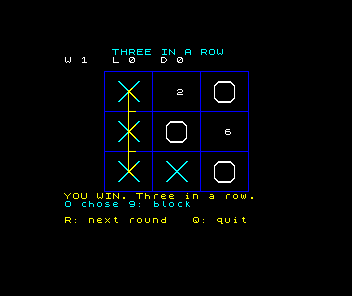
RUN the program, press S and play 1, 8, 7, 4, waiting for each O reply. This is the fork from Make two threats: X wins down the left column. Stop before you enter 4.
Line 5060 prints “R: next round Q: quit” with no INK item. Line 10 chose white ink. What colour will that footer be after X wins?
Show the explanation
Yellow. Line 6040 begins with INK 6: as a statement of its own, before it draws the winning line. A statement changes the colours used by everything after it, so the PRINT in line 5060, which names no colour, uses yellow too. White would be the answer if line 6040 had used yellow only for the line it draws.
After a draw there is no winning line, and the footer takes the colour of the last mark drawn: cyan after X, because line 2050 starts with INK 5:, or white after O, because line 2100 starts with INK 7:.
Enter 4 and compare.
Permanent and temporary colours
The Spectrum keeps two sets of colours. The permanent colours are what every PRINT, PLOT, DRAW and CLS uses unless told otherwise. INK 6 as a statement on its own, or after a colon, changes the permanent ink, and it stays changed until another statement changes it again. CLS also clears the whole screen in the permanent colours, so line 1000 starts each new round in whatever ink the last round left behind.
An INK 6; written as an item straight after PRINT, PLOT or DRAW is temporary. It colours only what that one statement prints or draws, and lasts until the end of that statement. Our PRINT lines already work this way: line 1060 is PRINT AT 18,2; INK 7;"Your move: choose 1-9.". The drawing lines are the ones that do not.
Every pixel PLOT or DRAW sets also gives its whole character square the ink in use. That is how the yellow line turns short pieces of the grid yellow where it crosses them. That clash is part of how the Spectrum stores colour, and it stays; what we are fixing is the colour that carries on after the drawing has finished.
Change five lines
Replace lines 1030, 1040, 2050, 2100 and 6040.
1030 FOR i=0 TO 3: PLOT INK 4;56 +i*48,32: DRAW INK 4;0,120: NEXT i
1040 FOR i=0 TO 3: PLOT INK 4;56,32 +i*40: DRAW INK 4;144,0: NEXT i
2050 FOR z=0 TO 1: PLOT INK 5;x-10 +z,y-10: DRAW INK 5;20,20: PLOT INK 5;x-10 +z,y+10: DRAW INK 5;20,-20: NEXT z
2100 FOR z=0 TO 1: PLOT x-6,y+10 -z: DRAW 12,0: DRAW 4,-4: DRAW 0,-12: DRAW -4,-4: DRAW -12,0: DRAW -4,4: DRAW 0,12: DRAW 4,4: NEXT z
6040 PLOT INK 6;sx,sy: DRAW INK 6;80 +col*48 -sx,132 -row*40 -sy: RETURN
Complete source at this checkpoint
  10 BORDER 0: PAPER 0: INK 7: BRIGHT 1: CLS
  20 LET wins=0: LET losses=0: LET draws=0: LET first=1
  30 PRINT AT 3,6; INK 5;"T H R E E  I N  A  R O W"
  40 PRINT AT 7,2;"You are X. The computer is O."
  50 PRINT AT 9,4;"Three in a line wins."
  60 PRINT AT 11,4;"Choose a square with 1-9."
  70 PRINT AT 13,2;"Watch why O chooses its move."
  80 PRINT AT 16,4;"R restarts. Q quits."
  90 PRINT AT 19,6; INK 5;"S starts. Q quits."
 100 GO SUB 9000
 110 LET k$=INKEY$: IF k$="" THEN GO TO 110
 120 IF k$="q" OR k$="Q" THEN GO TO 8000
 130 IF k$<>"s" AND k$<>"S" THEN GO TO 110
 200 DIM b(9): LET moves=0: LET winner=0: LET wl=0: LET a$=""
 210 GO SUB 1000
 220 IF first=2 THEN GO TO 600
 250 GO SUB 9000
 260 LET k$=INKEY$: IF k$="" THEN GO TO 260
 270 IF k$="q" OR k$="Q" THEN GO TO 8000
 280 IF k$="r" OR k$="R" THEN GO TO 200
 290 IF k$<"1" OR k$>"9" THEN GO TO 250
 300 LET n=VAL k$
 310 IF b(n)<>0 THEN PRINT AT 18,2; INK 6;"Taken. Choose an empty square.": GO TO 250
 320 LET b(n)=1: LET moves=moves+1: GO SUB 2000
 330 GO SUB 3000
 340 IF winner>0 OR moves=9 THEN GO TO 5000
 600 PRINT AT 18,2; INK 6;"O is choosing...             "
 610 GO SUB 4000
 620 LET n=mv: LET b(n)=2: LET moves=moves+1: GO SUB 2000
 630 PRINT AT 19,2; INK 5;"O chose ";mv;": ";a$;"        "
 640 GO SUB 3000
 650 IF winner>0 OR moves=9 THEN GO TO 5000
 660 PRINT AT 18,2; INK 7;"Your move: choose 1-9.        "
 670 GO TO 250
1000 CLS
1010 PRINT AT 0,8; INK 5;"THREE IN A ROW"
1020 PRINT AT 1,2; INK 7;"W ";wins;"   L ";losses;"   D ";draws
1030 FOR i=0 TO 3: PLOT INK 4;56 +i*48,32: DRAW INK 4;0,120: NEXT i
1040 FOR i=0 TO 3: PLOT INK 4;56,32 +i*40: DRAW INK 4;144,0: NEXT i
1050 FOR n=1 TO 9: GO SUB 2000: NEXT n
1060 PRINT AT 18,2; INK 7;"Your move: choose 1-9."
1070 IF first=1 THEN PRINT AT 19,2; INK 5;"You start this round."
1080 IF first=2 THEN PRINT AT 19,2; INK 5;"O starts this round."
1090 PRINT AT 21,2; INK 7;"1-9: place  R: reset  Q: quit"
1100 RETURN
2000 LET row=INT ((n-1)/3): LET col=n-1 -row*3
2010 LET x=80 +col*48: LET y=132 -row*40
2020 PRINT AT 5 +row*5,10 +col*6; INK 7;" "
2030 IF b(n)=0 THEN PRINT AT 5 +row*5,10 +col*6; INK 7;n: RETURN
2040 IF b(n)=2 THEN GO TO 2100
2050 FOR z=0 TO 1: PLOT INK 5;x-10 +z,y-10: DRAW INK 5;20,20: PLOT INK 5;x-10 +z,y+10: DRAW INK 5;20,-20: NEXT z
2060 RETURN
2100 FOR z=0 TO 1: PLOT x-6,y+10 -z: DRAW 12,0: DRAW 4,-4: DRAW 0,-12: DRAW -4,-4: DRAW -12,0: DRAW -4,4: DRAW 0,12: DRAW 4,4: NEXT z
2110 RETURN
3000 LET winner=0: LET wl=0: RESTORE 9500
3010 FOR w=1 TO 8: READ p,q,f
3020 IF b(p)<>0 AND b(p)=b(q) AND b(q)=b(f) THEN LET winner=b(p): LET wl=w
3030 NEXT w: RETURN
4000 LET mark=2: GO SUB 4500
4010 IF mv>0 THEN LET a$="win": RETURN
4020 LET mark=1: GO SUB 4500
4030 IF mv>0 THEN LET a$="block": RETURN
4040 IF b(5)=0 THEN LET mv=5: LET a$="centre": RETURN
4050 RESTORE 9530
4060 FOR j=1 TO 4: READ v
4070 IF mv=0 AND b(v)=0 THEN LET mv=v
4080 NEXT j
4090 IF mv>0 THEN LET a$="corner": RETURN
4100 FOR j=1 TO 9: IF b(j)=0 THEN LET mv=j
4110 NEXT j: LET a$="edge": RETURN
4500 LET mv=0: RESTORE 9500
4510 FOR w=1 TO 8: READ p,q,f
4520 IF mv=0 AND b(p)=mark AND b(q)=mark AND b(f)=0 THEN LET mv=f
4530 IF mv=0 AND b(p)=mark AND b(f)=mark AND b(q)=0 THEN LET mv=q
4540 IF mv=0 AND b(q)=mark AND b(f)=mark AND b(p)=0 THEN LET mv=p
4550 NEXT w: RETURN
5000 IF winner=1 THEN LET wins=wins+1: LET r$="YOU WIN. Three in a row."
5010 IF winner=2 THEN LET losses=losses+1: LET r$="O WINS. Three in a row."
5020 IF winner=0 THEN LET draws=draws+1: LET r$="DRAW. No line completed."
5030 IF wl>0 THEN GO SUB 6000
5040 PRINT AT 18,2; INK 6;r$;"      "
5050 PRINT AT 1,2; INK 7;"W ";wins;"   L ";losses;"   D ";draws;"  "
5060 PRINT AT 21,2;"R: next round   Q: quit      "
5070 GO SUB 9000
5080 LET k$=INKEY$: IF k$="" THEN GO TO 5080
5090 IF k$="q" OR k$="Q" THEN GO TO 8000
5100 IF k$<>"r" AND k$<>"R" THEN GO TO 5080
5110 LET first=3 -first: GO TO 200
6000 RESTORE 9500: FOR w=1 TO wl: READ p,q,f: NEXT w
6010 LET row=INT ((p-1)/3): LET col=p-1 -row*3
6020 LET sx=80 +col*48: LET sy=132 -row*40
6030 LET row=INT ((f-1)/3): LET col=f-1 -row*3
6040 PLOT INK 6;sx,sy: DRAW INK 6;80 +col*48 -sx,132 -row*40 -sy: RETURN
8000 PAPER 0: INK 7: BRIGHT 0: PRINT AT 21,2;"Three in a Row finished.     ": STOP
9000 IF INKEY$<>"" THEN GO TO 9000
9010 RETURN
9500 DATA 1,2,3,4,5,6,7,8,9
9510 DATA 1,4,7,2,5,8,3,6,9
9520 DATA 1,5,9,3,5,7
9530 DATA 1,3,7,9
Lines 1030 and 1040 draw the grid in green, INK 4. Bright green stands out clearly against black and is still different from the cyan X, the white O and the yellow winning line. Line 1040 needs the change too: it used to rely on the blue that line 1030 had left behind.
Line 2050 draws X in cyan, and line 6040 draws the winning line in yellow, each with temporary items. O is white, which is already the permanent ink from line 10, so line 2100 simply drops its INK 7: and draws in the permanent colours. The permanent ink now stays white for the whole session.
Line 2050 puts INK 5; after every PLOT and every DRAW. Why is one INK 5; after the first PLOT not enough?
Show the explanation
A temporary colour lasts only until the end of its own statement, and each PLOT or DRAW is a separate statement. A DRAW without an item draws in the permanent white and gives every character square it passes through white ink, including the square the PLOT has just made cyan. The cross would come out white.
Typing INK inside a line works as it does at the start of a statement: enter extended mode, then Symbol Shift with X. The semicolon after the colour number is Symbol Shift with O.
Check the colours
RUN the changed program and play 1, 8, 7, 4 again.
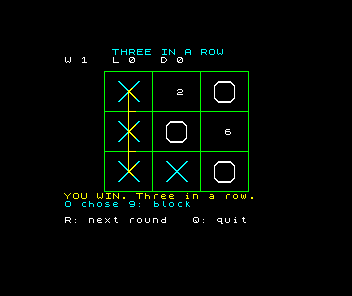
The footer is white. Press R and play a round to a draw: the footer stays white whichever mark was drawn last. If a mark comes out in the wrong colour, check that every PLOT and DRAW in its line carries the item and ends it with a semicolon. If the footer still changes colour, look for a statement INK still left in lines 1030 to 6040.
Try other grid colours by changing the 4 in lines 1030 and 1040. Before each RUN, predict whether the grid will still be easy to tell apart from the cyan crosses, the white noughts and the yellow winning line, then compare.
Keep the new copy
The tape from the previous lesson still holds the old colours. Quit with Q and save again with SAVE "three" LINE 10, following the same tape workflow. Then load the new copy in a fresh session, play a round and check the grid and footer.
Sources
Steven Vickers, edited by Robin Bradbeer, ZX Spectrum BASIC Programming, second edition (Sinclair Research, 1983), chapter 16 on permanent colours and temporary colour items in PRINT, and chapter 17 on colour items in PLOT and DRAW and the colour of the character square each plotted pixel sets.
Run it here
This unit's program, built for you.
- Program
- three.tap
- Machine
- ZX Spectrum 48K (PAL)