
One crate, four characters. Each Spectrum character is eight pixels wide and eight high. Put four together and we can draw a wooden box with enough room for its frame and diagonal braces.
Use a 48K ZX Spectrum with Sinclair BASIC. Save anything you want to keep, then enter NEW. Keywords are tokens: in Original keyboard mode, for example, R enters RUN at the start of a command. Use your setup’s keyboard mode; the spaces the ROM displays after tokens are not extra spaces you must type.
Turn a sketch into bytes
Here is the crate at sixteen pixels across. # means an ink pixel; . means a paper pixel. Split it after column eight and row eight to get four character designs.
................
.##############.
.#............#.
.#.##########.#.
.#.##......##.#.
.#.#.#....#.#.#.
.#.#..#..#..#.#.
.#.#...##...#.#.
.#.#...##...#.#.
.#.#..#..#..#.#.
.#.#.#....#.#.#.
.#.##......##.#.
.#.##########.#.
.#............#.
.##############.
................| Quadrant | Character code in this program | Eight row bytes |
|---|---|---|
| Top left | 144 | 0, 127, 64, 95, 88, 84, 82, 81 |
| Top right | 145 | 0, 254, 2, 250, 26, 42, 74, 138 |
| Bottom left | 146 | 81, 82, 84, 88, 95, 64, 127, 0 |
| Bottom right | 147 | 138, 74, 42, 26, 250, 2, 254, 0 |
Each row of eight pixels becomes one number. From left to right the places are worth 128, 64, 32, 16, 8, 4, 2, 1. Add the values wherever there is a #. Thus .####### is 64+32+16+8+4+2+1, or 127. .#.##### is 64+16+8+4+2+1, or 95. A blank row is zero.
The table groups the eight row numbers for each quadrant. We store all eight rows of the top-left character first, then the top right, bottom left and bottom right. Reading straight across all sixteen pixels would mix two characters together.
Draw the box
Enter this program, then RUN.
  10 BORDER 0: PAPER 0: INK 6: CLS
  20 RESTORE 7200: FOR n=0 TO 31: READ b: POKE USR "a"+n,b: NEXT n
  30 LET t$=CHR$ 144 +CHR$ 145 +CHR$ 146 +CHR$ 147
  40 PRINT AT 10,15;t$(1 TO 2);AT 11,15;t$(3 TO 4)
  50 STOP
7200 DATA 0,127,64,95,88,84,82,81
7210 DATA 0,254,2,250,26,42,74,138
7220 DATA 81,82,84,88,95,64,127,0
7230 DATA 138,74,42,26,250,2,254,0
Line 10 chooses black paper and yellow ink, then clears the screen. Line 20 returns the DATA reader to line 7200. READ b takes the next number; POKE writes that byte into memory. With a string argument, USR "a" gives the address of the first user-defined character. Adding n, from 0 to 31, fills four characters of eight bytes each. This use of USR locates graphic storage; it does not call a machine-code routine.
There are two different kinds of number here. 127 is a row’s pixel pattern. 144 is the character code used to print the first custom character. CHR$ 144 makes a one-character string; + joins strings. Line 30 joins our four characters into t$ in quadrant order.
t$(1 TO 2) takes the first two characters, including both endpoints. t$(3 TO 4) takes the other pair. Line 40 prints the first pair at screen row 10, column 15, then the second pair on row 11. PRINT AT counts from zero. Semicolons keep the items together; they do not start new lines. STOP ends the program before BASIC reaches the DATA. The 9 STOP statement report is expected.
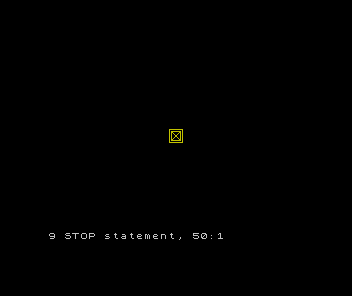
Change one pixel
What would changing the first number on line 7200 from 0 to 128 do?
Show the explanation
It sets the leftmost pixel of the top-left character’s first row. The other seven pixels in that row stay blank, and the other 31 rows of character data are unchanged.
Make that change, run and compare. Then restore the first number to 0 and run again. A fresh RUN rebuilds the graphic from DATA, so it also removes the experimental pixel.
If the box looks scrambled, check quadrant order and the eight numbers on each DATA line. If its halves are separated, check the two PRINT positions and slices. We now have a repeatable way to draw a tile; next we will give that tile a place in a room.
Sources
Steven Vickers, edited by Robin Bradbeer, ZX Spectrum BASIC Programming, second edition (Sinclair Research, 1983), chapters 6 (DATA and RESTORE), 8 (string slices), 14 (UDGs, POKE, USR and CHR$), and 15–16 (printing and colour).
Run it here
This unit's program, built for you.
- Program
- step-01.tap
- Machine
- ZX Spectrum 48K (PAL)