
A picture tells us what the warehouse looks like. The game also needs to know what is in each square. We will keep that information in an array and use it to reconstruct the picture.
Continue from the restored crate program. This lesson has three runnable stages: a collection of tiles, a room, then a player.
A small tile collection
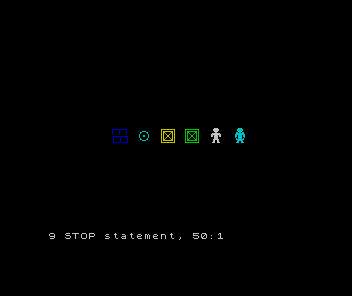
We need brickwork, a target ring and a player as well as the crate. Each uses the same four-character construction. Expand the graphic routine and run it on its own first.
Replace lines 10, 20, 30, 40, 7200, 7210, 7220, 7230.
Add lines 7000, 7010, 7020, 7030, 7040, 7050, 7055, 7060, 7240, 7250, 7260, 7270, 7280, 7290, 7300, 7310, 7320, 7330, 7340, 7350, 7360, 7370, 7380, 7390.
  10 GO SUB 7000: BORDER 0: PAPER 0: CLS
  20 FOR z=1 TO 7
  30 PRINT AT 10,2+3*z; INK a(z);t$(z,1 TO 2);AT 11,2+3*z;t$(z,3 TO 4)
  40 NEXT z
7000 RESTORE 7200: FOR n=0 TO 159: READ b: POKE USR "a"+n,b: NEXT n
7010 DIM t$(7,4): DIM a(7)
7020 LET t$(1)="    ": LET t$(2)=CHR$ 144 +CHR$ 145 +CHR$ 146 +CHR$ 147
7030 LET t$(3)=CHR$ 148 +CHR$ 149 +CHR$ 150 +CHR$ 151
7040 LET t$(4)=CHR$ 152 +CHR$ 153 +CHR$ 154 +CHR$ 155: LET t$(5)=t$(4)
7050 LET t$(6)=CHR$ 156 +CHR$ 157 +CHR$ 158 +CHR$ 159
7055 LET t$(7)=CHR$ 160 +CHR$ 161 +CHR$ 162 +CHR$ 163
7060 LET a(1)=0: LET a(2)=1: LET a(3)=5: LET a(4)=6: LET a(5)=4: LET a(6)=7: LET a(7)=5: RETURN
7200 DATA 0,254,129,129,129,129,129,0
7210 DATA 0,254,2,2,2,2,2,0
7220 DATA 127,64,64,64,64,64,127,0
7230 DATA 127,129,129,129,129,129,127,0
7240 DATA 0,0,0,3,12,8,16,17
7250 DATA 0,0,0,192,48,16,8,136
7260 DATA 17,16,8,12,3,0,0,0
7270 DATA 136,8,16,48,192,0,0,0
7280 DATA 0,127,64,95,88,84,82,81
7290 DATA 0,254,2,250,26,42,74,138
7300 DATA 81,82,84,88,95,64,127,0
7310 DATA 138,74,42,26,250,2,254,0
7320 DATA 3,7,7,3,1,15,31,27
7330 DATA 192,224,224,192,128,240,248,216
7340 DATA 27,3,3,7,6,6,14,0
7350 DATA 216,192,192,224,96,96,112,0
7360 DATA 3,7,7,3,13,15,31,27
7370 DATA 192,224,224,192,176,240,248,216
7380 DATA 27,19,11,15,7,6,14,0
7390 DATA 216,200,208,240,224,96,112,0
Complete program for this step
  10 GO SUB 7000: BORDER 0: PAPER 0: CLS
  20 FOR z=1 TO 7
  30 PRINT AT 10,2+3*z; INK a(z);t$(z,1 TO 2);AT 11,2+3*z;t$(z,3 TO 4)
  40 NEXT z
  50 STOP
7000 RESTORE 7200: FOR n=0 TO 159: READ b: POKE USR "a"+n,b: NEXT n
7010 DIM t$(7,4): DIM a(7)
7020 LET t$(1)="    ": LET t$(2)=CHR$ 144 +CHR$ 145 +CHR$ 146 +CHR$ 147
7030 LET t$(3)=CHR$ 148 +CHR$ 149 +CHR$ 150 +CHR$ 151
7040 LET t$(4)=CHR$ 152 +CHR$ 153 +CHR$ 154 +CHR$ 155: LET t$(5)=t$(4)
7050 LET t$(6)=CHR$ 156 +CHR$ 157 +CHR$ 158 +CHR$ 159
7055 LET t$(7)=CHR$ 160 +CHR$ 161 +CHR$ 162 +CHR$ 163
7060 LET a(1)=0: LET a(2)=1: LET a(3)=5: LET a(4)=6: LET a(5)=4: LET a(6)=7: LET a(7)=5: RETURN
7200 DATA 0,254,129,129,129,129,129,0
7210 DATA 0,254,2,2,2,2,2,0
7220 DATA 127,64,64,64,64,64,127,0
7230 DATA 127,129,129,129,129,129,127,0
7240 DATA 0,0,0,3,12,8,16,17
7250 DATA 0,0,0,192,48,16,8,136
7260 DATA 17,16,8,12,3,0,0,0
7270 DATA 136,8,16,48,192,0,0,0
7280 DATA 0,127,64,95,88,84,82,81
7290 DATA 0,254,2,250,26,42,74,138
7300 DATA 81,82,84,88,95,64,127,0
7310 DATA 138,74,42,26,250,2,254,0
7320 DATA 3,7,7,3,1,15,31,27
7330 DATA 192,224,224,192,128,240,248,216
7340 DATA 27,3,3,7,6,6,14,0
7350 DATA 216,192,192,224,96,96,112,0
7360 DATA 3,7,7,3,13,15,31,27
7370 DATA 192,224,224,192,176,240,248,216
7380 DATA 27,19,11,15,7,6,14,0
7390 DATA 216,200,208,240,224,96,112,0
GO SUB 7000 calls the graphics routine; RETURN at 7060 resumes after that call. The loop now reads 160 bytes, enough for twenty custom characters. The crate’s pixels have not changed, but its character codes move to 152–155 because walls and targets come first.
DIM t$(7,4) creates seven strings of four characters each. The final dimension of a Spectrum string array is the string length. t$(4) is the fourth complete string; t$(4,1 TO 2) is its first pair of characters. Assignments shorter than four characters are padded with spaces; longer ones are cut to length. This is why each tile fits its row exactly.
DIM a(7) holds seven ink colours. Matching positions in the two arrays describe one appearance:
| Appearance index | Four-character image | Ink |
|---|---|---|
| 1 | Four spaces: floor | Black, 0 |
| 2 | Brick wall | Blue, 1 |
| 3 | Target ring | Cyan, 5 |
| 4 | Crate | Yellow, 6 |
| 5 | Same crate | Green, 4 |
| 6 | Player | White, 7 |
| 7 | Player with target ring | Cyan, 5 |
The loop at line 20 prints all seven appearances in order. The first is invisible against black paper. The delivered crate reuses the wooden design in a different colour. The last player design includes a ring, so a target remains visible beneath the player’s feet.
Pixel sketches and row bytes for the complete tile collection
Brickwork
................
#######.#######.
#......#......#.
#......#......#.
#......#......#.
#......#......#.
#......#......#.
................
.#######.#######
.#......#......#
.#......#......#
.#......#......#
.#......#......#
.#......#......#
.#######.#######
................| Quadrant | Character code in full bank | Eight row bytes |
|---|---|---|
| Top left | 144 | 0, 254, 129, 129, 129, 129, 129, 0 |
| Top right | 145 | 0, 254, 2, 2, 2, 2, 2, 0 |
| Bottom left | 146 | 127, 64, 64, 64, 64, 64, 127, 0 |
| Bottom right | 147 | 127, 129, 129, 129, 129, 129, 127, 0 |
Target
................
................
................
......####......
....##....##....
....#......#....
...#........#...
...#...##...#...
...#...##...#...
...#........#...
....#......#....
....##....##....
......####......
................
................
................| Quadrant | Character code in full bank | Eight row bytes |
|---|---|---|
| Top left | 148 | 0, 0, 0, 3, 12, 8, 16, 17 |
| Top right | 149 | 0, 0, 0, 192, 48, 16, 8, 136 |
| Bottom left | 150 | 17, 16, 8, 12, 3, 0, 0, 0 |
| Bottom right | 151 | 136, 8, 16, 48, 192, 0, 0, 0 |
Crate
................
.##############.
.#............#.
.#.##########.#.
.#.##......##.#.
.#.#.#....#.#.#.
.#.#..#..#..#.#.
.#.#...##...#.#.
.#.#...##...#.#.
.#.#..#..#..#.#.
.#.#.#....#.#.#.
.#.##......##.#.
.#.##########.#.
.#............#.
.##############.
................| Quadrant | Character code in full bank | Eight row bytes |
|---|---|---|
| Top left | 152 | 0, 127, 64, 95, 88, 84, 82, 81 |
| Top right | 153 | 0, 254, 2, 250, 26, 42, 74, 138 |
| Bottom left | 154 | 81, 82, 84, 88, 95, 64, 127, 0 |
| Bottom right | 155 | 138, 74, 42, 26, 250, 2, 254, 0 |
Player
......####......
.....######.....
.....######.....
......####......
.......##.......
....########....
...##########...
...##.####.##...
...##.####.##...
......####......
......####......
.....######.....
.....##..##.....
.....##..##.....
....###..###....
................| Quadrant | Character code in full bank | Eight row bytes |
|---|---|---|
| Top left | 156 | 3, 7, 7, 3, 1, 15, 31, 27 |
| Top right | 157 | 192, 224, 224, 192, 128, 240, 248, 216 |
| Bottom left | 158 | 27, 3, 3, 7, 6, 6, 14, 0 |
| Bottom right | 159 | 216, 192, 192, 224, 96, 96, 112, 0 |
Player on target
......####......
.....######.....
.....######.....
......####......
....##.##.##....
....########....
...##########...
...##.####.##...
...##.####.##...
...#..####..#...
....#.####.#....
....########....
.....######.....
.....##..##.....
....###..###....
................| Quadrant | Character code in full bank | Eight row bytes |
|---|---|---|
| Top left | 160 | 3, 7, 7, 3, 13, 15, 31, 27 |
| Top right | 161 | 192, 224, 224, 192, 176, 240, 248, 216 |
| Bottom left | 162 | 27, 19, 11, 15, 7, 6, 14, 0 |
| Bottom right | 163 | 216, 200, 208, 240, 224, 96, 112, 0 |
Store an eight-by-eight room
The tile arrays describe appearances. A different array, g, will describe the warehouse. Its two indices are row and column, both running from 1 to 8.
Replace lines 10, 20, 30, 40, 50.
Add lines 15, 60, 70, 80, 100, 110, 1000, 1010, 1040, 1050, 1060, 1080, 2000, 2010, 2030, 2040.
  10 GO SUB 7000: LET h$=""
  15 LET room=1
  20 DIM g(8,8)
  30 FOR r=1 TO 8: FOR c=1 TO 8
  40 IF r=1 OR r=8 OR c=1 OR c=8 THEN LET g(r,c)=1
  50 NEXT c: NEXT r
  60 LET g(3,4)=1: LET g(4,4)=1
  70 LET g(3,5)=2: LET g(5,4)=3
  80 LET pr=6: LET pc=3: LET moves=0: LET won=0
 100 GO SUB 1000
 110 STOP
1000 BORDER 0: PAPER 0: INK 7: CLS
1010 PRINT AT 0,2; INK 5;"CRATES";AT 0,24; INK 7;"ROOM 0";room
1040 FOR r=1 TO 8: FOR c=1 TO 8
1050 GO SUB 2000
1060 NEXT c: NEXT r
1080 RETURN
2000 LET y=3 +2 *(r-1): LET x=8 +2 *(c-1)
2010 LET z=g(r,c)+1
2030 PRINT AT y,x; INK a(z);t$(z,1 TO 2);AT y+1,x;t$(z,3 TO 4)
2040 RETURN
Complete program for this step
  10 GO SUB 7000: LET h$=""
  15 LET room=1
  20 DIM g(8,8)
  30 FOR r=1 TO 8: FOR c=1 TO 8
  40 IF r=1 OR r=8 OR c=1 OR c=8 THEN LET g(r,c)=1
  50 NEXT c: NEXT r
  60 LET g(3,4)=1: LET g(4,4)=1
  70 LET g(3,5)=2: LET g(5,4)=3
  80 LET pr=6: LET pc=3: LET moves=0: LET won=0
 100 GO SUB 1000
 110 STOP
1000 BORDER 0: PAPER 0: INK 7: CLS
1010 PRINT AT 0,2; INK 5;"CRATES";AT 0,24; INK 7;"ROOM 0";room
1040 FOR r=1 TO 8: FOR c=1 TO 8
1050 GO SUB 2000
1060 NEXT c: NEXT r
1080 RETURN
2000 LET y=3 +2 *(r-1): LET x=8 +2 *(c-1)
2010 LET z=g(r,c)+1
2030 PRINT AT y,x; INK a(z);t$(z,1 TO 2);AT y+1,x;t$(z,3 TO 4)
2040 RETURN
7000 RESTORE 7200: FOR n=0 TO 159: READ b: POKE USR "a"+n,b: NEXT n
7010 DIM t$(7,4): DIM a(7)
7020 LET t$(1)="    ": LET t$(2)=CHR$ 144 +CHR$ 145 +CHR$ 146 +CHR$ 147
7030 LET t$(3)=CHR$ 148 +CHR$ 149 +CHR$ 150 +CHR$ 151
7040 LET t$(4)=CHR$ 152 +CHR$ 153 +CHR$ 154 +CHR$ 155: LET t$(5)=t$(4)
7050 LET t$(6)=CHR$ 156 +CHR$ 157 +CHR$ 158 +CHR$ 159
7055 LET t$(7)=CHR$ 160 +CHR$ 161 +CHR$ 162 +CHR$ 163
7060 LET a(1)=0: LET a(2)=1: LET a(3)=5: LET a(4)=6: LET a(5)=4: LET a(6)=7: LET a(7)=5: RETURN
7200 DATA 0,254,129,129,129,129,129,0
7210 DATA 0,254,2,2,2,2,2,0
7220 DATA 127,64,64,64,64,64,127,0
7230 DATA 127,129,129,129,129,129,127,0
7240 DATA 0,0,0,3,12,8,16,17
7250 DATA 0,0,0,192,48,16,8,136
7260 DATA 17,16,8,12,3,0,0,0
7270 DATA 136,8,16,48,192,0,0,0
7280 DATA 0,127,64,95,88,84,82,81
7290 DATA 0,254,2,250,26,42,74,138
7300 DATA 81,82,84,88,95,64,127,0
7310 DATA 138,74,42,26,250,2,254,0
7320 DATA 3,7,7,3,1,15,31,27
7330 DATA 192,224,224,192,128,240,248,216
7340 DATA 27,3,3,7,6,6,14,0
7350 DATA 216,192,192,224,96,96,112,0
7360 DATA 3,7,7,3,13,15,31,27
7370 DATA 192,224,224,192,176,240,248,216
7380 DATA 27,19,11,15,7,6,14,0
7390 DATA 216,200,208,240,224,96,112,0
DIM g(8,8) creates 64 numeric cells, initially zero. We use 0 for floor, 1 for wall, 2 for target and 3 for crate. Lines 30–50 visit every cell. The outer loop selects a row and the inner loop visits its columns. A cell on any outside edge becomes a wall. Lines 60–70 place two inner walls, one target and one crate.
The routine at 1000 clears and redraws the whole room. For each cell it calls 2000. That routine turns board coordinates into screen positions: y = 3 + 2 * (r - 1) and x = 8 + 2 * (c - 1). Each tile occupies two character rows and columns. Board (1,1) starts at screen (3,8); board (8,8) starts at (17,22).
z = g(r,c) + 1 converts a cell code beginning at zero into an appearance index beginning at one. For example, a crate is world code 3 but appearance 4. Neither number is an ink colour or a pixel byte. Line 2030 prints the two slices with the chosen ink.
Run it. All four corner cells should be brickwork. The inner wall is at (3,4) and (4,4), the target at (3,5) and the crate at (5,4). There is no player yet: line 80 remembers a position, but nothing draws it.
Put the player on top
Add lines 2020, 2025.
2020 IF r=pr AND c=pc THEN LET z=6
2025 IF z=6 AND g(r,c)=2 THEN LET z=7
Complete program for this step
  10 GO SUB 7000: LET h$=""
  15 LET room=1
  20 DIM g(8,8)
  30 FOR r=1 TO 8: FOR c=1 TO 8
  40 IF r=1 OR r=8 OR c=1 OR c=8 THEN LET g(r,c)=1
  50 NEXT c: NEXT r
  60 LET g(3,4)=1: LET g(4,4)=1
  70 LET g(3,5)=2: LET g(5,4)=3
  80 LET pr=6: LET pc=3: LET moves=0: LET won=0
 100 GO SUB 1000
 110 STOP
1000 BORDER 0: PAPER 0: INK 7: CLS
1010 PRINT AT 0,2; INK 5;"CRATES";AT 0,24; INK 7;"ROOM 0";room
1040 FOR r=1 TO 8: FOR c=1 TO 8
1050 GO SUB 2000
1060 NEXT c: NEXT r
1080 RETURN
2000 LET y=3 +2 *(r-1): LET x=8 +2 *(c-1)
2010 LET z=g(r,c)+1
2020 IF r=pr AND c=pc THEN LET z=6
2025 IF z=6 AND g(r,c)=2 THEN LET z=7
2030 PRINT AT y,x; INK a(z);t$(z,1 TO 2);AT y+1,x;t$(z,3 TO 4)
2040 RETURN
7000 RESTORE 7200: FOR n=0 TO 159: READ b: POKE USR "a"+n,b: NEXT n
7010 DIM t$(7,4): DIM a(7)
7020 LET t$(1)="    ": LET t$(2)=CHR$ 144 +CHR$ 145 +CHR$ 146 +CHR$ 147
7030 LET t$(3)=CHR$ 148 +CHR$ 149 +CHR$ 150 +CHR$ 151
7040 LET t$(4)=CHR$ 152 +CHR$ 153 +CHR$ 154 +CHR$ 155: LET t$(5)=t$(4)
7050 LET t$(6)=CHR$ 156 +CHR$ 157 +CHR$ 158 +CHR$ 159
7055 LET t$(7)=CHR$ 160 +CHR$ 161 +CHR$ 162 +CHR$ 163
7060 LET a(1)=0: LET a(2)=1: LET a(3)=5: LET a(4)=6: LET a(5)=4: LET a(6)=7: LET a(7)=5: RETURN
7200 DATA 0,254,129,129,129,129,129,0
7210 DATA 0,254,2,2,2,2,2,0
7220 DATA 127,64,64,64,64,64,127,0
7230 DATA 127,129,129,129,129,129,127,0
7240 DATA 0,0,0,3,12,8,16,17
7250 DATA 0,0,0,192,48,16,8,136
7260 DATA 17,16,8,12,3,0,0,0
7270 DATA 136,8,16,48,192,0,0,0
7280 DATA 0,127,64,95,88,84,82,81
7290 DATA 0,254,2,250,26,42,74,138
7300 DATA 81,82,84,88,95,64,127,0
7310 DATA 138,74,42,26,250,2,254,0
7320 DATA 3,7,7,3,1,15,31,27
7330 DATA 192,224,224,192,128,240,248,216
7340 DATA 27,3,3,7,6,6,14,0
7350 DATA 216,192,192,224,96,96,112,0
7360 DATA 3,7,7,3,13,15,31,27
7370 DATA 192,224,224,192,176,240,248,216
7380 DATA 27,19,11,15,7,6,14,0
7390 DATA 216,200,208,240,224,96,112,0
Line 2020 substitutes appearance 6 when the cell being drawn matches pr,pc. Line 2025 selects appearance 7 if that cell contains a target. These lines change z, the choice of picture, without changing g(r,c). The player therefore needs only two coordinates; the floor underneath remains in the array.
Why not replace the target with a player code in the grid?
Show the explanation
We would then need another way to remember that a target was underneath. Separate player coordinates let the drawing routine show the player while the array keeps the original floor or target.
Run and find the player at (6,3). For a temporary experiment, replace line 80 with the same line using pr = 3 and pc = 5. Run: the player should include the target ring. Restore pr = 6, pc = 3, keeping the other assignments on that line, and run again. The target reappears because its stored cell never changed.
If the room is shifted, check the coordinate calculation. If a wall looks like a crate, check the cell-code-to-appearance conversion before changing the artwork. The room and its drawing now have separate jobs.
Sources
Steven Vickers, edited by Robin Bradbeer, ZX Spectrum BASIC Programming, second edition (Sinclair Research, 1983), chapters 4–6 (loops and routines), 8 and 12 (strings and arrays), and 14–16 (graphics and printing).
Run it here
This unit's program, built for you.
- Program
- step-03.tap
- Machine
- ZX Spectrum 48K (PAL)