
Meteor Storm
Spectrum · Assembly
Dodge a drifting storm, collect stars and race the clock — build the game from pixels and measured updates.
36 units
New to assembly? Begin with Meet Assembly →
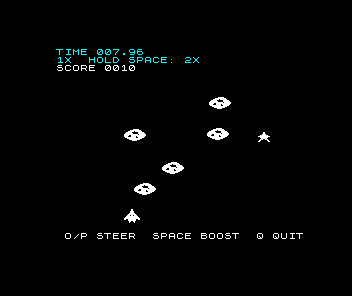
Race through a scattered meteor storm. One hit ends the run. Stars tempt you away from a safe path; holding Space doubles your progress and their value. Cross one storm and the next begins: the voyage is five storms long, and each is faster, denser and hotter than the last. Finish each storm faster for a bigger bonus, multiplied by the storm’s number, then try to beat your fastest storm and your furthest voyage. Every star, boost, arrival and impact has its own sound, a hit breaks the ship apart before the result, and meteors change colour as they fall towards you.
Source · view and edit
Companion file: assets.inc
The include line reads this editable data when you assemble. Keep it beside your source for a local build.
Edit the source, then assemble.
Edits are saved in this browser. Keep a downloaded copy of work you want to keep.
Focus the Spectrum screen to use the keyboard, or hold these buttons. Assemble again for a fresh machine.
Run the program to inspect it. Editing source does not change the running machine.
phase- —
storm- —
score- —
elapsed- —
Build it in small steps
We start with a pixel crossing a byte boundary and finish with a game you can load from tape. The target is a stock 48K PAL ZX Spectrum, using original Z80 instructions. Meet Assembly introduces the registers, memory, loops, calls, keyboard input and debugger we use here; immediate ideas are recalled as they become useful. BASIC is not a prerequisite.
Every lesson includes runnable source, an experiment and a way to inspect the real machine. Companions containing artwork and course data are editable and downloadable too. The browser starts code directly so you can spend time changing the program; the final lesson separately checks a fresh tape load. Tick Sound beside an experiment’s buttons to hear the machine; it starts off, and once ticked it stays on for the other lessons. Asm198x is the recommended local assembler, with upstream Pasmo as an alternative, and Emu198x is the recommended desktop emulator; getting started covers installing them.
Pixels and a measured update
- Carry a pixel into the next byte
- Prepare eight horizontal positions
- Find a pixel in Spectrum memory
- Draw the whole ship
- Erase before moving
- Give the interrupt a small job
- Count frames, choose updates
- Put steering on the frame clock
Objects, phases and rewards
- Let a meteor move independently
- Distinguish a hit from a near miss
- Give the game clear phases
- Give each object a record
- Walk the pool and reuse a slot
- Make a storm with an end
- Give meteors a gentle drift
- Collect something worth the risk
- Turn a score into readable digits
A complete timed game
- Measure time without counting distance
- Show seconds and hundredths
- Hold Space to boost
- Draw once, check twice
- Keep the best time and score
- Make the instructions fit
Sound, spectacle and sharing
- Turn a click into a tone
- Give every event a sound
- Pay for sound in the frame
- Break the ship apart
- Colour the storm by place
- Chain storms into a voyage
- Let the score outgrow a byte
- Reward each storm cleared
- Make each storm harder
- Remember the furthest storm
- Let the title play itself
- Draw a loading screen
- Keep and share the game