
Leave the ship still in unit 26’s program and let a meteor hit it. You hear the falling impact tone, and the moment it ends the screen clears to SHIP DESTROYED. You never see what hit you, or what happened to the ship. A crash ends much like reaching clear space: a sound, then the result screen.
In this lesson the program stops for one second at contact and shows it. The border flashes red, the storm freezes where it is, and the ship breaks into eight pieces that are thrown up and outwards, fall back and land. Then the result appears.
Source · view and edit
Companion file: assets.inc
The include line reads this editable data when you assemble. Keep it beside your source for a local build.
Edit the source, then assemble.
Edits are saved in this browser. Keep a downloaded copy of work you want to keep.
Focus the Spectrum screen to use the keyboard, or hold these buttons. Assemble again for a fresh machine.
Run the program to inspect it. Editing source does not change the running machine.
phase- —
hull- —
border- —
debris_time- —
elapsed- —
Space launches; O/P steer; hold Space for 2X. To see the crash, launch and leave the ship alone: the first meteor hits it in the middle about 2.2 seconds later. Hold O and Space from launch to be hit at the left edge, or P and Space for the right. R and Q do nothing until the result appears; then R retries and Q returns to the title.
Tick Sound beside the buttons under the editor to hear the crash. If you ticked it in an earlier lesson, it is already on.
What you should see
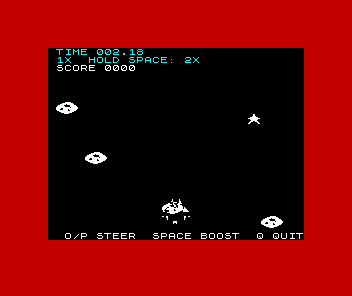
At contact the whole border turns red. The meteor that hit sits where the ship was, and the pieces burst out of it. Everything else stops but stays drawn: the other meteors, the stars and the HUD. The centre piece rises highest; the nose halves and wings arc out to each side; the tail pieces skid out low, and one drops straight down. After six frames the border is black again.
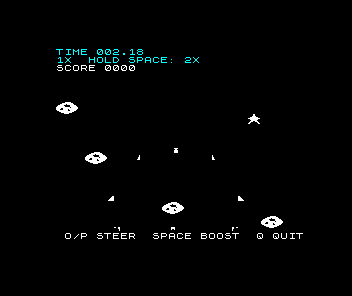
The pieces come down and land along a line just above the controls text. In the middle of the screen all eight have landed by the end of the second. Then the screen clears to the same result as before, with a black border and no piece left.
The inspector shows the phase from the program’s side. hull drops to 0 and phase becomes 2 at contact. border reads 2 during the flash and 0 afterwards. debris_time counts down from 25 to 0, one step per update. The readings are samples, so you may not catch every value.
Leave flight at contact
Unit 11 gave the game its phases: 0 for the title, 1 for flight, 2 for a lost result and 3 for a won one. Until now, contact went straight from flight to the result. The main loop still notices contact the same way, by testing hull after moving the meteors, but now jumps somewhere new:
race_step:
 call erase_ship
 ld bc,$FBFE
 in a,(c)
 bit 0,a
 jp z,title
 call steer
 call draw_ship
 call advance_meteors
 ld a,(hull)
 or a
 jp z,destroyed
jp z,destroyed was jp z,lost. destroyed is a short loop of its own that shows the crash, then falls into lost, so the result that follows is unchanged.
The contact itself changes in two ways:
meteor_contact:
 ; One contact ends this attempt. The meteor keeps its slot and its image,
 ; so the destroyed phase shows what hit the ship.
 xor a
 ld (hull),a
 ld hl,impact_sound
 call start_sound
 jr advance_meteors_skip
It used to fall through to advance_meteors_remove, which frees the meteor’s slot. Now it jumps to advance_meteors_skip, the path that leaves a slot alone, so the meteor keeps its record and stays on screen. It sits exactly where it hit, which is what the player needs to see. The run is over, so the extra active slot costs nothing: new_game clears it with the rest of the run’s state.
The other change is start_sound in place of play_sound. We come back to that when we listen.
Flash the border
Here is the start of destroyed:
; The storm stops where it is. The ship becomes DEBRIS pieces that fly
; apart for DEBRIS_UPDATES updates while the impact sound plays in the
; frame waits. No keys are read, so nothing can cut the phase short.
destroyed:
 ld a,2
 ld (phase),a
 ; Flash the border. The impact sound's speaker writes carry `border`.
 ld a,FLASH_BORDER
 ld (border),a
 out ($FE),a
 call erase_ship
phase is set to 2 straight away, because the run is lost from this moment. Then the flash. Unit 24 gave the border colour its own byte, border, and made every speaker write carry that byte’s colour bits. Here we store FLASH_BORDER (2, red) in it and write it to port $FE, so the border turns red at once. The impact sound writes to port $FE 240 times while it plays, twice for each of its 120 cycles, and each write carries border, so the border stays red instead of flickering back to black. erase_ship then removes the ship.
The constants live at the top of the source with the others:
DEBRIS equ 8
DEBRIS_ROWS equ 5
DEBRIS_UPDATES equ 25
DEBRIS_FLOOR equ 179
FLASH_BORDER equ 2
FLASH_UPDATES equ 3
Cut the ship into pieces
The pieces are not new drawings. The asset script cuts them from the ship’s own artwork, in three bands of five rows each, starting at ship rows 1, 6 and 11. The nose band is cut into two halves, left and right. The middle band is cut into three: left wing, centre and right wing. The tail band is cut into three too. That makes eight pieces, each with 8 to 20 lit pixels.
Each piece keeps its pixels in the same columns of the ship’s 24-pixel-wide frame. Draw every piece at the ship’s X, each at the row where its band starts, and the eight together are the ship, pixel for pixel. That is how the break-up can begin without a jump: the first picture of the pieces is exactly the picture of the ship.
Each piece gets its own shift table, like the ship’s from unit 2: eight copies of the artwork, one for each pixel offset within a byte, so any X can be drawn without shifting at run time. The tables follow each other in assets.inc from the label debris_sprites. Each is 512 bytes, eight shifts of 64 bytes, laid out like the ship’s table so draw_sprite finds the right shift in the same way. A piece is only five rows tall, so draw_sprite reads just the first 20 bytes of each shift.
Give every piece a record
Each piece needs a position and a speed, and eight pieces need eight of them. We already have a way to hold that: unit 12 gave every meteor a record with fixed field offsets, read through IX. A piece’s record is four bytes:
| Offset | Field |
|---|---|
| 0 | X |
| 1 | Y |
| 2 | dX, the sideways speed, signed |
| 3 | dY, the vertical speed, signed |
“Signed” works as it did for drift in unit 15: -3 is stored as 253, and adding 253 to a byte has the same low-byte result as subtracting 3. A negative dY moves a piece up the screen, because Y counts downwards.
The starting records sit in the source as data:
; Debris records: X (set from ship_x), Y, dX, dY. The Y values are the
; ship rows where each piece's artwork begins: nose, middle, tail.
debris_start:
 defb 0,SHIP_Y+1,-3,-11
 defb 0,SHIP_Y+1,3,-11
 defb 0,SHIP_Y+6,-5,-8
 defb 0,SHIP_Y+6,0,-12
 defb 0,SHIP_Y+6,5,-8
 defb 0,SHIP_Y+11,-6,-4
 defb 0,SHIP_Y+11,-1,1
 defb 0,SHIP_Y+11,6,-4
The first two are the nose halves, starting one row into the ship. The next three are the middle band and the last three the tail. The dX values push pieces outwards, and the upward dY values give each band a different throw: the centre piece gets the hardest push, -12, and the tail pieces the gentlest.
destroyed copies those 32 bytes into the run’s state, then fills in X:
 ld hl,debris_start
 ld de,debris
 ld bc,DEBRIS*4
 ldir
 ; Every piece starts at the ship's X. Its artwork sits where it was in
 ; the ship, so together the pieces first draw the whole ship.
 ld ix,debris
 ld b,DEBRIS
 ld de,4
 ld a,(ship_x)
destroyed_place:
 ld (ix+0),a
 add ix,de
 djnz destroyed_place
 call draw_debris
 ld a,DEBRIS_UPDATES
 ld (debris_time),a
ldir copies BC bytes from the address in HL to the address in DE. new_game has used it since unit 11 to clear the run’s state; here it copies the 32 bytes of records into debris. The copy leaves every X at 0, so the destroyed_place loop stores ship_x into each record. It is unit 13’s pool walk: IX points at a record, DE holds the stride of 4, and B counts the pieces down with djnz. Then draw_debris draws all eight, which puts the ship straight back where it was, now in pieces.
draw_debris walks the same eight records:
; XOR every piece at its record's position: the first call draws, the
; same call at the same positions erases. Piece n's artwork is the nth
; 512-byte shift table from debris_sprites. Changes AF/BC/DE/HL/IX.
draw_debris:
 ld ix,debris
 ld hl,debris_sprites
 ld b,DEBRIS
draw_debris_next:
 push bc
 push hl
 ld e,(ix+0)
 ld d,(ix+1)
 ld a,DEBRIS_ROWS
 call draw_sprite
 pop hl
 ld de,512
 add hl,de
 pop bc
 ld de,4
 add ix,de
 djnz draw_debris_next
 ret
For each record it loads X into E and Y into D, sets A to the five rows and calls draw_sprite, just as draw_ship does with sixteen rows. The difference is HL. It starts at debris_sprites and moves on by 512 after each piece, so record 0 draws with piece 0’s table, record 1 with piece 1’s, and so on.
`destroyed_wait` calls `draw_debris` twice in a row with only `move_debris` between them. How can one routine both erase and draw?
Show the explanation
draw_sprite XORs the artwork onto the screen. XOR undoes itself: XOR a byte with the same pattern twice and you get the original back. The first call runs at the positions the records held when the pieces were last drawn, so it removes them. move_debris changes the records, and the second call draws at the new positions. It is the same erase-before-draw we have used since unit 5, with the records deciding where.
XOR also means a piece can pass over a frozen meteor or the star without damaging it. Where they overlap, pixels flip off, and the erase flips them back.
Run the phase
Now the loop that runs the phase:
destroyed_wait:
 call wait_frame
 ld a,(frames)
 and 1
 jr nz,destroyed_wait
 call draw_debris
 call move_debris
 call draw_debris
 ld a,(debris_time)
 dec a
 ld (debris_time),a
 ; After FLASH_UPDATES updates the border returns to black.
 cp DEBRIS_UPDATES-FLASH_UPDATES
 jr nz,destroyed_count
 xor a
 ld (border),a
 out ($FE),a
destroyed_count:
 ld a,(debris_time)
 or a
 jr nz,destroyed_wait
lost:
 call save_score
 ld a,2
 ld (phase),a
 ld de,lost_text
 jr result
It is the main loop in miniature. wait_frame from unit 26 waits for the next frame and plays any sound that is due. The next three lines skip odd frames, so the phase updates on every second frame like flight: 25 times a second. Each update erases the pieces, moves them and draws them again.
debris_time starts at DEBRIS_UPDATES, 25, and counts down once per update. When it reaches 22, three updates in, border is set back to 0 and written: the flash is over after six frames. That restore matters for more than looks. border sits outside the run’s state, so new_game does not reset it. If destroyed left it at 2, the result and every later run would have a red border.
When debris_time reaches 0 the loop ends and the program falls through into lost, which saves the score and shows the result as before. result clears the screen, so no piece survives it. Twenty-five updates at 25 a second take one second: the result now appears 50 frames after contact.
Nothing in this loop reads the keyboard. Q, R, steering and boost are all ignored until the result, so nothing can cut the crash short. The result still waits for any key held from flight to be released before it reads R or Q, as it always has.
Add gravity
Moving the pieces is where they start to look like pieces:
; Add each piece's dX and dY. A piece that would leave X 8..224 keeps its
; X, so draw_sprite's bounds hold. Gravity adds 1 to dY every update, so a
; rising piece slows, stops and falls. A piece that would pass DEBRIS_FLOOR
; lands there and stops moving sideways. Changes AF/BC/DE/IX.
move_debris:
 ld ix,debris
 ld b,DEBRIS
move_debris_next:
 ld a,(ix+0)
 add a,(ix+2)
 cp 8
 jr c,debris_x_kept
 cp 225
 jr nc,debris_x_kept
 ld (ix+0),a
debris_x_kept:
 inc (ix+3)
 ld a,(ix+1)
 add a,(ix+3)
 cp DEBRIS_FLOOR+1
 jr c,debris_y_store
 ld (ix+2),0
 ld a,DEBRIS_FLOOR
debris_y_store:
 ld (ix+1),a
 ld de,4
 add ix,de
 djnz move_debris_next
 ret
The first part adds dX to X. We come back to the cp 8 and cp 225 tests below. After that, one instruction does all the physics: inc (ix+3) adds 1 to dY. Then move_debris adds dY to Y.
That is gravity. A piece thrown upwards starts with a negative dY. Every update makes dY one larger, so the piece rises by less each time, stops, and then falls faster and faster. Nothing in the program knows about arcs or physics formulas. A steady change to the speed produces the curve.
The centre piece starts at Y 166 with dY -12. Gravity adds 1 before each move. How far does it rise, and after how many updates is it back at 166?
Show the explanation
The first update makes dY -11, so the piece moves up 11 pixels. Then 10, then 9, down to 1:
| Update | dY | Y |
|---|---|---|
| 1 | -11 | 155 |
| 2 | -10 | 145 |
| 3 | -9 | 136 |
| … | … | … |
| 11 | -1 | 100 |
| 12 | 0 | 100 |
| 13 | +1 | 101 |
| … | … | … |
| 23 | +11 | 166 |
It rises 11 + 10 + … + 1 = 66 pixels, to Y 100, the highest any piece goes. On update 12 dY is 0, so it hangs for one update. On the way down it falls 1, 2, … 11 pixels, the same distances in reverse, so after 23 updates it is back at 166. A tempting answer is 24, twelve updates up and twelve down, but the first move is already -11, not -12, because gravity comes before the move.
The same sums give the others. The nose halves start at -11 and rise 10 + 9 + … + 1 = 55 pixels. The wings start at -8 and rise 28.
The centre piece still has two updates to go after it is back at 166. Update 24 moves it 12 pixels to 178. Update 25 would move it 13, to 191, which is where the floor comes in.
Land, and stay on the screen
DEBRIS_FLOOR is 179, the lowest Y a piece may have. A piece’s five rows then end at Y 183, just above the controls line at 184. After adding dY, move_debris compares the new Y with DEBRIS_FLOOR+1. Below that, the carry is set and the new Y is stored. Otherwise the piece has landed: Y becomes 179, and dX becomes 0 so it stops sliding. Its dY keeps growing, but every later update lands it on 179 again, so it stays put.
The centre piece lands on update 25, the last one. The wings, which rise only 28 pixels, are back at their start height after 15 updates and land two updates later.
Could a piece’s Y wrap round, below 0 or past 255? The highest point is 100, and the fastest fall is 26 pixels, starting from no lower than 179. 179 + 26 is 205, which the floor test catches. So with these starting speeds Y stays between 100 and 179.
X needs the same care. draw_sprite expects X from 8 to 224, and the screen edge is close when the crash happens at the side. The tests are the same cp 8 and cp 225 pair that bounds drift in unit 15. A piece whose new X would fall outside that range keeps its old X, so it stops moving sideways short of the edge. Crash at the left edge, where the ship’s X is 8, and the pieces thrown left cannot move left at all: 8 plus 253, keeping the low byte, is 5, which is below 8. They rise and fall in a straight line at X 8.
Hear the crash
In unit 26, the impact still blocked. By the time it played, there was no update left to delay, and a 193 ms sound spread across frame waits would only flutter. Now there is work to do while it plays, so the impact goes through start_sound, like the star and boost. It starts at contact, and the waits in destroyed_wait play it while the pieces fly.
If it still blocked, the pieces would sit still for about 193 ms, ten frames, before they started moving. The break-up and the sound would not happen together.
There is a cost, and you can hear it. With Sound ticked, crash and listen: the three falling notes (measured at 882, 668 and 525 Hz in an Emu198x capture) rattle. Every update, the speaker stops while the program erases and redraws sixteen sprites and moves eight records, about 8 ms of silence. Six of those gaps fall inside the sound, one every 40 ms, so 193 ms of tone is spread over 241 ms. It is the 25 Hz flutter from unit 26’s long star. A rattle does not sound out of place in a crash, but nothing in the sound table asks for it: it is the price of drawing while the sound plays.
Now reach clear space and compare. The arrival sound still blocks through play_sound and cuts straight to the result, so arriving and being destroyed now look and sound different.
Experiments
Keep a working copy before each change, then press Revert when you have finished.
Predict: delete the first `call draw_debris` after `jr nz,destroyed_wait`, so the pieces are drawn but never erased. What will the second after contact look like?
Show the explanation
Every position a piece is drawn at stays on screen, so each piece leaves a trail, and the trails show the shape gravity gives each path: arcs that rise, flatten and fall. The trails are drawn with XOR, so where two overlap they cut holes in each other. The centre piece has no sideways speed, so it comes down through the same positions it went up through, and drawing it there a second time removes its own trail. The result still clears everything.
Predict: delete `inc (ix+3)`, turning gravity off. What happens to the centre piece?
Show the explanation
Without gravity dY stays -12, so every piece flies in a straight line. The centre piece rises 12 pixels an update, from 166, and reaches the HUD after 12 updates, at Y 22, where it XORs through the text. One more update takes it to 10. The next would take it to -2, but a byte cannot hold -2: 10 + 244 is 254 once the carry is dropped. 254 is above DEBRIS_FLOOR, so the floor test treats the piece as landed and puts it on 179. Its dY is still -12, so it climbs again. The floor test compares unsigned bytes and cannot tell “fell too far” from “went above the top”. It is only safe because gravity keeps Y between 100 and 179.
Change `FLASH_BORDER` to 7. Which parts of the flash change?
Show the explanation
The border flashes white instead of red, for the same six frames. The impact still carries it, because every speaker write ORs in border. Only the colour bits come from border: unit 24’s and 7 keeps any value from touching the speaker or MIC bits.
Two more to try, with your own prediction first:
- Double the gravity by writing
inc (ix+3)twice. The centre piece’s moves become -10, -8, -6, -4 and -2: it rises 30 pixels, hangs for one update, and is back at its start height after 11 updates. Everything lands sooner and the second ends with the pieces lying still. - Set
DEBRIS_UPDATESto 15. The flash is unchanged, but the result arrives after 30 frames, while the centre piece is still near the top of its arc. Too short a phase cuts off the thing it exists to show.
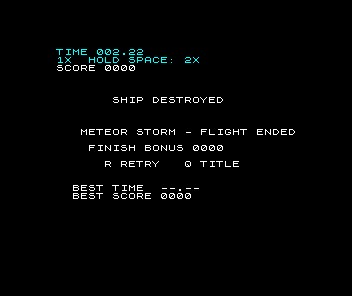
The game is complete again, with a crash you can see. Below the HUD it is still white on black, though. The next lesson gives the storm colour without letting one object’s colour spill onto another.
Sources
Zilog, Z80 CPU User Manual, UM008011-0816, INC (IX+d), ADD, CP and the carry flag, LDIR and DJNZ. Sinclair Research, ZX Spectrum BASIC Programming, chapter 23, port 254 output: loudspeaker on D4, MIC on D3, border on D2 to D0. The maintained Meteor Storm source linked through this page supplies the destroyed phase, the piece records and the artwork cut. The timings, positions and impact pitches come from Emu198x runs and an audio capture of this program; the screenshots are native Emu198x captures of the run where the ship is left in the middle.
Run it here
This unit's program, built for you.
- Program
- meteor-storm.tap
- Machine
- ZX Spectrum 48K (PAL)