
Meteor Storm’s tape takes about two minutes to load: the game is over 11,000 bytes, and a cassette delivers them a bit at a time as tones. Spectrum players spent those minutes looking at the screen, and most commercial games gave them something to look at: a picture, loaded before the game, that stayed up while the rest of the tape played. A loading screen.
This lesson makes one. The game itself does not change. The new work is a picture, a short BASIC program to load it, and a tape that holds all three parts in order.
Press Run and let it play; it takes under a minute here. The loader comes first and the screen goes black. Then comes the picture, and for a while nothing seems to happen except the border’s loading stripes. Then the whole picture appears at once, and it stays up while the game loads beneath it. When the game starts, its title clears the picture away.
Three blocks on one tape
A Spectrum tape is a sequence of blocks, each with a short header saying what it is. Until now, every lesson’s tape held two: a small BASIC program, made by the assembler’s --tapbas option, that loaded and ran the code. This tape holds three:
| Block | Kind | Contents |
|---|---|---|
meteor |
Program, runs from line 10 | the loader |
screen |
Bytes, 6,912 at 16384 | the picture |
storm |
Bytes, 11,757 at 32768 | the game |
The picture
The screen is two areas of memory: 6,144 bytes of bitmap from 16384 ($4000), then 768 bytes of attributes from $5800, which unit 28 coloured. Together they are 6,912 bytes. A file holding exactly those bytes, in that order, is called a SCREEN$, after the BASIC keyword that saves and loads one.
Any picture has to fit the attribute grid: each 8×8 cell has one INK and one PAPER. A photograph or a free-hand drawing ignores that, and converting it means choosing two colours for every cell and losing the rest. This picture is drawn to fit from the start, by colouring it the way the game colours its storm: by place. A short Python program, compose.py, draws it from the game’s own artwork, the ship, meteor and star rows in assets.py, plus large letters for the name. Every row of cells gets one bright INK on black PAPER:
ROW_INK = [BLACK,
           WHITE, CYAN, CYAN,           # METEOR
           YELLOW, RED, RED,            # STORM
           CYAN, CYAN, CYAN,
           GREEN, GREEN, GREEN,
           YELLOW, YELLOW, YELLOW,
           RED, RED, RED,
           WHITE, WHITE,                # the ship
           BLACK, BLACK, BLACK]
The name takes four of the rows, two colours to each word, and the meteors fall through the game’s own cyan, green, yellow and red. Because colour depends only on the row, whatever is drawn anywhere in a row gets that row’s colour, and no cell can hold more than two colours. The bottom three rows are left empty.
compose.py writes a PNG. build198x image, the family’s image converter, turns that into a SCREEN$:
build198x image loading-screen.png --machine sinclair-zx-spectrum \
    --format scr --dither none -o meteor-storm.scr
Its report for this picture gives a mean error of 0 and the remark “input appears already constrained”: every cell already had two colours or fewer, so nothing had to be changed. --dither none keeps it that way, since dithering would only add noise to a picture that needs none.
To go on the tape, the SCREEN$ needs a header like any other code block. A two-line assembly file makes one:
; Meteor Storm loading screen: the 6912-byte SCREEN$ as a CODE block at 16384,
; the bitmap's address, so that LOAD ""SCREEN$ puts it straight on the screen.
; meteor-storm.scr comes from loading-screen.png (see compose.py).
 org 16384
 incbin "meteor-storm.scr"
incbin copies a file’s bytes into the output unchanged, and org 16384 sets the address the block’s header gives: the start of the screen.
The loader
The --tapbas loader only knew how to load one code block and run it. This one is written by hand:
  10 BORDER 0: PAPER 0: INK 0: CLEAR 32767
  20 LOAD ""SCREEN$
  30 POKE 23739,111
  40 LOAD ""CODE
  50 RANDOMIZE USR 32768
Line 10 sets the border, the paper and the ink to black. CLEAR 32767 then clears the screen in those colours, so the screen goes black. It also lowers RAMTOP, the top of the memory BASIC uses, to just below 32768, so BASIC keeps out of the space the game is about to load into.
Line 20 loads the next block into the screen. SCREEN$ here is shorthand for CODE 16384,6912.
Line 30 keeps the ROM from printing over the picture. Before loading each block, the ROM prints its header, Bytes: storm, on the main screen. With INK and PAPER both black, the message cannot be seen, but printing it still writes zeros over the picture’s pixels where it lands, cutting a black strip out of it. We tried exactly that first, and the strip was there.
The main screen’s printing goes through a channel, S, and the channel’s record in memory holds the address of the routine that does the printing. On a 48K Spectrum, channel S’s record starts at 23739, and its first two bytes are that address: $09F4, the ROM’s print routine. POKE 23739,111 changes the low byte from $F4 to $6F, so the address becomes $096F, and the byte at $096F in the ROM is RET. Every attempt to print on the main screen now returns at once, having printed nothing.
Line 40 loads the next block, the game, to the address its header gives, 32768. Line 50 runs it.
build198x basic tokenises the file into a BASIC program that runs from line 10 as soon as it has loaded, the same tool that builds the BASIC courses’ tapes.
Line 30 comes after the picture has loaded. Why not put it before line 20, so no message is ever printed?
Show the explanation
It could go first, and nothing would print. But before line 20 the screen is plain black, and the Bytes: screen message would be printed in black on black where there is no picture to damage yet. Only messages printed after the picture has arrived matter, and the only one is Bytes: storm. Either place works; line 30 is the latest place that does.
One tape from three files
The unit’s Makefile builds each block and joins them:
# The tape shows each block's name: --name sets the loader's; asm198x takes
# the others from the output file, so they are built in build/ as screen and
# storm.
build/meteor.tap: $(SRC)/loader.bas
	mkdir -p build
	$(BUILD198X) basic $< --machine sinclair-zx-spectrum -o $@ --name meteor

build/screen: $(SRC)/screen.asm $(SRC)/meteor-storm.scr
	mkdir -p build
	cd build && $(ASM) $(ASMFLAGS) $(abspath $<) -o screen

build/storm: $(SRC)/meteor-storm.asm $(wildcard $(SRC)/*.inc)
	mkdir -p build
	cd build && $(ASM) $(ASMFLAGS) $(abspath $<) -o storm

# A .tap file is its blocks one after another, so the tape is the three joined.
meteor-storm.tap: build/meteor.tap build/screen build/storm
	cat $^ > $@
A block’s header carries a name of up to ten characters, which the ROM prints while loading. build198x basic takes the loader’s from --name meteor. asm198x uses its output file’s name, so the screen and the game are assembled inside build/ as screen and storm, giving clean names without a folder or an extension in them.
A TAP file is nothing more than its blocks one after another, each with a two-byte length in front. So joining three TAP files end to end with cat gives one tape that holds all three blocks, in order.
Why it appears all at once
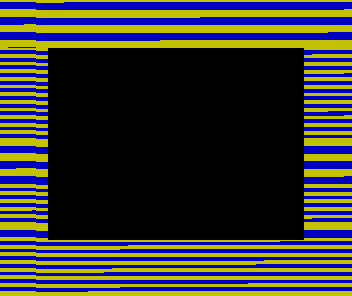
The bitmap comes first in the block and the attributes last. While the bitmap loads, every attribute is still the black-on-black that line 10 left, so the pixels arrive unseen. The colours come in the final 768 bytes, a few seconds of tape, and the picture appears as they land.
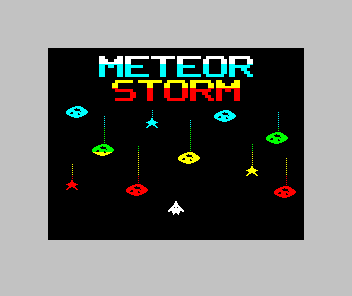
The checks for this unit load the tape through a fresh ROM, the way you just did. They find the screen black before the picture, the picture identical to the SCREEN$, nothing printed over it in all the time the game loads, and the game reaching its title.
Experiments
These change the loader or the picture, not the program, so they are done on your own copy of the files with a local build: the browser editor below runs only the program.
Change line 10's `INK 0` to `INK 7`. What changes while the tape loads?
Show the explanation
The pixels are now white as they arrive, so you can watch the picture draw in, in the screen’s own order: the top line of every character row in the top third, then the next line, and so on, as unit 3 found. Colour floods in at the end as before. The Bytes: screen message is now visible too, white on black, until the picture loads over it.
Remove line 30 and load the tape. Where does the `Bytes: storm` message go?
Show the explanation
It is printed black on black at the screen’s current print position, near the top left in our tests, and wipes a strip of the picture there. The strip stays until the game starts, because nothing puts those pixels back.
Then change the picture: edit ROW_INK or the meteor positions in compose.py, run it, convert the PNG again and rebuild the tape. Keep every cell to one INK, and the converter will report a mean error of 0 again.
The program on the tape is the previous lesson’s, unchanged, here so the course runs in order:
Source · view and edit
Companion file: assets.inc
The include line reads this editable data when you assemble. Keep it beside your source for a local build.
Edit the source, then assemble.
Edits are saved in this browser. Keep a downloaded copy of work you want to keep.
Focus the Spectrum screen to use the keyboard, or hold these buttons. Assemble again for a fresh machine.
Run the program to inspect it. Editing source does not change the running machine.
phase- —
storm- —
score- —
The game is finished. The last lesson checks the release tape on a fresh machine and gathers the files you need to share it.
Sources
Sinclair Research, ZX Spectrum BASIC Programming, chapter 20, tape storage: SCREEN$ as CODE 16384,6912, and LOAD "" CODE. Chapter 24, the memory: the display file and attributes, CLEAR clearing the display file and setting RAMTOP, and the channel information for the keyboard, the screen and the printer. The channel record and the ROM addresses were read from a running 48K machine: channel S’s output address at 23739-23740 is $09F4, and the byte at $096F is RET. The maintained Meteor Storm source linked through this page supplies the loader, screen.asm, compose.py and the Makefile; its tape check loads the tape through a fresh ROM. The screenshots are native Emu198x captures of that load.
Run it here
This unit's program, built for you.
- Program
- meteor-storm.tap
- Machine
- ZX Spectrum 48K (PAL)