
Meteor Storm has had colour almost from the start. The time and speed readings at the top are bright cyan, and everything else is bright white on black. Two bytes in clear make that happen, and in this lesson we read them bit by bit.
Then we give the storm itself some colour. The plan most of us would try first, a colour for each meteor and one for the ship, does not work on a Spectrum, and we will see exactly how it fails. What works is to colour the screen by place: the storm runs from cyan at the top through green and yellow to red just above the ship, and every meteor takes on the colour of wherever it is. A meteor that enters cyan turns green, yellow and red as it falls.
The machine is beside your current experiment. Your edits stay with it.
Space launches; O/P steer; hold Space for 2X. One hit ends the run: the border flashes, the ship breaks apart for a second, then the result appears. At the result R retries and Q returns to the title.
To watch the bands work, launch and leave the ship still. The first meteor falls through cyan, green, yellow and red and hits the white ship about 2.2 seconds after launch. As it crosses into the ship’s rows its lower half turns white.
What you should see
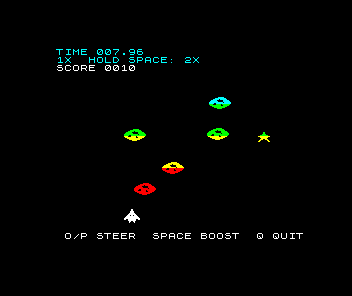
The HUD looks as it always has: cyan time and speed, a white score. Below it the storm is banded. Meteors and stars are cyan near the top, then green, then yellow, then red just above the ship. The ship, the controls line and anything that lands beside the ship are white. Nothing changes colour as it moves sideways; colour changes only on the way down.
The title and result screens are banded too. We come back to them once we have seen why.
The colours the game already has
Here is clear from unit 27’s program:
clear:
 xor a
 ld hl,$4000
 ld de,$4001
 ld bc,6143
 ld (hl),a
 ldir
 ld hl,$5800
 ld de,$5801
 ld bc,767
 ld (hl),$47
 ldir
 ld hl,$5800
 ld b,64
clear_top:
 ld (hl),$45
 inc hl
 djnz clear_top
 ret
The first six lines fill the bitmap with zeros, as they have since unit 1: the ldir fill writes a byte, then copies each byte onto the next. The next five do the same for a second area of memory, starting at $5800, with the value $47. The last loop writes $45 over the first 64 bytes of that area.
That area is the attribute map. The bitmap at $4000 says which pixels are lit; the attributes say what colour they are. The screen is 24 rows of 32 character cells, each 8 by 8 pixels, and each cell has one attribute byte: 768 bytes in all, from $5800 to $5AFF. Unlike the bitmap, whose rows unit 3 had to untangle, the attribute map is stored in plain order. Row 0’s 32 bytes come first, then row 1’s, and so on, so the cell in row r and column c is at $5800 + 32r + c. The first 64 bytes are rows 0 and 1, the two HUD rows.
Each attribute byte is split into four fields:
| Bits | Field | Meaning |
|---|---|---|
| 7 | FLASH | 1 swaps INK and PAPER over and over |
| 6 | BRIGHT | 1 shows both colours at a brighter level |
| 5 to 3 | PAPER | Colour 0 to 7 for unlit pixels |
| 2 to 0 | INK | Colour 0 to 7 for lit pixels |
The Spectrum numbers its colours 0 black, 1 blue, 2 red, 3 magenta, 4 green, 5 cyan, 6 yellow and 7 white. So a byte’s value is 128×FLASH + 64×BRIGHT + 8×PAPER + INK. Now decode the two bytes:
| Byte | Binary | FLASH | BRIGHT | PAPER | INK |
|---|---|---|---|---|---|
| $47 | 0100 0111 | 0, steady | 1, bright | 000, black | 111, white |
| $45 | 0100 0101 | 0, steady | 1, bright | 000, black | 101, cyan |
$47 is bright white INK on black PAPER, written to all 768 cells. $45 is bright cyan INK on black PAPER, written over rows 0 and 1. The score, on row 2, keeps the white. That is the whole of the game’s colour until now.
Why cyan for the readings? They are the only part of the screen that is not the storm. A different colour sets them apart, so a glance up finds the time without searching among the meteors for it.
Which byte would make the HUD bright yellow INK on blue PAPER?
Show the explanation
BRIGHT is 64, PAPER blue is 1 × 8 = 8 and INK yellow is 6: 64 + 8 + 6 = 78, which is $4E, or 0100 1110 in binary. The whole of rows 0 and 1 would turn blue, because PAPER colours every unlit pixel in a cell, not only the space around the text.
Colour belongs to cells, not objects
That last answer shows the rule that shapes everything else here. An attribute colours a whole 8 by 8 cell. Every lit pixel in the cell shows the cell’s INK, and every unlit one its PAPER. There is no way to give two pixels in the same cell different INKs.
Our sprites do not line up with cells. Since unit 2 the ship and meteors have been drawn at any pixel position, so a meteor 24 pixels wide and 12 tall usually covers parts of four columns of cells and two or three rows. To colour one meteor red we would have to write red into every cell it touches. As it moved, its colour would jump from cell to cell in 8-pixel steps, the old cells would stay red after it left, and any other object sharing one of its cells would turn red with it. Spectrum players call this colour clash.
You can try it. In draw_ship, after ld (ship_visible),a, add these nine lines:
 ld a,(ship_x)
 rrca
 rrca
 rrca
 and 31          ; ship_x/8: the column of the ship's left cell
 add a,$80       ; row 20 starts at $5800+20*32 = $5A80
 ld l,a
 ld h,$5A
 ld (hl),$46     ; bright yellow INK on black PAPER
This is the X half of unit 3’s pixel_address. Three rrca instructions move X’s bits three places to the right, with the three lowest wrapping round to the top, and and 31 clears those three. What is left is X divided by 8, the column of the cell the ship’s left edge is in. The ship’s top half sits in character row 20, whose first cell is at $5A80, so adding the column to $80 in L and putting $5A in H gives that cell’s attribute address. ld (hl),$46 writes yellow there on every update.
Launch, then steer left and right. Which parts of the ship will be yellow?
Show the explanation
Only part of the ship. Each update writes one cell: row 20, the column of the ship’s left edge. The ship is 24 pixels wide and two cells tall, so it covers three or four cells in row 20 and the same in row 21. At launch only one of those cells has been written.
Steer, and the yellow spreads, because a cell keeps its attribute until something writes it again. Every row 20 cell the ship’s left edge has passed over stays yellow after the ship has gone. You cannot see those cells while they are empty, since yellow INK with nothing drawn shows only the black PAPER, but a meteor that reaches row 20 in one of them turns yellow there. The colour belongs to the place, and it stains whatever passes through. Row 21 never turns yellow, so the ship stays split along the row line.
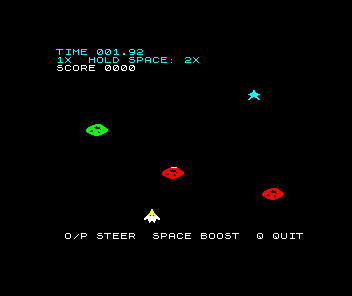
Remove the nine lines before going on.
To colour the ship properly we would have to write all six or eight of its cells on every move, put back whatever colour each cell had before, and still dye any meteor that came close. Many Spectrum games sidestepped the problem by turning it round.
Colour by place
Instead of giving objects colours, give places colours. Each character row of the screen gets one colour, and whatever passes through a row takes it on. Every object in a row then shares that row’s INK, on black PAPER everywhere, so two objects can never disagree about a cell. There is nothing to clash.
This lesson’s clear does that. The bitmap half is unchanged; the attribute half now reads a table:
 ; Colour by place: each character row takes one byte from row_colours,
 ; written to all 32 of its cells. Objects take the colour of the row
 ; they pass through, so no two objects in one cell can disagree.
 ld hl,$5800
 ld de,row_colours
 ld c,24
clear_row:
 ld a,(de)
 ld b,32
clear_cell:
 ld (hl),a
 inc hl
 djnz clear_cell
 inc de
 dec c
 jr nz,clear_row
 ret
It is two loops, one inside the other. HL walks the attribute map from $5800, DE walks the table row_colours, and C counts the 24 rows. For each row, ld a,(de) fetches that row’s byte and ld b,32 sets up a count of cells. clear_cell writes A to the cell at HL, moves HL on and repeats with djnz until the row is done. Then inc de moves to the next row’s byte, and dec c with jr nz runs the next row until all 24 are written.
Nothing computes a row’s address. The attribute map is in plain row order, so after 32 cells HL is already at the start of the next row, and after 768 it has reached $5B00 and stops. The old clear_top loop and its label are gone.
The table sits with the program’s other data:
; One attribute byte per character row, top to bottom. Bit 7 FLASH,
; bit 6 BRIGHT, bits 5-3 PAPER, bits 2-0 INK: $40+INK is BRIGHT INK on
; black PAPER. Cool at the top of the storm, hot just above the ship.
row_colours:
 defb $45,$45,$47          ; rows 0-2: HUD, cyan; the score row white
 defb $45,$45,$45,$45      ; rows 3-6: cyan
 defb $44,$44,$44,$44      ; rows 7-10: green
 defb $46,$46,$46,$46      ; rows 11-14: yellow
 defb $42,$42,$42,$42,$42  ; rows 15-19: red
 defb $47,$47,$47,$47      ; rows 20-23: white; the ship and the controls
The comments name the bands:
| Rows | Byte | Colour | What is there |
|---|---|---|---|
| 0 and 1 | $45 | cyan | Time and speed, as before |
| 2 | $47 | white | The score, as before |
| 3 to 6 | $45 | cyan | Where meteors and stars enter |
| 7 to 10 | $44 | green | |
| 11 to 14 | $46 | yellow | |
| 15 to 19 | $42 | red | Just above the ship |
| 20 to 23 | $47 | white | The ship on rows 20 and 21, landed pieces on row 22, the controls on row 23 |
Every byte is $40 plus an INK number: BRIGHT on, black PAPER, FLASH off, just like the two old bytes. The storm runs from cool at the top to hot just above the ship, so the colour tells you how close a meteor is. The ship’s rows stay white, the brightest colour, so the ship stands out from everything falling towards it. Blue, INK 1, is left out: a blue meteor on black PAPER is too dark to pick out.
Two meteors fly side by side in row 12. Can one be yellow and the other green? And can one meteor be two colours at once?
Show the explanation
The two meteors are both yellow. Every cell in row 12 has the same byte, $46, and the program never writes another, so anything drawn in row 12 is yellow.
One meteor can be two colours, though, if it covers two rows with different bytes. A meteor from Y 80 to Y 91 has its top eight pixel rows in character row 10, which is green, and its bottom four in row 11, which is yellow. The split runs exactly along the line between the rows.
Band edges are not clash
Look again at the flight picture. Several meteors are two colours, split straight across: cyan over green, green over yellow, yellow over red. A meteor is 12 pixels tall and each band is 32 or 40, so on its way down a meteor spends a few updates across each band edge, showing the colour above on its upper part and the colour below on its lower part.
That is not clash. The split is at a fixed place on the screen, the same for every object that crosses it, and it moves smoothly through the meteor as the meteor falls. No object changes another’s colour, and nothing jumps as an object moves sideways, because every cell in a row has the same colour. The edge is part of the picture, like a line painted across the playfield.
Written once, never in flight
Nothing else in the program writes attributes. draw_sprite and text change only the bitmap, $4000 to $57FF, so the colours clear writes stay until the next clear. The meteors, stars, ship and pieces are drawn, moved and erased exactly as before. Flight, collision, scoring and timing are unchanged, and the keyboard routes we have checked the game with finish with the same frames, times and scores as unit 27’s program.
The colours cost something once per screen. Counting T-states with Zilog’s figures, as in unit 24:
| Part | T-states |
|---|---|
Set-up: ld hl, ld de, ld c |
27 |
One cell: ld (hl),a 7, inc hl 6, djnz 13 |
26, or 21 for the last in a row |
One row: ld a,(de), ld b,32, 32 cells, inc de, dec c, jr nz |
863 |
| All 24 rows, set-up included | about 20,700 |
The old code wrote the map in about 18,000: the ldir fill of 767 bytes takes about 16,100, and clear_top about 1,900 more. So the table costs about 2,700 T-states more than the two fills. The attribute map is in the 16K the ULA shares with the processor, so some of those writes wait a few T-states while the picture is drawn, and the real figure is a little higher. A frame is 69,888 T-states, so the whole colour pass takes under a third of one.
That is why the work belongs in clear and not in the update. Nothing moves the colours during flight, so writing them again every update would repeat 20,700 T-states of work, about 15% of the update’s 139,776, to write exactly the same bytes.
It also stays out of the run’s time. new_game calls clear first and only at its end records the current frames byte in last_frame, the baseline unit 18 measures elapsed time from. The colours are written before the run’s clock starts, so the extra 2,700 T-states never reach the time on the HUD.
row_colours sits among the program’s texts, outside the run’s block of memory from unit 11, so new_game’s zero fill cannot touch it and a retry uses the same colours.
The title and the result take the bands
clear is not only called by new_game. The title calls it before it draws its lines, and so does result. Each screen therefore gets the same bands, and each line of text takes the colour of the row it is printed on.
On the title, METEOR STORM and the one-line goal are cyan, the O and P keys green, the boost hint yellow, the star and boost values and the finish-bonus line red, and SPACE TO LAUNCH white. On a result, SHIP DESTROYED or CLEAR SPACE is cyan, the FLIGHT ENDED line green, the finish bonus and R RETRY yellow, and the best time and score red. None of those colours was chosen for the text: they come from where each line already was.
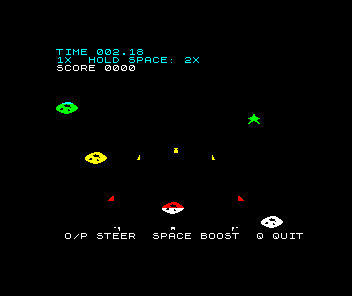
The destroyed phase from unit 27 needed no change either. Its pieces are drawn with draw_sprite like everything else, so as they fly up through the red and yellow bands they turn red and yellow, and they are white again when they land on row 22. The red border flash is unchanged: the border is written through port $FE, not the attribute map.
Experiments
Keep a working copy before each change, then press Revert when you have finished.
Subtract $40 from every byte in `row_colours`, so $45 becomes $05 and so on. What changes, and what stays the same?
Show the explanation
Subtracting $40 clears bit 6, BRIGHT, and leaves INK, PAPER and FLASH alone. Every band keeps its colour but is shown at the Spectrum’s normal level instead of its bright one: the same gradient, dimmer. White becomes a light grey, so the ship and the score stand out less. Black PAPER looks the same either way.
Put the table back, then make row 20's byte $42 instead of $47. Where will you see red that was not red before?
Show the explanation
The first defb $47 in the last line of the table is row 20. Making it $42 puts row 20 in the red band. The ship’s top half, in row 20, turns red with the rows above it; its bottom half, in row 21, stays white, split along the row line. The title’s SPACE TO LAUNCH is also printed on row 20, so it turns red too. A table byte colours whatever any screen draws in that row, not only what flies through it.
Then design a palette of your own. Change the bytes, keeping each one $40 plus an INK number, and judge the result against three questions. Can you still read a meteor in every band? Can you tell the HUD from the storm? Does the ship stand out from what is about to hit it? Try a row of $40 before you decide: black INK on black PAPER hides every meteor in that row, yet the game still ends when one hits you, because the collision test from unit 10 reads positions, never colours.
The game is complete again, now in colour. It is still a single storm, though: forty seconds and it is over. The next lesson chains five storms into a voyage.
Sources
Sinclair Research, ZX Spectrum BASIC Programming, chapter 16, colours: 24 lines of 32 character positions, one INK and one PAPER for each position, the colour numbers 0 to 7, and an attribute value as 128 for FLASH plus 64 for BRIGHT plus 8×PAPER plus INK. Chapter 24, the memory: the attributes stored line by line at 22528 ($5800), after the display file at 16384. Zilog, Z80 CPU User Manual, UM008011-0816, T-state counts for LD, INC, DEC, DJNZ, JR and LDIR, and RRCA. Chris Smith, The ZX Spectrum ULA: How to Design a Microcomputer (ZX Design and Media), p. 225, the 69,888 T-state frame. The maintained Meteor Storm source linked through this page supplies clear and row_colours. The screenshots are native Emu198x captures of this program and of the clash prediction.
Run it here
This unit's program, built for you.
- Program
- meteor-storm.tap
- Machine
- ZX Spectrum 48K (PAL)